November 26, 2022
Solved

How do I create a Recurring expense such that the Transaction Type = CC Expense?

  • November 26, 2022
  • 1 reply
  • 0 views
 I have several of Recurring expenses that have a CC Expense type in the Txn Type column, but I can't create new ones or change existing rec expenses to CC Expense type.  Business reason is that this helps with cash flow forecasting
Best answer by SarahannC

Hello there, ladler1. Thanks for adding screenshots and enough details of your concern.


I'll show you another other way how we can record a transaction as a CC expense in QuickBooks.


Yes, you're right. We're unable to utilize CC expense when creating a transaction. I understand that this isn't the option you want to manage your money out. Since we're looking to create a specific transaction for CC expense, we can submit your suggestion to our product engineers. Go to the Gear icon and select Feedback.


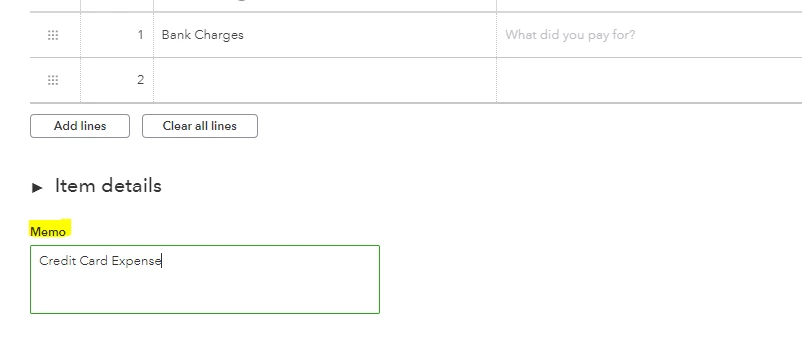
For now, I'd still recommend following the steps shared by my colleague above. Creating an expense type and using CC as a payment method or account can help us record the amount. As a workaround, we can use the Memo field and indicate that this transaction is a Credit Card Expense transaction type.
 

To manage your expenses and vendors, feel free to visit and read the details provided in this article: Enter expenses, pay bills, write checks, and manage suppliers.


If you need help entering data within your QuickBooks, I'm here to help you anytime. Take care and have a good one.


1 reply

MaryLandT
November 26, 2022

It's my pleasure to help you create a recurring expense in QuickBooks Online, ladler1.


The correct way to set up recurring transactions is to create a new template. I'll guide you on how to accomplish the task.


  1. Go to Settings ⚙, then select Recurring transactions.
  2. Click New.
  3. Choose Expense, then click OK.
  4. Enter a Template name.
  5. Select a Type: Scheduled, Unscheduled, or Reminder.
  6. Fill in other fields.
  7. Choose Credit Card from the Payment method drop-down.
  8. Click Save template.


If you need to edit the template, you can browse this article: Learn how to change a recurring transaction template in QuickBooks Online. I'll tell you how these changes may affect items, customers, and company settings.


To see all your recurring transactions in one place, open the Recurring Template List report. This tells you which accounts they're linked to on your chart of accounts.


I appreciate you taking the time to ask a question here in the Community forum. If you have additional questions, please let me know by using the Reply button below. Have a wonderful weekend ahead!

ladler1Author
November 26, 2022

Thank you for your prompt reply!  I don't have "Credit Card" in my Payment Method drop down list.  I had been using Visa which didn't work, nor did American Express.  Not sure where to edit the list.  Please let me know what you think.