
Solved
How do I delete a receipt that I uploaded? I uploaded the wrong one. Thank you!
Original commenter did not share additional details


I cleared the cache and there still isn't anything there...in fact, the only options I have on the left-hand side of my page is: Home, Transactions, Miles, Taxes, Reports and Invoices. I do not have "Dashboard, Expenses, Sales, Projects, Workers, Accounting, My Accountant, Capital or Apps. Why do I not have these and how can I get them?
Thank you.
Tim
Hello there, @krtharan.
The steps provided by my colleague above is for QuickBooks Online. You'll see a paper clip if there's added a receipt on it. Let me walk you through the process on how to delete a receipt that you uploaded in QuickBooks Self-Employed.
I'm adding a screenshot for visual reference.
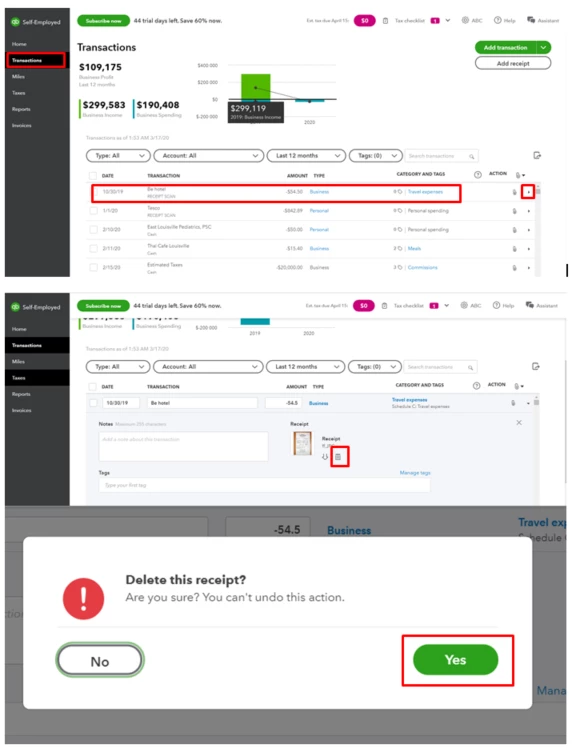
Also, I'm adding these helpful articles that you can read about receipts in QBSE:
Let me know if you need further questions about receipts or any concerns about QuickBooks Self-Employed. I'm here to lend a hand. Take good care.
Enter your E-mail address. We'll send you an e-mail with instructions to reset your password.