December 21, 2021
Solved

How do I edit an account on the chart of accounts? I need it to be a liability not an asset.

  • December 21, 2021
  • 1 reply
  • 0 views
Original commenter did not share additional details

Best answer by SarahannC

Hello there, @polly-yardmaster.


I'd be glad to walk you through correcting your account type in the Chart of Accounts (COA).


You can follow the steps below to complete the task:
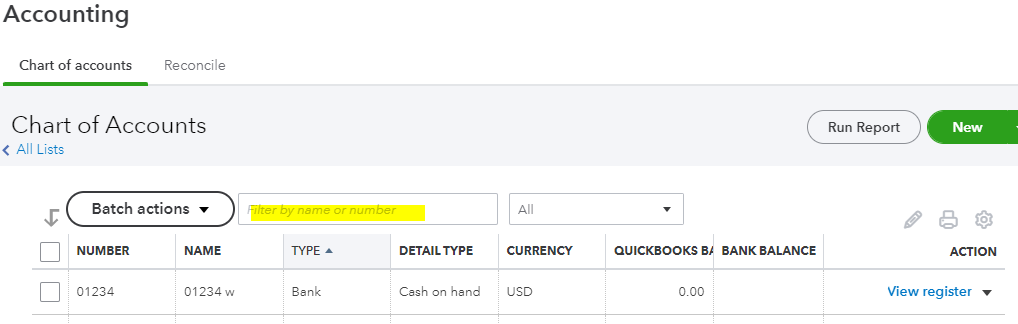
 

  1. Go to the Accounting on the left menu.
  2. Within the Chart of Accounts menu, search the liability account or the account name.
  3. Click the View register drop-down arrow. Then, select Edit.
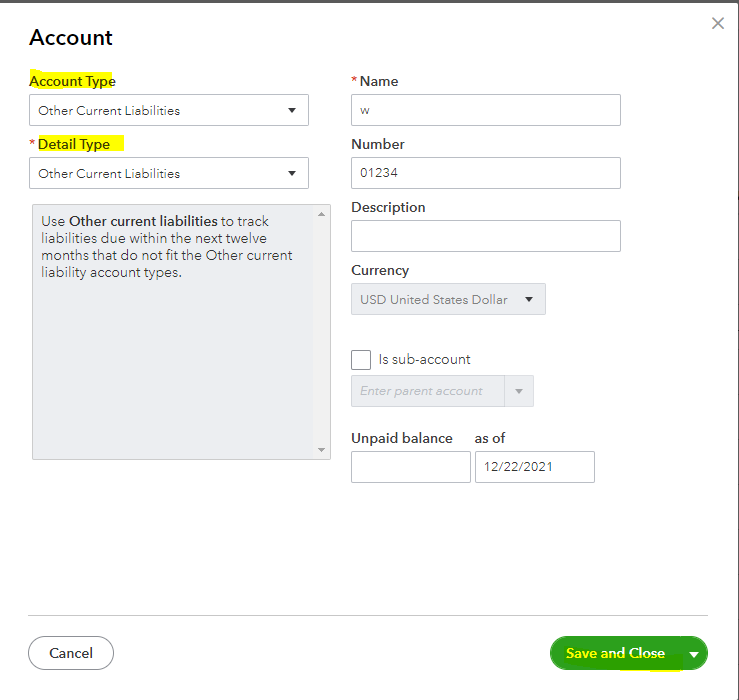
  4. In the Account window, change the account type and detail type to the appropriate one.
  5. Once done, click Save and Close to reflect the changes.

I'd recommend checking this link for more information and tips about handling accounts in QBO: Learn about the chart of accounts in QuickBooks.


Also, you'll want to run the Transaction Detail by Account report by going to the Reports menu. This report shows the lists of accounts you created from the COA. You can use these articles to learn more about managing reports in QuickBooks.


Please let me know if you need further assistance. I'm always around to help. Take care, polly-yardmaster

1 reply

SarahannCAnswer
December 22, 2021

Hello there, @polly-yardmaster.


I'd be glad to walk you through correcting your account type in the Chart of Accounts (COA).


You can follow the steps below to complete the task:
 

  1. Go to the Accounting on the left menu.
  2. Within the Chart of Accounts menu, search the liability account or the account name.
  3. Click the View register drop-down arrow. Then, select Edit.
  4. In the Account window, change the account type and detail type to the appropriate one.
  5. Once done, click Save and Close to reflect the changes.

I'd recommend checking this link for more information and tips about handling accounts in QBO: Learn about the chart of accounts in QuickBooks.


Also, you'll want to run the Transaction Detail by Account report by going to the Reports menu. This report shows the lists of accounts you created from the COA. You can use these articles to learn more about managing reports in QuickBooks.


Please let me know if you need further assistance. I'm always around to help. Take care, polly-yardmaster
