
Solved
How do I find customers who have been inactivated?
I uploaded all my desktop QBooks data to the online version recently and I need to access customers I have inactivated in the past.

There's an option to access your inactive customers, Kari.
After uploading your data to QuickBooks Online, accounts with an open balance will automatically become active while those with no balances will be tagged as inactive (deleted).
You can browse through this article for more information: Learn how features and data move from QuickBooks Desktop to QuickBooks Online.
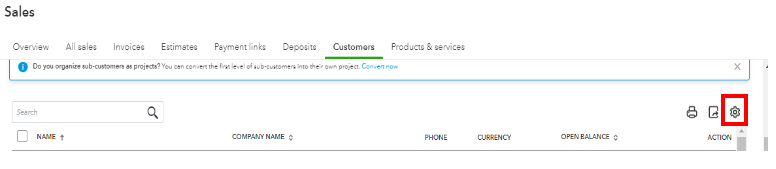
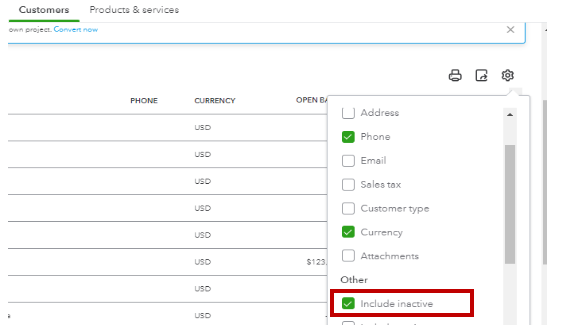
To access your inactive customers in QuickBooks Online, here's how:
You may refer to the screenshots below:
Moreover, you may want to check these articles to guide you through the process of creating and recording invoices in QuickBooks.
If you have additional questions or concerns about accessing inactive customers or other items, please don't hesitate to post them here by clicking the Reply button below. I'm always here to assist. Have a good one.
Enter your E-mail address. We'll send you an e-mail with instructions to reset your password.