Solved
How do I get rid of a billable expense from 2016 (an invoice was never created)? It's asking for a password when I try to go to the original bill and make it NOT billable
Original commenter did not share additional details


Thanks for getting back to us, @devonne-kahunain.
Allow me to join in this conversation and share the steps on how to disable the password.
It could be that the master admin locked your books and used a password to avoid creating changes. If you're not the primary admin, contact him so he can change your settings or transfer the role to you.
Here's how to remove the password:
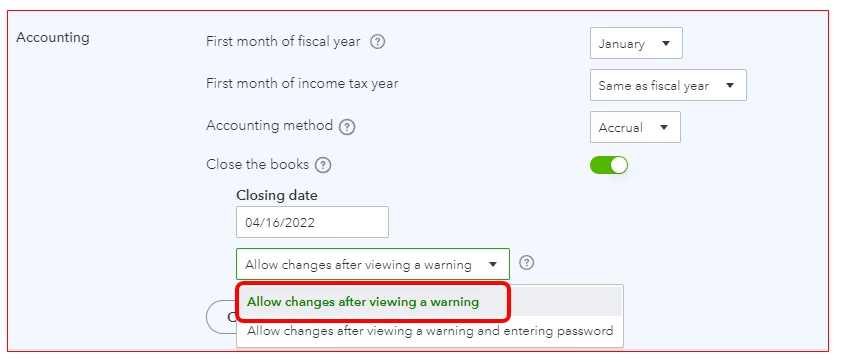
Once done, open again the bill and remove the billable checkmark. You can make changes to past reconciliations, but be careful. This can unbalance your accounts and other reconciliations.
On top of that, I've also included this reference for a compilation of articles you can use while working with us: Account Management for QuickBooks Online.
Keep me posted if you need anything else or if you have other questions about managing your account in QuickBooks, @devonne-kahunain. I'll be here to help. Have a great weekend.
Enter your E-mail address. We'll send you an e-mail with instructions to reset your password.