Solved
How do I get to cash flow money in/money out totals for the current month? This was recently replaced on the dashboard with a projection that I do not find useful.
Original commenter did not share additional details


Hi, I don't think this is a caching issue. I see the same dashboard page, attached again, when I go into incognito mode or clear cache.
It would most helpful for someone in support to check to see that the information requested - actual money in/out based on bank balances retrieved - is available when *you* look at the dashboard. Do *you* see actuals for the current month in addition to the projections when you look at the page that I attached, or do you just see the projections? If you do see actuals, could you send a screenshot of what it looks like for you? If you don't see the actuals, telling me to clear cache is not going to help me, and it would seem more likely that the page has been changed with a recent software update.
Again, the information I am looking for is actual cash in/out for the month based on retrieved bank balances, pretty basic numbers. These were replaced within the last month by qbo-generated projections, which are not useful to me.
I came to this forum after trying chat. The two times I tried chat to answer this question the line was dropped with no explanation after a long wait following the question. So I'm not eager to get back to those waits and would prefer a forum response if possible.
Thanks,
Cecelia
Hello, Cecelia.
I'm jumping to this thread and help you figure out what's preventing the actuals from showing up on the Cash Flow chart.
On the Cash Flow chart, there are two buttons to show the data. Your view is likely set on the Cash balance setting, which shows the balances and the projections calculated by QuickBooks.
Set it back to Money in/out view to show the actuals. I've attached a screenshot from my sample company file that shows the actual values:
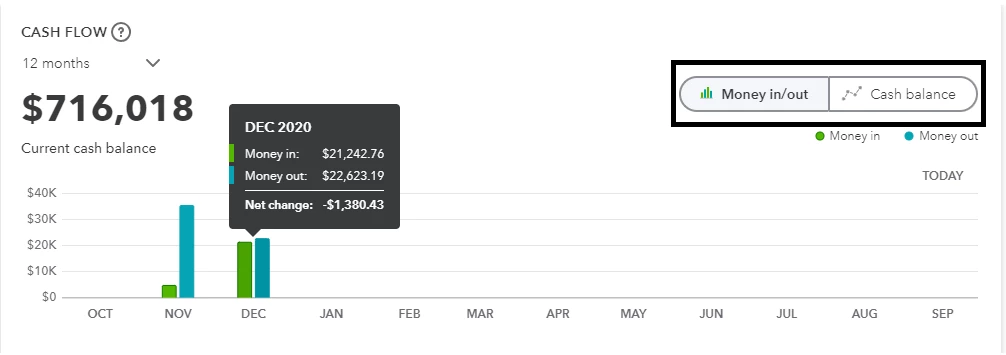
Another thing that causes the projection values is the event from the planner module. You have the option to edit or delete it:
If the actuals still don't show up in your end, then I'd recommend following up with our support. They can check the system and see what's preventing you from seeing the actual balances.
Use the method you've used to reach us, or if you want to call us instead, follow these steps:
I'll share a couple of articles in case you need references in managing your Cash Flow chart:
Do you need help taking care of your bank transactions after dealing with the Cash Flow chart? This article can help you categorize or match them: Categorize and match online bank transactions in QuickBooks Online.
I'd be glad to help you out again with your reports or charts in QuickBooks (I can also help you with any other processes). Just let me know what you need to see, and I'll get back to you as soon as possible.
Enter your E-mail address. We'll send you an e-mail with instructions to reset your password.