Solved
How do I print a class list
I want a listing of all the classes. How do I print? In Reports / Lists there is no option for Class List.
Under the tab Class in the Class entry, the display says to use Reports / Lists.
Another QB endless loop.


I want a listing of all the classes. How do I print? In Reports / Lists there is no option for Class List.
Under the tab Class in the Class entry, the display says to use Reports / Lists.
Another QB endless loop.
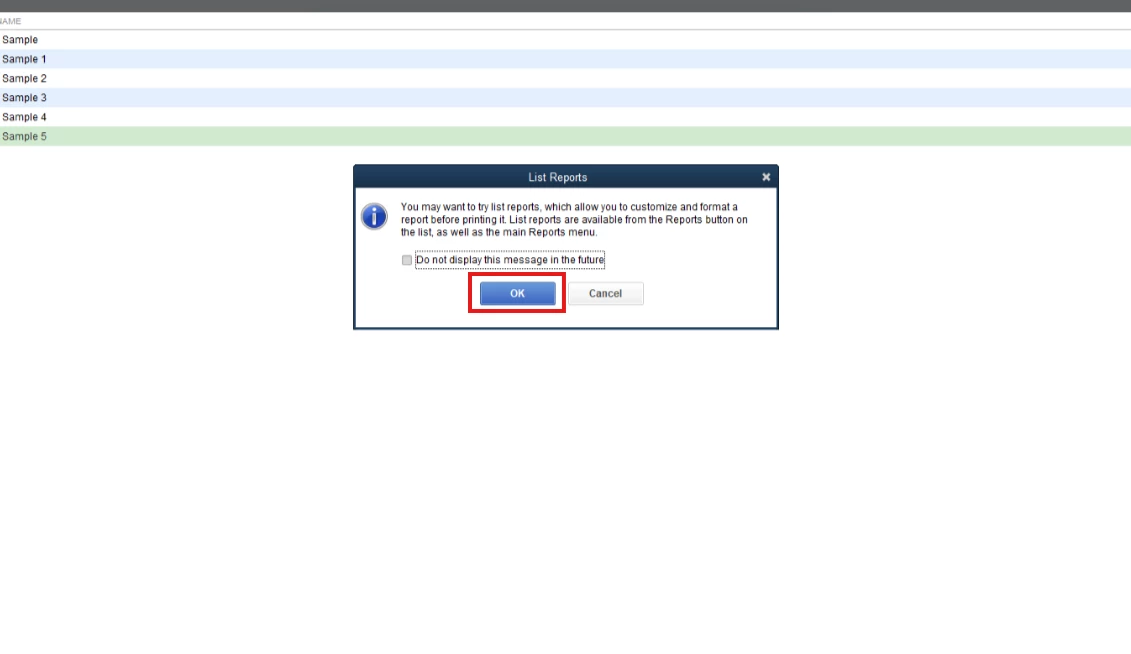
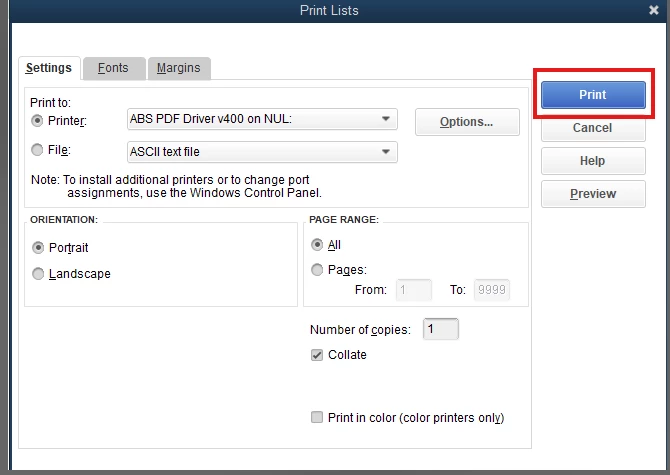
You need to click the OK button on the message that will prompt to print the class list report, Deadwood. Let's proceed with printing your classes.
You have the option to print a class list without generating a report. Simply click the OK button to continue printing your class.
Here's how:
I'll be sharing this article that will guide you in sorting out your classes in QuickBooks Desktop: Filter, sort or total reports by Class
In addition, I'll provide links that will assist you in personalizing your reports to incorporate class information and other relevant details:
If you need any more help with your classes or other QuickBooks tasks, you can always rely on me. I’m here to ensure everything is sorted out for you. Stay safe.
Enter your E-mail address. We'll send you an e-mail with instructions to reset your password.