I'm here to guide you as to how you can record a wire transfer payment with a fee and match it to the outstanding invoice in QuickBooks Online (QBO), @kerzdenn-vizeers.
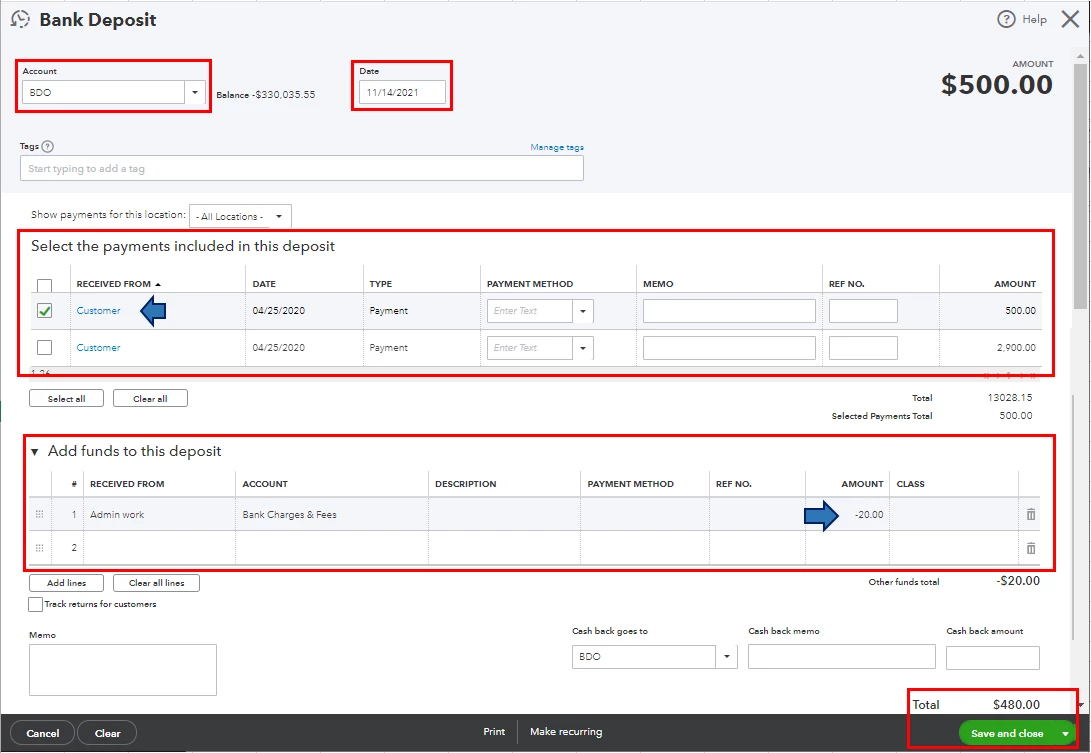
Since the wire transfer is an income into your account, you'll be creating a Bank Deposit transaction. You'll first need to record the invoice's full payment amount. Then, deduct the transfer fee (negative amount) through the Add funds to this deposit section when you deposit the invoice payment. This way, you're able to match the bank deposit to the wire transfer payment without getting a duplicate record. Here's how:
- Go to the + New button.
- Under Other, select Bank deposit.
- From the Account dropdown, choose the bank account the wire was transferred to.
- Enter the Date the wire was received.
- Select the box for the invoice payment in the Select the payments included in this deposit section.
- Go to the Add funds to this deposit section, fill in all the necessary columns (i.e., Received From, Account, and Amount)
- Double-check the total amount and once everything is correct, click Save and close.
Once you're done, match the bank deposit to the wire transfer payment from the Banking menu. This way, you can keep your account accurate and updated. For the step-by-step guide, please refer to this article: Categorize and match online bank transactions in QuickBooks Online.
Then, pull up sales reports (i.e., Invoices and Received Payments and Deposit Detail). This is to verify that the transactions are entered correctly. To do this, go to the Who owes you and Sales and customers sections from the Reports menu's Standard tab.
Also, I'd recommend reconciling your accounts every month. This will help you in monitoring your income and expenses and detect any possible errors accordingly. To know more about this process, you can check out this article: Reconcile an account in QuickBooks Online.
Please don't hesitate to keep me posted on how it goes in the comments below. If you have other concerns about recording wire transfer payments and matching bank transactions, I'll gladly help. Take care, and I wish you continued success, @kerzdenn-vizeers.

