Thanks for bringing this to our attention about generating a Budget vs. Actuals report in QuickBooks Online (QBO), rmcneill1222. I'd be happy to assist you with this.
It's possible to tailor the report to specifically show Year-to-date totals, Actual, Budget, and Variances. This customization allows you to extract the exact insights you require in a format that aligns with your preferences. This enhancement improves the practicality of the data, simplifies the analysis process, and contributes to making well-informed decisions for your business.
Here's how:
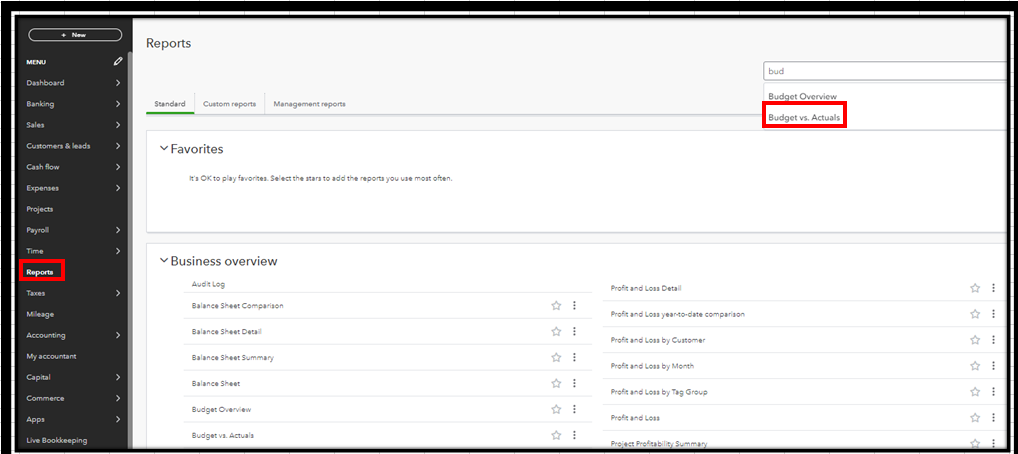
- Go to the Reports menu.
- In the search bar, type Budget vs. Actuals.
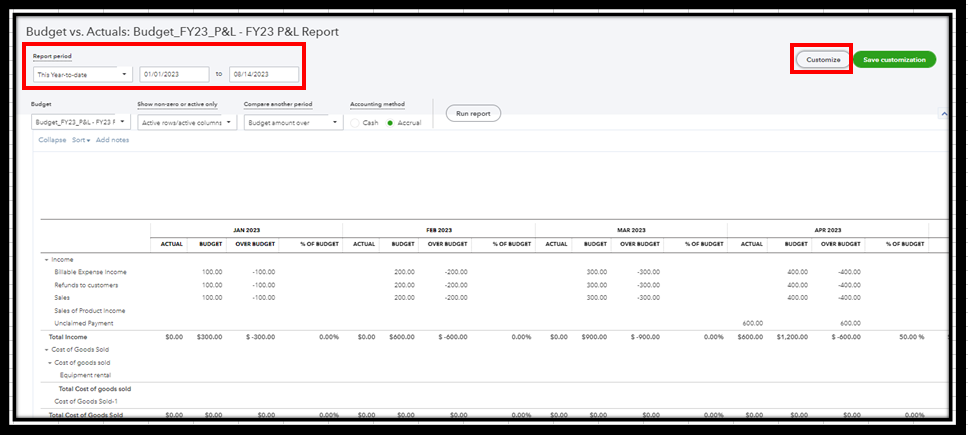
- Click the Report period drop-down arrow, and then select This Year-to-date.
- Select the Customize button.
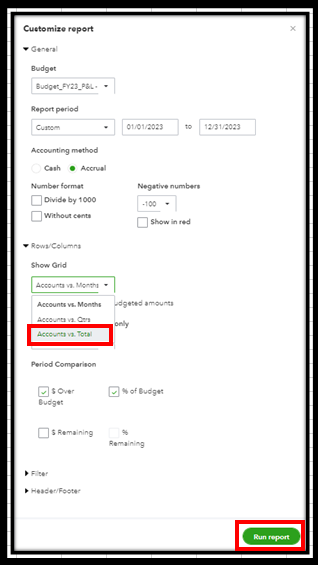
- Choose Accounts vs. Total in the Show Grid drop-down arrow.
- Hit Run report.
I've added this article to get the most out of your financial reports: Customize reports in QuickBooks Online.
I hope this helps! If you have more questions or need additional guidance, feel free to let me know. I'm here to assist.

