
April 25, 2024
Solved

How do you void an invoice?

  • April 25, 2024
  • 1 reply
  • 0 views
Original commenter did not share additional details

Best answer by MJoy_D

I can guide you with voiding an invoice, @davidk1. 


Voiding an invoice or any other transaction in QuickBooks Online (QBO) means that the record of it remains in QuickBooks, but it won't affect your books. If you want to remove it from your books completely, you can delete it, and it won't appear in any reports or accounts.


Here's how to void the invoice:
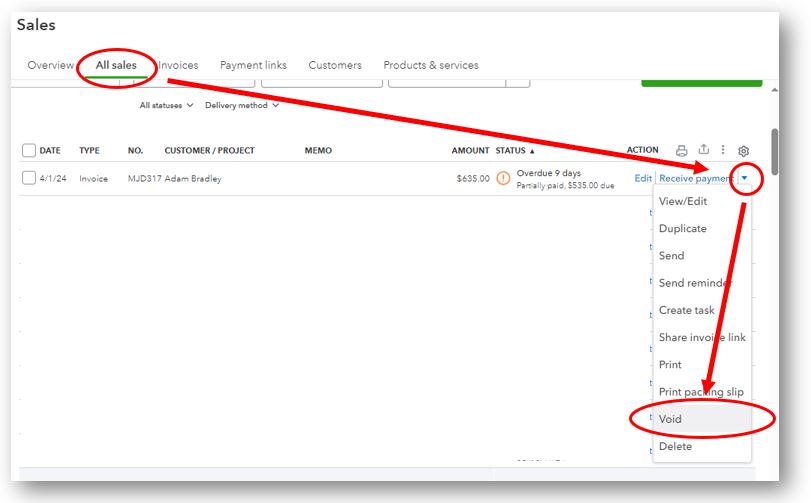
 

  1. Access the All sales section under Sales.
  2. Select the invoice to void.
  3. From the Action column, choose Void.


Here's more information about the difference between voiding and deleting transactions: Void or delete transactions in QuickBooks Online


Follow the steps outlined on this article on how to write off amounts you can't collect from your customers: Write off bad debt in QuickBooks Online.


Let me know if you need further guidance voiding an invoice. I'm always here to answer them for you. Have a great rest of the day!

1 reply

MJoy_D
MJoy_DAnswer
April 25, 2024

I can guide you with voiding an invoice, @davidk1. 


Voiding an invoice or any other transaction in QuickBooks Online (QBO) means that the record of it remains in QuickBooks, but it won't affect your books. If you want to remove it from your books completely, you can delete it, and it won't appear in any reports or accounts.


Here's how to void the invoice:


  1. Access the All sales section under Sales.
  2. Select the invoice to void.
  3. From the Action column, choose Void.


Here's more information about the difference between voiding and deleting transactions: Void or delete transactions in QuickBooks Online


Follow the steps outlined on this article on how to write off amounts you can't collect from your customers: Write off bad debt in QuickBooks Online.


Let me know if you need further guidance voiding an invoice. I'm always here to answer them for you. Have a great rest of the day!
