

September 23, 2020
Solved

How to clear transactions in AR Aging/AP Aging that net to zero.

  • September 23, 2020
  • 4 replies
  • 0 views

I have a recurring issue on a few accounts that have to do with how the AR was originally journalized back in 2015. I have transactions within a customer that net to $0, however I don't know how to clear them so they disappear from the report.


The only complexity here is that there are journal entries involved. I know how to clear invoices/payments with discounts and credits, but I don't know how to clear the below.


Again, the accounting impact is $0, but it makes the detailed reports messy/conviluted.

How do I clear for good?


THanks, 
Best answer by BigRedConsulting

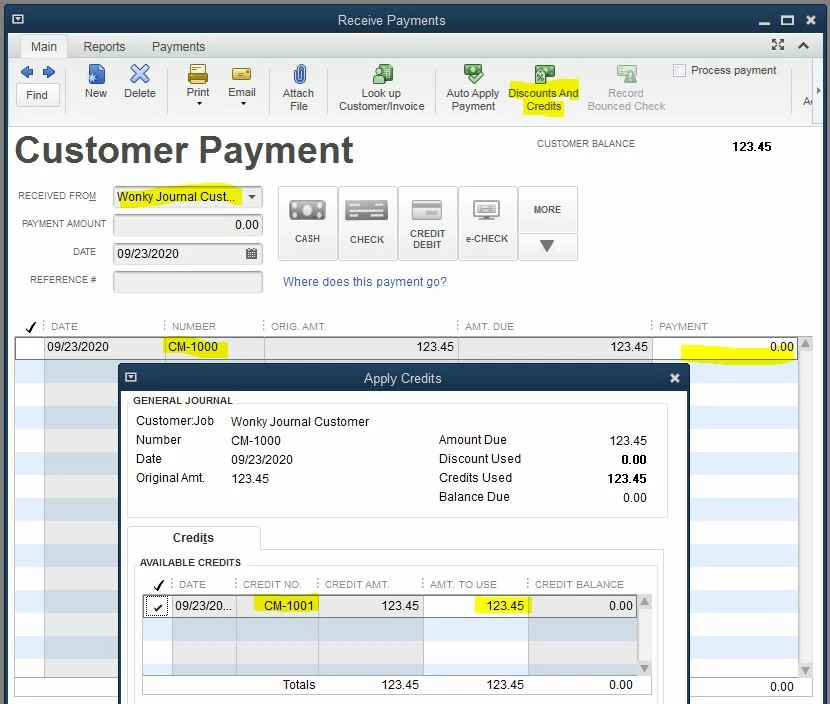
 In the case where both are General Journal transactions:

- Open the Receive Payments window and select the customer.

- Then click in the Payment column for the General Journal that will appear in the table.

- Then click Discounts & Credits

- You'll see the other General Journal there.  Make sure the Amount to Use is correct and then click Done.

- Click Save & Close at the bottom of the Receive Payments window and the two transactions will be applied to each other, much like an invoice and payment.


4 replies

Pmull001Author
September 23, 2020

The screenshot isn't showing on the first post

BigRedConsulting
September 23, 2020

In this case, edit the customer Payment transaction and then select the Journal to pay as if it was an Invoice.

Pmull001Author
September 23, 2020

Thanks so much!


What about if the debit and credit are both journal entries? 

January 8, 2023

The issue I have is that the detail for the accounts receiveable does not appear in the Payment section when I select the customer. Something to do with using a target account when posting JE's to the Accounts Receivable account. My AR Aging detail has years worth of these record and reverse JE adjustments that off-set but do not appear anywhere that I can find.


My Aging looks like garbage.

Nicole_N
January 8, 2023

Hi, @T_Hor. Thanks for joining the thread. Let me help you fix this.


There may be damaged links between transactions or the transactions themselves that's why it does not appear in the Payment section. I recommend that you run the verify and rebuild data tool. This enables us to see any data issue within your company file. 


To run the Verify Data utility:   
 

  1. Click the File menu.
  2. Select Utilities.
  3. Click Verify Data.
  4. If there are issues found, you’ll be prompted to Rebuild Now.


Here’s how to run the Rebuild utility:   
 

  1. Click the File menu.
  2. Select Utilities.
  3. Choose Rebuild Data.
  4. Click Ok on Rebuild has completed.


It may take a few minutes for the process to start depending on the file size of your company. When the rebuild tool is complete, run the Verify tool again to check the remaining data damage. Otherwise, if you received the message stated above, then you're good to go.


You can also visit this article to learn more about depositing payments: Record and make bank deposits in QuickBooks Desktop. 


Let me know how it goes on your end. I'll be around to assist. Stay safe and have a great day!

November 8, 2023

for AP to clear offsetting JEs with no payment due, select new CHECK. Enter the supplier, date, etc.. The JEs should pop up. Add them. Save. The JE's are cleared.