
Solved
How to copy automaticly the description to Memo field?
Original commenter did not share additional details


Hi there, inc. I appreciate you getting back and sharing additional information about your concern. I understand your interest in copying the bank detail of your entries to the Memo section. I'm here to help you achieve your goal today.
Good news! The system will allow you to display the bank detail in the Memo field in just a few clicks through the Banking page. This way, you don't need to input the information manually when running your reports. You can follow these steps as your reference:
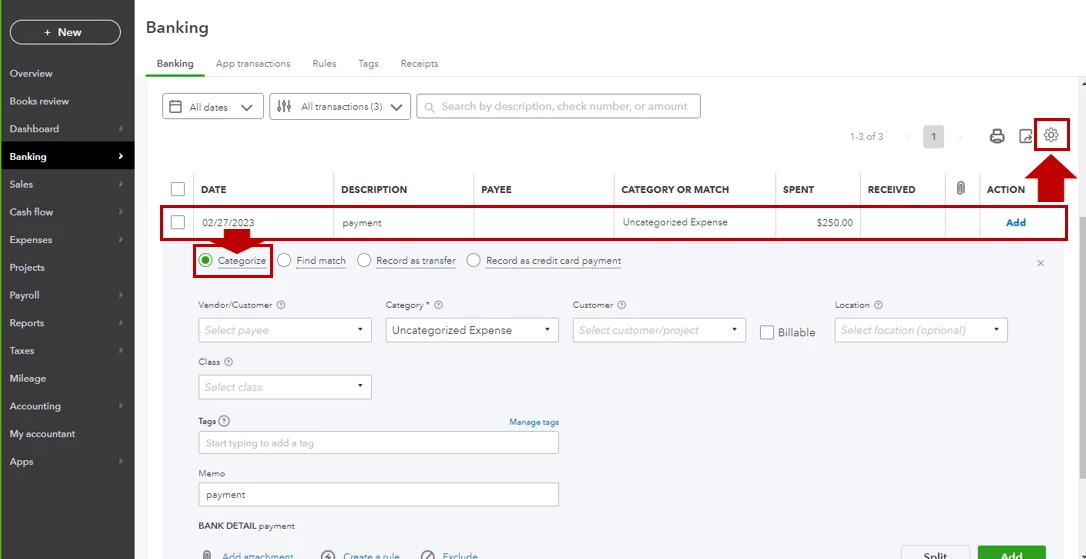

Once you open your reports, the details will be reflected automatically under Memo/Description.
You can also review the resources from this article for more tips while reviewing your downloaded bank and credit card transactions in our system: Categorize and match online bank transactions in QuickBooks Online.
On the other hand, you may utilize bank rules to speed up the review process. I'm adding this material as your guide: Set up bank rules to categorize online banking transactions in QuickBooks Online.
Please let me know in the comment section below if you have follow-up questions about your banking entries. I'm always here to help. Have a great day!
Enter your E-mail address. We'll send you an e-mail with instructions to reset your password.