

June 23, 2023
Solved

How to enter a Bill paid via Credit Card (on Quickbooks Desktop Mac)

  • June 23, 2023
  • 1 reply
  • 0 views

Is there a simple way to handle paying a bill via credit card on QB Mac? When using Vendors>Pay Bills, the only payment accounts I can choose are bank accounts - my credit card accounts are not available in the dropdown menu.


My current solution is to use a clearing account (set up as a bank account, so it does appear in the dropdown) called "Bills Paid Via Credit Card" and (a) allocate each credit card entry to this when importing transactions from my credit card statement, and then (b) "pay" each bill from here - but it's neither elegant nor quick.
Best answer by Rea_M

Hello there, @LekkerByDieSee.


Yes, there's a simple way to handle bill payments via credit cards in QuickBooks Desktop (QBDT) for Mac. I'll gladly show you how to do this below.


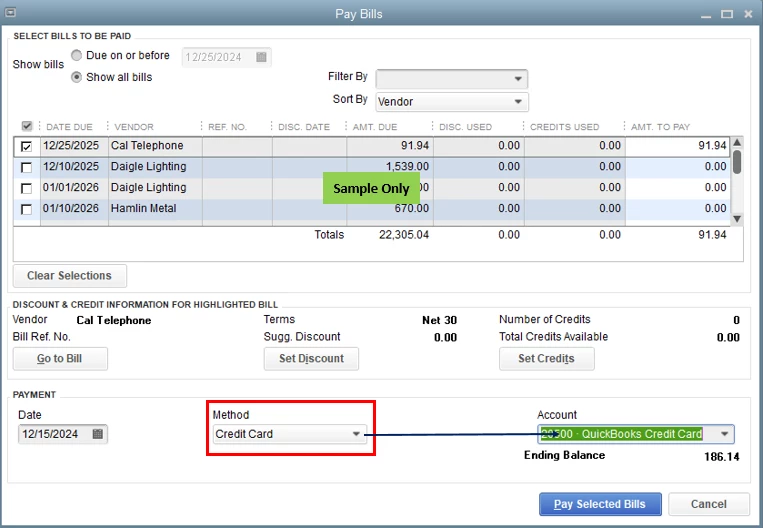
When paying your bills, you'll have to select the Credit Card payment method to use credit cards. This way, your list of credit card accounts will be available in the Account drop-down. Please see the screenshot below for your reference. 


For the complete guide to paying your bills in QBDT for Mac, please see this article: Pay bills in QuickBooks Desktop.


Also, paying bills is part of your usual accounts payable workflow. There are two A/P workflows available in QBDT. If you wish to see the complete list and other vendor-related transactions, feel free to check out this article: Accounts Payable workflows in QuickBooks Desktop.


Keep me posted in the comments if you have other concerns about paying bills and managing expenses in QBDT for Mac. I'll gladly help. Take care always, @LekkerByDieSee.

1 reply

Rea_MAnswer
June 24, 2023

Hello there, @LekkerByDieSee.


Yes, there's a simple way to handle bill payments via credit cards in QuickBooks Desktop (QBDT) for Mac. I'll gladly show you how to do this below.


When paying your bills, you'll have to select the Credit Card payment method to use credit cards. This way, your list of credit card accounts will be available in the Account drop-down. Please see the screenshot below for your reference. 


For the complete guide to paying your bills in QBDT for Mac, please see this article: Pay bills in QuickBooks Desktop.


Also, paying bills is part of your usual accounts payable workflow. There are two A/P workflows available in QBDT. If you wish to see the complete list and other vendor-related transactions, feel free to check out this article: Accounts Payable workflows in QuickBooks Desktop.


Keep me posted in the comments if you have other concerns about paying bills and managing expenses in QBDT for Mac. I'll gladly help. Take care always, @LekkerByDieSee.

June 25, 2023

Thank you - that solution is what I was looking for.

June 25, 2023

Thanks for getting back here in the thread, @LekkerByDieSee.


I'm happy that my colleague was able to help you with your current situation.


You are always welcome to post here again if you have additional QuickBooks-related concerns. The Community team is always ready to assist you once again. Stay safe, and have a nice day!