Solved
How to get the list of Journal Entries?
I can't find the list of past created Journal Entries


Thanks for posting here in the Community, detzion. I'll help you locate your past-created journal entries.
Viewing the journal entry list allows you to track and review past entries accurately. There are a couple of ways to access this list, such as pulling your recently added entries or running a Journal report.
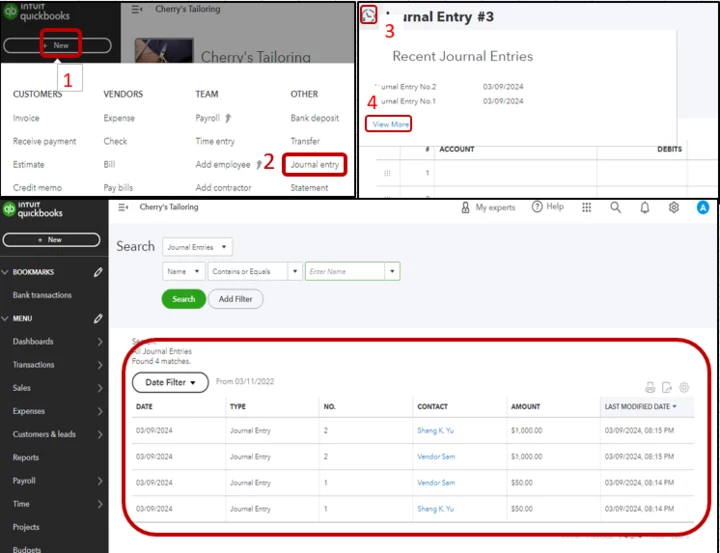
Here's how to pull up your recent entries list:
1. Go to + New in the top right corner.
2. Select Journal Entry.
3. Hit the counterclockwise arrow icon.
4. Click View More.
For visual reference, check out this screenshot.
Furthermore, to generate a Journal report. Here's how:
Additionally, you can create and print a journal entry report for a single entry or multiple entries together.
I’ve included these references in case you’d like to save the report setting and print it for future use:
If you need further assistance, let me know. It'll be my pleasure to help you more with your journal entries. Take care!
Enter your E-mail address. We'll send you an e-mail with instructions to reset your password.