April 8, 2020
Solved

how to import transactions from excel to quickbooks online

  • April 8, 2020
  • 2 replies
  • 0 views

When I import all transaction that I have in my excel file to QBs online and I classified the expenses on QBs online. When I run the profit and loss these expenses appears with negative symbol in the expense section. Can you please explain to me why? 

Best answer by ReyJohn_D

Hello, @MROCA2018.


Allow me to share with you some information about why you're seeing the negative expense amount in your Profit and Loss after importing. 


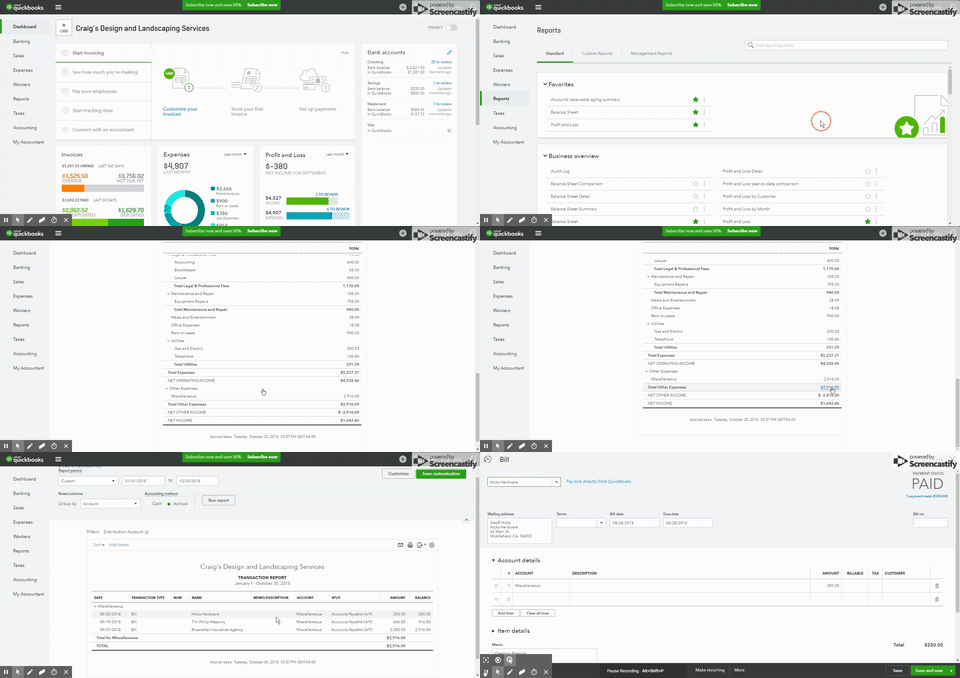
The negative value appearing in the expense section means that there are Expense transactions (or perhaps Journal Entries) which were credited for an expense account or debited it for a negative value. I'll walk you through on how to check this:


  1. Go to the Reports tab. 
  2. Click on the Profit and Loss report in the Business Overview section.
  3. On the line with the negative amount, choose the number to open a Transaction Report having the items with that amount.
  4. Click on the report to open and review any transaction.


I'm adding a brief video to display the process:


Learn more on how to import files in QuickBooks Online by checking out these articles:


Get back here in the Community if you've got more questions about importing your files in QuickBooks Online. I'll be around to help. Have a great day and take care always!


2 replies

ReyJohn_DAnswer
April 8, 2020

Hello, @MROCA2018.


Allow me to share with you some information about why you're seeing the negative expense amount in your Profit and Loss after importing. 


The negative value appearing in the expense section means that there are Expense transactions (or perhaps Journal Entries) which were credited for an expense account or debited it for a negative value. I'll walk you through on how to check this:


  1. Go to the Reports tab. 
  2. Click on the Profit and Loss report in the Business Overview section.
  3. On the line with the negative amount, choose the number to open a Transaction Report having the items with that amount.
  4. Click on the report to open and review any transaction.


I'm adding a brief video to display the process:


Learn more on how to import files in QuickBooks Online by checking out these articles:


Get back here in the Community if you've got more questions about importing your files in QuickBooks Online. I'll be around to help. Have a great day and take care always!

MROCA2018Author
April 15, 2020

Thank you, very good explanation.

Ashley H
April 15, 2020

Thanks for the reply, @MROCA2018.


You're most welcome! If you have any additional questions or concerns, just know that we're always happy to help you here in the Community.


Wishing you and your company continued success. 

July 25, 2022

can I create a summary report by category in quickbooks online for a credit card reconciliation statement 

July 25, 2022

Hello Btm1224,


Thank you for reaching out to the QuickBooks Community!  I was able to test this, and the reconciliation statement is not customizable, and I do see the importance of this and how helpful this can be. I will go ahead and submit feedback to our Developers.


Feel free to visit our blog to see the latest features in our program! Don't hesitate to reach out if you have any other questions! I hope you have a great day.