April 6, 2020
Solved

How to record credit/refund back from inventory purchase

  • April 6, 2020
  • 1 reply
  • 0 views

Hello,

I have my product expense account to "Cost of Good Sold"  & inventory as "inventory asset" when creating the product/service. Then PO/Expense it out using that product. Month later, i got a credit/discount from the same vendor, without having to return the item they gave me a price match discount since i paid a much higher price at the time of ordering. My question is the credit within the credit card bank feed. I notice making a credit card credit would not work since you need to input a qty higher then 0 which mines has nothing returned, so only other way out i can think of is just categorizing it within the feed without a match.

Best answer by vpcontroller


@mikelu9661 wrote:

Hello,

I have my product expense account to "Cost of Good Sold"  & inventory as "inventory asset" when creating the product/service. Then PO/Expense it out using that product. Month later, i got a credit/discount from the same vendor, without having to return the item they gave me a price match discount since i paid a much higher price at the time of ordering. My question is the credit within the credit card bank feed. I notice making a credit card credit would not work since you need to input a qty higher then 0 which mines has nothing returned, so only other way out i can think of is just categorizing it within the feed without a match.


"How to record credit/refund back from inventory purchase"


Great question!


What you need to do is edit your original entry.

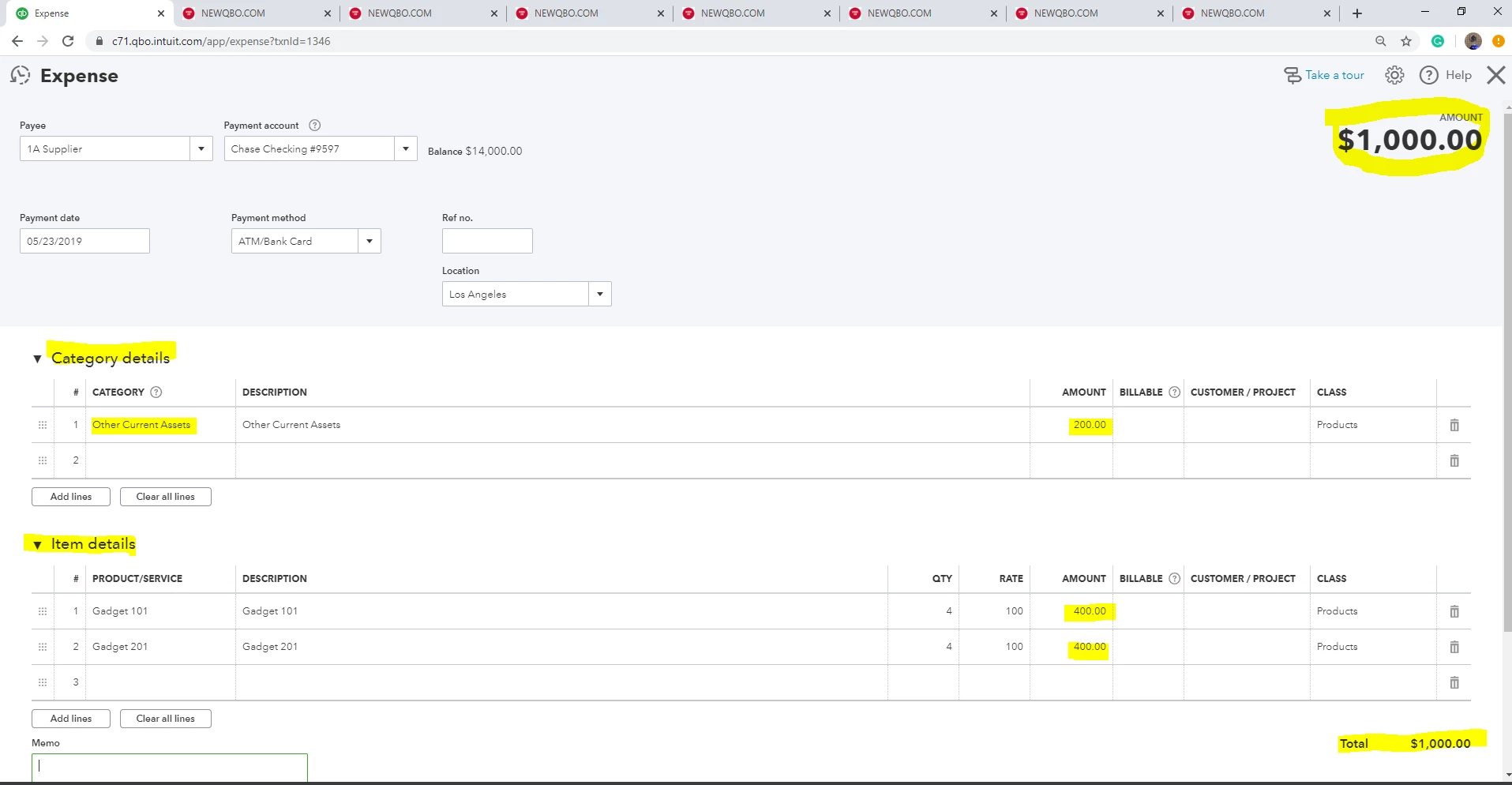
Let's say for this example, you paid $1,000 total for inventory items.

And now, they gave you a $200 credit/refund. Your new net cost is $800.


Go back to your original entry and make an adjustment:

  • Item Details section = $800 total for inventory items (this is your revised new inventory cost)
  • Category Details section = $200 for refund/receivable from Vendor (create a new account. Account and Detail type = Other Current Assets. Name something like Credit/Refund Receivable.)
  • You originally paid = $1000

This entry shows although you originally paid $1,000, $800 for purchased items and vendor owes you $200.


"My question is the credit within the credit card bank feed"

Use New account "Credit/Refund Receivable" for $200 in this example. That account should have zero balance with "in and out" transactions now.


Hope this helps!


1 reply

vpcontroller
April 6, 2020


@mikelu9661 wrote:

Hello,

I have my product expense account to "Cost of Good Sold"  & inventory as "inventory asset" when creating the product/service. Then PO/Expense it out using that product. Month later, i got a credit/discount from the same vendor, without having to return the item they gave me a price match discount since i paid a much higher price at the time of ordering. My question is the credit within the credit card bank feed. I notice making a credit card credit would not work since you need to input a qty higher then 0 which mines has nothing returned, so only other way out i can think of is just categorizing it within the feed without a match.


"How to record credit/refund back from inventory purchase"


Great question!


What you need to do is edit your original entry.

Let's say for this example, you paid $1,000 total for inventory items.

And now, they gave you a $200 credit/refund. Your new net cost is $800.


Go back to your original entry and make an adjustment:

  • Item Details section = $800 total for inventory items (this is your revised new inventory cost)
  • Category Details section = $200 for refund/receivable from Vendor (create a new account. Account and Detail type = Other Current Assets. Name something like Credit/Refund Receivable.)
  • You originally paid = $1000

This entry shows although you originally paid $1,000, $800 for purchased items and vendor owes you $200.


"My question is the credit within the credit card bank feed"

Use New account "Credit/Refund Receivable" for $200 in this example. That account should have zero balance with "in and out" transactions now.


Hope this helps!



April 6, 2020

Hello,

I'm sorry, but I'm totally confused, do you perhaps have a step by step illustration guide i can follow upon? as if I edit the original expense from $1000 to $800, it would not match with the feed of the original charge if that's what I'm being told to do.

DivinaMercy_N
April 6, 2020

Hi, @mikelu9661.


I'll guide you on how to create a vendor credit:

  1. Click the New button.
  2. Under Vendors, select Vendor credit
  3. Choose the name of your vendor.
  4. On the Category column, choose Credit/Refund Receivable and $200 for the Amount.

To create a new account according to @vpcontroller please refer to the screenshot below: 
 

       5. On the Product/Service column, enter the product and $800 for the Amount


You can also check this article for more detail: Enter vendor credits and refunds in QuickBooks Online.


That shall do it. If you have further questions please don't hesitate to post a questions below. I'll appreciate the opportunity to help.