July 30, 2023
Solved

I am using QB Self-Employed. Between July 28-29, 2023, my invoices stopped displaying on the new invoice. The page comes up, but not invoices are displayed.

  • July 30, 2023
  • 1 reply
  • 0 views
The data is not lost because I can see invoice summary information on my home page, and the QB Asistant can pull up the invoice information.  

I tried restarting the computer.  I tried using both Safari and Chrome.  I tried clearing the cache.  None have helped.
Best answer by Maybelle_S

Let's ensure we address this matter promptly so you can regain access to your invoices in QuickBooks Self-Employed (QBSE), azucker.


As of the moment, we have an ongoing investigation about being unable to access invoices in QBSE. Our software engineers are working diligently to identify the root cause of the problem. We assure you that we are taking all necessary steps to get this rectified as soon as possible.


For now, I recommend contacting our support team. This way, you'll be added to the list of affected users and receive status updates through email or SMS. For a faster transaction, provide this investigation number to our representative: INV-90843. Here's how:


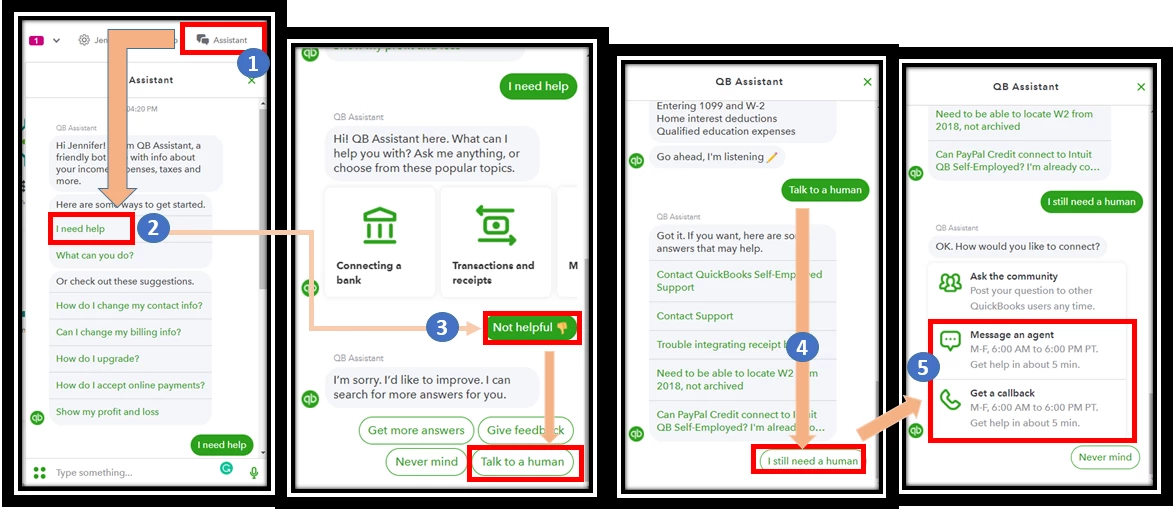
  1. Go to Help (?) and select Contact Us.
  2. Note: If you’re using the QuickBooks Self-Employed app, tap the + button and select Ask QB Assistant.
  3. Enter “talk to a human”, then select Continue.
  4. Select which way you want to connect with us.
  • Have us call you - Get a call from a support expert.
  • Chat with us - Start a conversation with a support expert.
 

For support hours, see his article: Contact QuickBooks Self-Employed Support.


In the meantime, you can consider using QuickBooks Self-Employed on your mobile to manage your invoices.


Your patience and understanding are greatly appreciated as we work to address the issue. We look forward to providing you with the best possible experience in the future, azucker. If there's anything else that I can do for you, just tag my name in the comment section. Take care!


1 reply

July 30, 2023

Let's ensure we address this matter promptly so you can regain access to your invoices in QuickBooks Self-Employed (QBSE), azucker.


As of the moment, we have an ongoing investigation about being unable to access invoices in QBSE. Our software engineers are working diligently to identify the root cause of the problem. We assure you that we are taking all necessary steps to get this rectified as soon as possible.


For now, I recommend contacting our support team. This way, you'll be added to the list of affected users and receive status updates through email or SMS. For a faster transaction, provide this investigation number to our representative: INV-90843. Here's how:


  1. Go to Help (?) and select Contact Us.
  2. Note: If you’re using the QuickBooks Self-Employed app, tap the + button and select Ask QB Assistant.
  3. Enter “talk to a human”, then select Continue.
  4. Select which way you want to connect with us.
  • Have us call you - Get a call from a support expert.
  • Chat with us - Start a conversation with a support expert.


For support hours, see his article: Contact QuickBooks Self-Employed Support.


In the meantime, you can consider using QuickBooks Self-Employed on your mobile to manage your invoices.


Your patience and understanding are greatly appreciated as we work to address the issue. We look forward to providing you with the best possible experience in the future, azucker. If there's anything else that I can do for you, just tag my name in the comment section. Take care!