March 1, 2023
Solved

I don't want quickbooks to group together expenses from the same vendor.

  • March 1, 2023
  • 1 reply
  • 0 views

Each expense is separate, different date and receipt #, but Quickbooks groups everything together and only keeps one receipt. 

Best answer by Rubielyn_J

I know why it's happening when you create an expense, @nlSB.


The auto-recall feature was enabled in your Accounts and Settings. Here's how you can check this in your QBO account: 


  1. Proceed to Settings ⚙, then choose Account and settings.
  2. Click Advanced.
  3. In the Automation section, select the pencil icon.
  4. Check the Pre-fill forms with previously entered content to enable auto-recall is turned off or on.


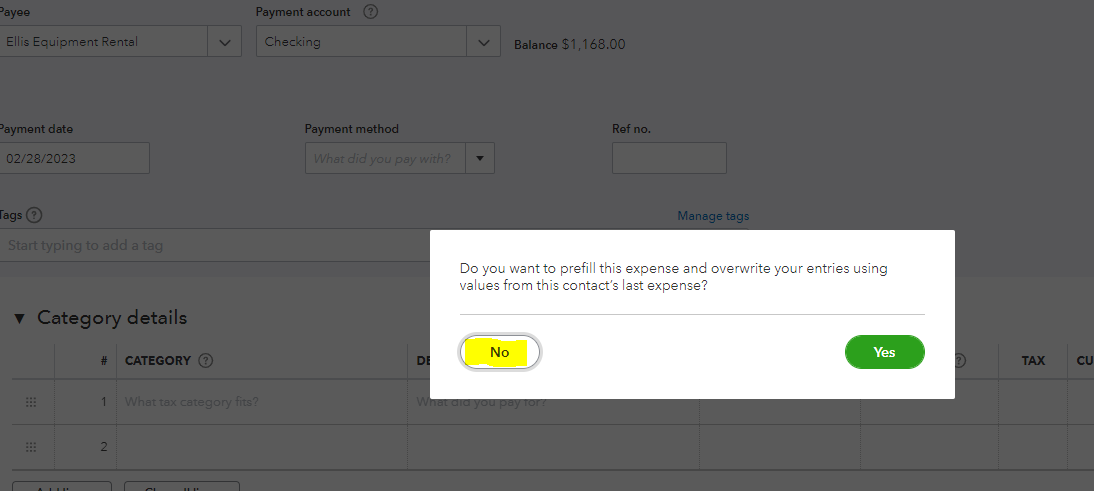
If it's on, a prompt will appear on the screen when you create an expense. Be sure to click No to prevent any previous expenses from showing up under the Category details section.
 

Additionally, I've got some relevant articles you can check out to record, edit, and delete expenses:


You're more than welcome again if you have further concerns with creating expenses in QuickBooks. I'll be around to assist you. Stay safe!

1 reply

Adrian_A
March 1, 2023

Hello there, nlSB.

To ensure we're on the same page, can you share more details about your concerns? I'd also appreciate it if you add a screenshot.

I'll be keeping an eye on your response.

nlSBAuthor
March 1, 2023

Sure, see screenshot below. Somehow the moment I choose Amazon ( a regular vendor) previous expenses show up. 

Rubielyn_J
March 2, 2023

I know why it's happening when you create an expense, @nlSB.


The auto-recall feature was enabled in your Accounts and Settings. Here's how you can check this in your QBO account: 


  1. Proceed to Settings ⚙, then choose Account and settings.
  2. Click Advanced.
  3. In the Automation section, select the pencil icon.
  4. Check the Pre-fill forms with previously entered content to enable auto-recall is turned off or on.


If it's on, a prompt will appear on the screen when you create an expense. Be sure to click No to prevent any previous expenses from showing up under the Category details section.


Additionally, I've got some relevant articles you can check out to record, edit, and delete expenses:


You're more than welcome again if you have further concerns with creating expenses in QuickBooks. I'll be around to assist you. Stay safe!
