
January 5, 2020
Solved

I enter a "Note" on an inventory item, and Save it, but then it is not viewable or findable. Why?

  • January 5, 2020
  • 2 replies
  • 0 views
Original commenter did not share additional details

Best answer by JoesemM

Hi there, @CS20.


I'm here to share information about saving an inventory item in QuickBooks Desktop (QBDT) Enterprise.


When you save notes to an item, it will automatically save to the Notes section on the Inventory Center. Here’s how to check the item notes:
 

  1. Go to the Inventory menu at the top.
  2. Select Inventory Center.
  3. Choose the inventory item.
  4. Click the Notes section at the bottom and the notes will appear.

I've provided a screenshot for reference:
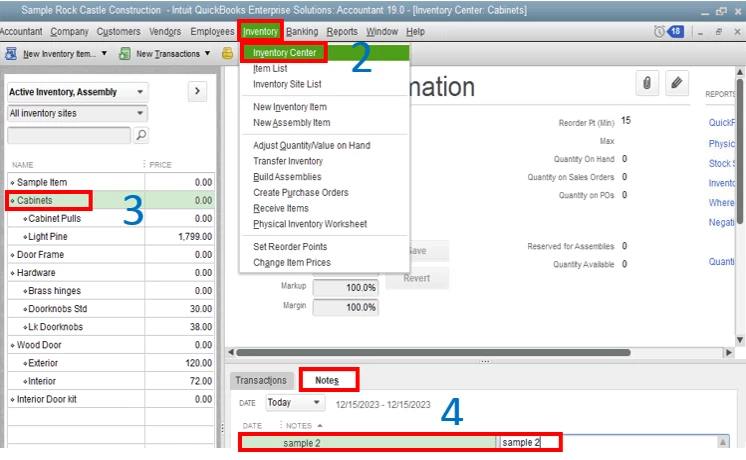
With regards to showing the item notes when editing the item on the Item list is unavailable. I'll feedback this to our Product Engineer to let them know about these ideas so they can put it into consideration for future product updates.


You can check our QuickBooks Blog to know the recent news and updates about QBDT Enterprise.


If you have further questions, please let me know. I'll be happy to help.  Have a good one.

2 replies

JoesemM
JoesemMAnswer
January 6, 2020

Hi there, @CS20.


I'm here to share information about saving an inventory item in QuickBooks Desktop (QBDT) Enterprise.


When you save notes to an item, it will automatically save to the Notes section on the Inventory Center. Here’s how to check the item notes:
 

  1. Go to the Inventory menu at the top.
  2. Select Inventory Center.
  3. Choose the inventory item.
  4. Click the Notes section at the bottom and the notes will appear.

I've provided a screenshot for reference:

With regards to showing the item notes when editing the item on the Item list is unavailable. I'll feedback this to our Product Engineer to let them know about these ideas so they can put it into consideration for future product updates.


You can check our QuickBooks Blog to know the recent news and updates about QBDT Enterprise.


If you have further questions, please let me know. I'll be happy to help.  Have a good one.

CS20Author
January 7, 2020

Thank you, perfect answer. and thanks for passing along to developers; Notes should be viewable similarly in different parts of the application (centers).

March 7, 2023

The same thing is happening in QB Desktop Pro Plus 2023.  If you enter notes BEFORE you update any data fields for an item, the notes save.  If you update data fields first then add you notes and save, the notes are NOT there upon return and have to be re-entered.  It SHOULD NOT MATTER in what order data for an item is updated and saved.  Figuring this out has been a HUGE inefficient waste of time.  Intuit needs to fix this!!!

March 7, 2023

Hello there, HMCarley.

I can see how challenging re-entering the notes and make them show in the system. I hear your sentiments and got your point on how important to fix it.


We can follow the steps below to send your suggestion to our product engineers. You can input a few details that make them aware of the other features you're looking for. Here's how:


  1. Go to the Help menu in your company file.
  2. Select Send Feedback Online and choose Product Suggestion.
  3. Click the Type of Feedback drop-down arrow and select Product Suggestion.
  4. You can then add brief information in the box.
  5. Enter your name and e-mail address.
  6. Then, click the Send Feedback button.


Also, you may consider checking the articles below for additional guide about inventory in QuickBooks Desktop:


If you have suggestions or other feedback to share, feel free to post them. We'll take them as an opportunity to improve QuickBooks. Keep safe.
