Solved
I have two estimates that are marked "open balance" even though I have entered the payments. See Photo. Thanks.
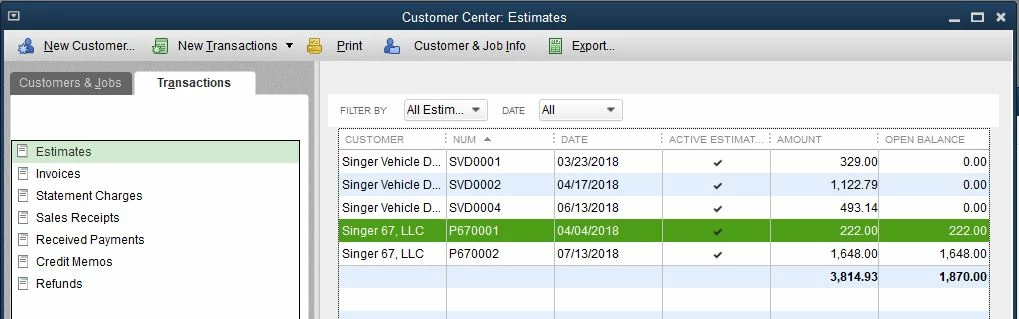


Appreciate the screenshot you've provided, @katyo24.
I'm here to help walk you through clearing out the open balance in your customer's account. Let's get started!
Creating an estimate is one of the process in the workflow for recording your business' accounts receivables in QuickBooks Desktop. Here's the workflow:
Please be inform that even if you have recorded a customer payments in QuickBooks, it is not a guarantee that your customer's balance will be cleared or zero out. A payment cannot be applied directly to an estimate since it is a non-posting transaction. You'll have to create an invoice to record the sales transactions after your customer accepts the estimate you've sent to them.
To zero out your customer's balance, here's how:

To pay the invoice, here's how:

That should do it! This should get you on the right track of accurately managing your accounts receivables in QuickBooks Desktop. Wishing you continued success!
Enter your E-mail address. We'll send you an e-mail with instructions to reset your password.