February 8, 2023
Solved

I'm not able to select more than one account when filering a report.

  • February 8, 2023
  • 2 replies
  • 0 views

Hi - when I try to select more than one account when filtering a report, it deletes the original account. So far I can only select one account at a time. Help? 

Best answer by BigRedConsulting

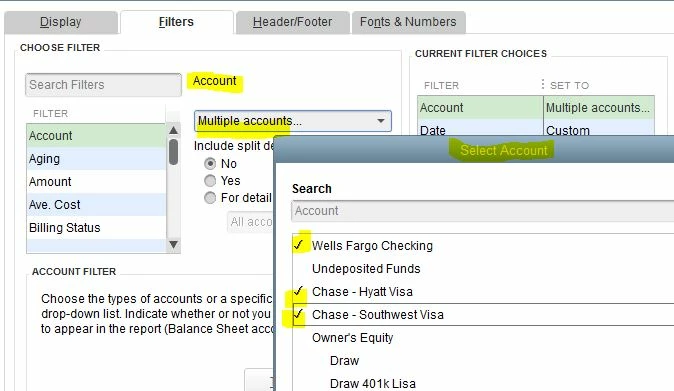
To filter a report on more than one account, pick the "Multiple accounts..." option at the top of the account list as seen in the filters.  After selecting that option, a window titled "Select Account" will open where you can select multiple accounts at once.


It should be titled "Select Accounts", plural, because that's what it's for, but it seems those coding and testing this area of QuickBooks have an adversarial relationship with English.


It looks like this:


2 replies

AlcaeusF
February 8, 2023

Hi @mg57,


We want to help you with your question about customizing a report. However, we need more information about it to provide the correct resolution and to get this sorted out promptly.

Can you share the report you're trying to filter in the Desktop version? This way, we'll be able to check the customizations on your behalf. If you could provide some screenshots, it would greatly help.


In the meantime, you can check this article for additional guidance on personalizing reports in QuickBooks: Customize reports in QuickBooks Desktop.

Please know that you're always welcome to post questions in this space. Have a great day ahead. 

mg57Author
February 8, 2023

Thanks! Big Red gave me the info i needed. 

BigRedConsulting
February 8, 2023

To filter a report on more than one account, pick the "Multiple accounts..." option at the top of the account list as seen in the filters.  After selecting that option, a window titled "Select Account" will open where you can select multiple accounts at once.


It should be titled "Select Accounts", plural, because that's what it's for, but it seems those coding and testing this area of QuickBooks have an adversarial relationship with English.


It looks like this:


mg57Author
February 8, 2023

Thank you!! Didn't see that!
