September 20, 2021
Solved

I'm trying to setup a new parent account under COA. Window has no option to create a parent

  • September 20, 2021
  • 1 reply
  • 0 views
Clicking New under COA, goes to a new window that creates a category only. I don't have the checkbox to opt out of a Sub Account Option to create a parent account. It only give me the option to create a sub-account. How/where do I go to remove a sub account and place it as a parent account?
Best answer by MadelynC

I’ll make sure you’ll be able to set up a new parent account in QuickBooks, @ems-2019.


QuickBooks Online (QBO) made updates to the Chart of Accounts (COA) so users will have more organize accounts.


In order to create a new parent account, you’ll need to switch from Business view to Accountant view. Accountant view has complete control over features to provide a better accounting experience.


Here’s how:


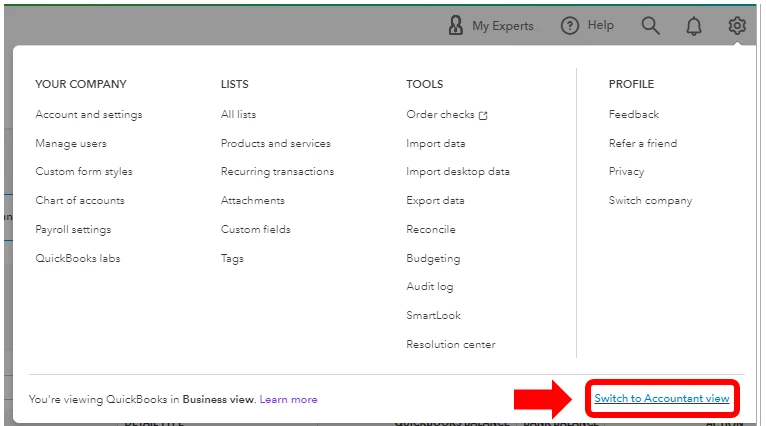
  1. Select the Gear icon at the top right.
  2. Click the Switch to Accountant view option.
  3. After QuickBooks refresh the page, go back to the Chart of Accounts window.
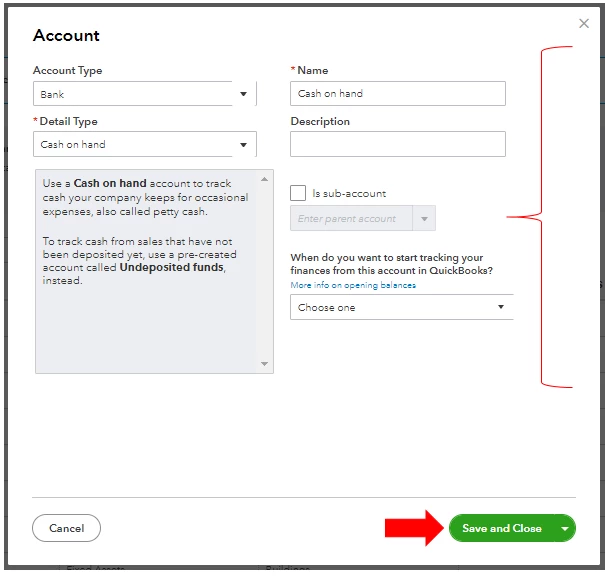
  4. Press New.
  5. Select and enter the necessary information.
  6. Select Save and close.


You can check this guide to learn more about each view and how to switch between them: Switch between Business and Accountant view in QBO.


Moreover, here are some articles that give you insights about COA:


I’ll be here anytime to help if you have additional questions or concerns about account setup. Just leave a message below. Take care always!


1 reply

MadelynCAnswer
September 20, 2021

I’ll make sure you’ll be able to set up a new parent account in QuickBooks, @ems-2019.


QuickBooks Online (QBO) made updates to the Chart of Accounts (COA) so users will have more organize accounts.


In order to create a new parent account, you’ll need to switch from Business view to Accountant view. Accountant view has complete control over features to provide a better accounting experience.


Here’s how:


  1. Select the Gear icon at the top right.
  2. Click the Switch to Accountant view option.
  3. After QuickBooks refresh the page, go back to the Chart of Accounts window.
  4. Press New.
  5. Select and enter the necessary information.
  6. Select Save and close.


You can check this guide to learn more about each view and how to switch between them: Switch between Business and Accountant view in QBO.


Moreover, here are some articles that give you insights about COA:


I’ll be here anytime to help if you have additional questions or concerns about account setup. Just leave a message below. Take care always!