
Solved
I'm using Quickbooks Pro 2017. There was an upgrade in the program and now my statement format size decreased when printing only? How can I change it back?
Original commenter did not share additional details

It is set for Letter size (8.5x11) but still having the same problem. Any other solution?
Hello, wshephard.
I appreciate your time in doing the steps provided by my colleagues. I have another solution we can use to resolve the statement printing issue.
This looks like a case of a corrupted statement template. To see if this is the case, you'll want to print a letter size statement using a sample company file. Here's how to switch to a sample file:
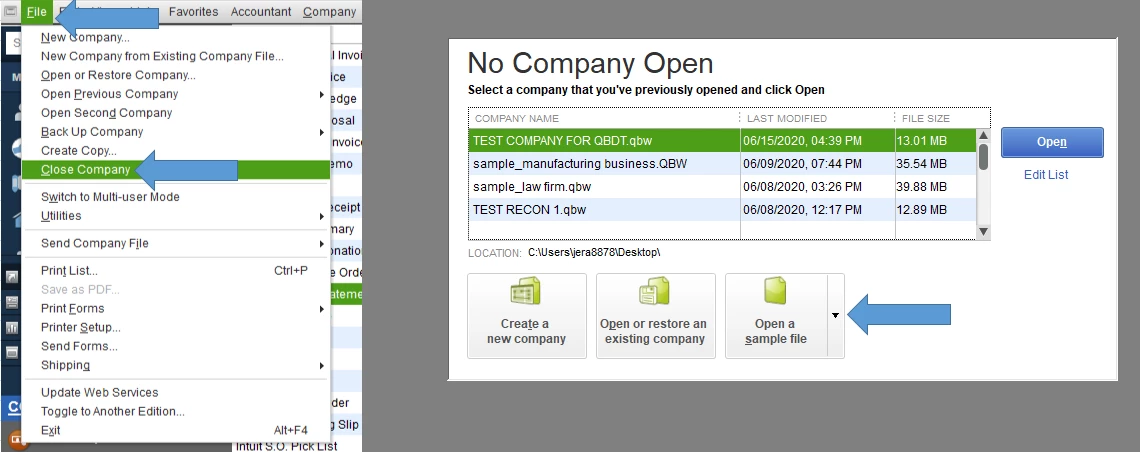
Next, print a sample statement and ensure the settings are set for letter size. If it works, let's go back to your regular company file and delete and recreate the statement template. Before doing this, make sure to remember your statement settings.
To delete the template:
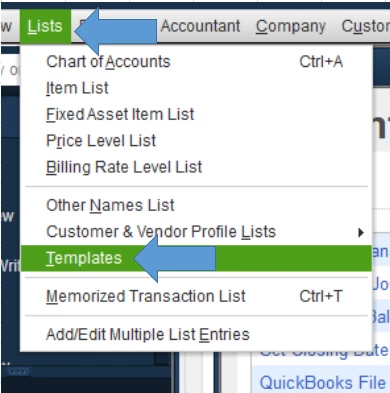
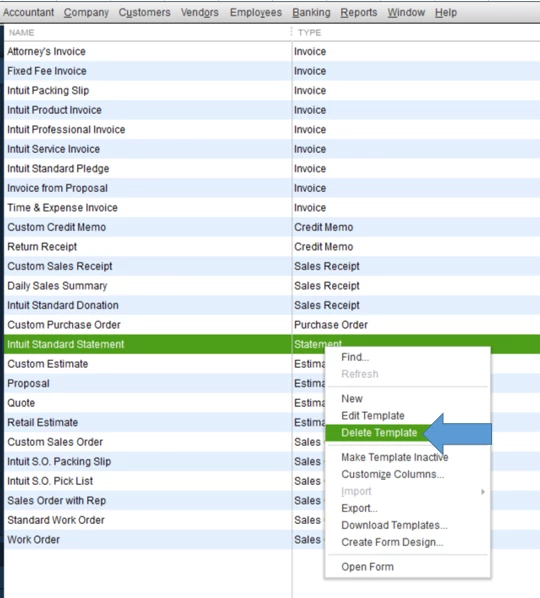
Recreate your statement with the same custom settings. Print a sample to see if the letter size option is working.
I see that one of my colleagues posted this article. You'll want to exhaust all the solutions outlined in it if you haven't already done so.
If it still prints as A5 after doing all the solutions, I recommend contacting our support. They can look at the program and see what's preventing the statement from using the letter size setting. Here's how to reach them:
Just a quick note, QuickBooks Pro 2017 is no longer supported. The steps might not work for unsupported versions. I recommend upgrading to the latest supported version.
After printing the statement successfully, there are a number of customer-related reports you can run. They might be helpful if you're looking to see your customer data and how much you've earned from each of them. You can browse articles to help you pull up a sales report: Sales reports.
You can also check our general support page with articles if you need further assistance with QuickBooks Desktop.
I'm more than happy to hear you out if you have other concerns regarding QuickBooks Desktop. If you have future questions about your customers in the program, you can add a reply below.
Enter your E-mail address. We'll send you an e-mail with instructions to reset your password.