December 28, 2019
Solved

I need to create a journal entry but cannot find the icon

  • December 28, 2019
  • 2 replies
  • 0 views
Original commenter did not share additional details
Best answer by vpcontroller

@elksjon @Mark_R 


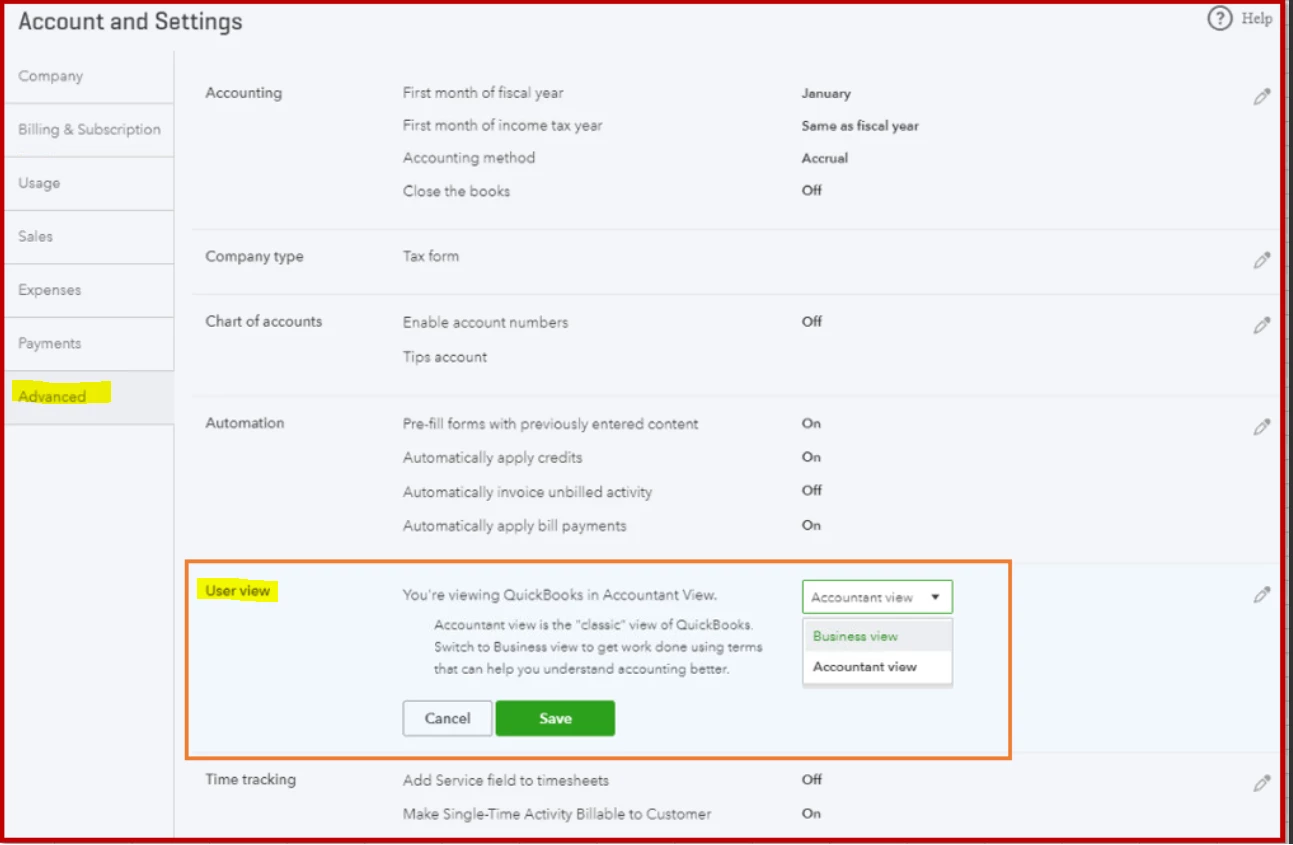
With the update on “+ New” look moving from the top right corner to left dashboard, they have added the "User View" feature for Business view and Accountant view.

With the Accountant view, you will see the Journal Entry form like used to experience in the past. But the default set up for "+ New" is the Business view, that's why you're not seeing JE.


You can change it from the company gear settings. Here's how:

  • Gear icon > Account and Settings  > Advanced  > User view
  • Select Accountant view for a classic look with Journal Entry under Other


2 replies

December 28, 2019

Glad to have you here in the Community, @elksjon.


I'm here to ensure you'll be able to create a journal entry in your QuickBooks Online (QBO).


Aren't you able to find the Plus (+) icon at the top right corner of your QBO? If yes, try to check the + New button at the top left corner. If you happen to locate the "+ New" icon from there, it means that your QuickBooks is already updated. The latest update of QuickBooks includes the interface of the page.


However, if you can't still see the Plus (+) icon from there, let's try logging into your QBO account using a private browser. There are times that the browser is full of frequently-accessed page resources, thus causing websites, like QBO, to act weirdly.


To use a private browser, here's how:      


  • Google Chrome: Ctrl + Shift + N
  • Internet Explorer: Ctrl + Shift + P
  • Mozilla Firefox: Ctrl + Shift + P
  • Safari: Command + Option + P

If this works, it means that you need to clear your browser's cache so the system can start fresh. 


If you get the same result while using a private browser, I recommend switching to a different browser. 


You can check out this article to learn how to create a journal entry: Create a Journal Entry.


Fill me in if you have further questions. I'm always around if you need any help. Have a good one.

vpcontroller
December 28, 2019

@elksjon @Mark_R 


With the update on “+ New” look moving from the top right corner to left dashboard, they have added the "User View" feature for Business view and Accountant view.

With the Accountant view, you will see the Journal Entry form like used to experience in the past. But the default set up for "+ New" is the Business view, that's why you're not seeing JE.


You can change it from the company gear settings. Here's how:

  • Gear icon > Account and Settings  > Advanced  > User view
  • Select Accountant view for a classic look with Journal Entry under Other