February 22, 2021
Solved

I purchased a truck from a dealer with a loan and using a trade-in for my business for $24,497. How do I make all appropriate entries in QB Desktop Pro to show sales tax, documentary fees, title and registry fees and cash down payment?

  • February 22, 2021
  • 1 reply
  • 0 views

Help!   I purchased a truck from a dealer with a loan using a trade-in for my business for $24,497. How do I make all the appropriate entries in QB Desktop Pro to show sales tax paid, documentary fees, title and registry fees and the cash down payment?  I have read at least 10 different ways of entering this type of transaction using journal entries, negative number entries, etc., but most don't seem to work with Desktop Pro 2018 for Windows. I'm not an accountant and I don't play one on TV so don't make those type of assumptions please.

Best answer by DivinaMercy_N

Let me help you record your purchased truck with a loan, @DrainageGuy.


Here's how:

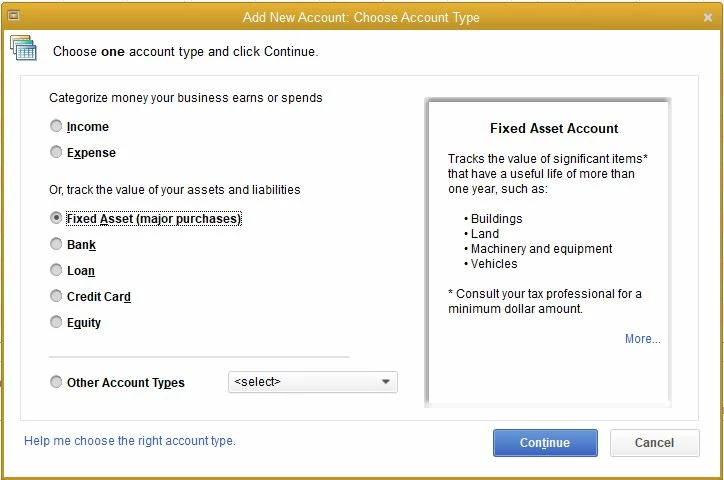
  1. Let's create a Fixed Asset Account for the truck, by going to the Accountant menu. 
  2. Click Chart of Accounts and hit New. 
  3. Select Fixed Assets
  4. Enter the name and description for the account
  5. Choose the Detail Type.


Once done, you'll need to record the purchase and link it to the Fixed Asset account.


Then, set up a liability account. Here's how:

  1. Navigate to the Accountant tab and click Chart of Accounts.
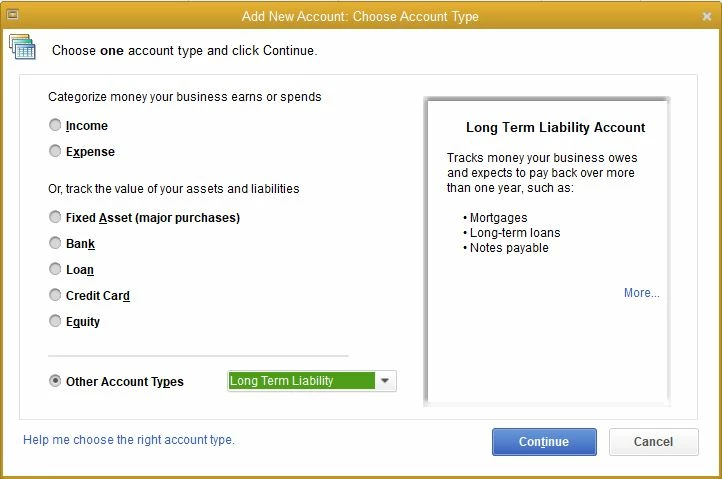
  2. Select New. Choose Long Term Liability and then Next
  3. Enter the details and the name.
  4. Click on Save.


Now, here are the steps to record the loan amount:

  1. Select Accountant menu.
  2. Tap Make General Journal Entries.
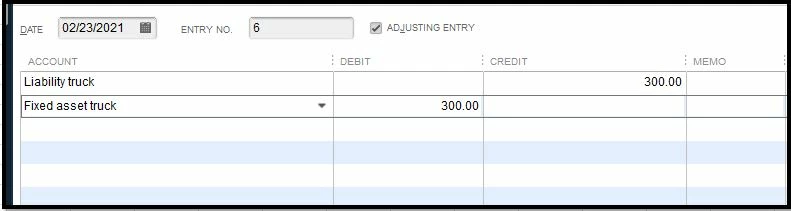
  3. Click on the Account drop-down options and select Liability Account.
  4. Enter the total amount for the loan on the Credit column.
  5. Choose the Asset Account that you want the loan amount to be linked with.
  6. Enter loan amount again but this time on the Debit column. 
 

Also, it's recommended to always create a backup copy of your company file before doing any changes. This is to ensure you have an original copy and restore it anytime


For the best advice on how you can record it, I recommend consulting your accountant. If you don't have one, no worries you can look for a Pro-Advisor near your area using our Find an Accountant tool.


In case you need tips and related articles in the future, you can visit our QuickBooks Help page


Feel free to get back to me if you need further assistance in recording purchases with a loan in QuickBooks. I'm just a post away to help. Have a good one. 

1 reply

DivinaMercy_N
February 22, 2021

Let me help you record your purchased truck with a loan, @DrainageGuy.


Here's how:

  1. Let's create a Fixed Asset Account for the truck, by going to the Accountant menu. 
  2. Click Chart of Accounts and hit New. 
  3. Select Fixed Assets
  4. Enter the name and description for the account
  5. Choose the Detail Type.


Once done, you'll need to record the purchase and link it to the Fixed Asset account.


Then, set up a liability account. Here's how:

  1. Navigate to the Accountant tab and click Chart of Accounts.
  2. Select New. Choose Long Term Liability and then Next
  3. Enter the details and the name.
  4. Click on Save.


Now, here are the steps to record the loan amount:

  1. Select Accountant menu.
  2. Tap Make General Journal Entries.
  3. Click on the Account drop-down options and select Liability Account.
  4. Enter the total amount for the loan on the Credit column.
  5. Choose the Asset Account that you want the loan amount to be linked with.
  6. Enter loan amount again but this time on the Debit column. 


Also, it's recommended to always create a backup copy of your company file before doing any changes. This is to ensure you have an original copy and restore it anytime


For the best advice on how you can record it, I recommend consulting your accountant. If you don't have one, no worries you can look for a Pro-Advisor near your area using our Find an Accountant tool.


In case you need tips and related articles in the future, you can visit our QuickBooks Help page


Feel free to get back to me if you need further assistance in recording purchases with a loan in QuickBooks. I'm just a post away to help. Have a good one. 

February 23, 2021

Thank you, I followed your directions and everything seemed to work and without making negative entries which QB didn't seem to like.  Any advice on recording sales tax paid and documentation fees?

February 23, 2021

Hello @Phoenixivmark,


Let me walk you through the steps on how you can record sales tax payments in QuickBooks.

  1. Go to Vendors.
  2. Select Sales Tax.
  3. Click Pay Sales Tax.
  4. On the Pay From Account menu, select the checking account used for the sales tax payment.
  5. Review and make sure the date is correct.
  6. Select the sales taxes you have made the payment with.
  7. Enter the amount of payment.
  8. Select Adjust and enter the documentation fee.
  9. Click OK.

In the same manner, here's an article you can read to learn more about paying your sales taxes: Use the Pay Sales tax window to create sales tax payments.


On top of that, I've also included this reference for a compilation of articles you can use while working with us: Pay and manage sales tax in QuickBooks Desktop.


If there's anything else that I can help you with, please let me know in the comments below. I'll be here to lend a hand.