August 2, 2020
Solved

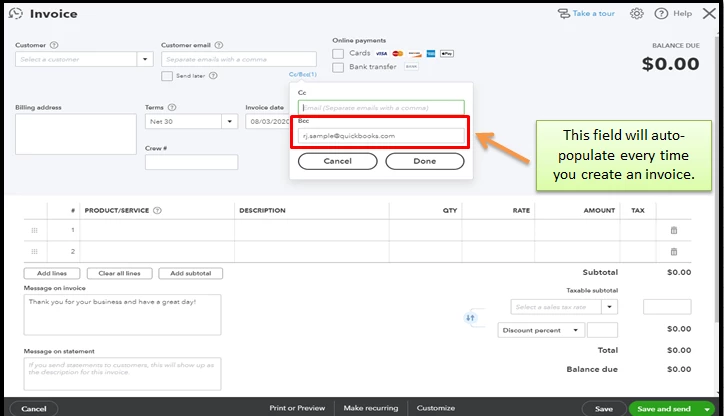
I would like to automatically be bcc'd on all invoices I send out. Now I manually type in my email in the bcc field; I would like this to happen automatically.

  • August 2, 2020
  • 1 reply
  • 0 views
Original commenter did not share additional details

Best answer by ReyJohn_D

Welcome to the Community, @anison.


Having a default email in the Blind copy (Bcc) field when sending invoices is simple and easy. We can achieve this in the Account and Settings page. I'll guide you with the steps:


  1. Click the Gear icon ⚙️ at the top right corner, and then select Account and Settings under Your Company.

  2. Choose the Sales tab, and then tap the pencil icon ✏️ under the Messages section.
  3. Enter the email you wish in the Bcc field, and then pick Invoices and other sales forms in the Sales forms drop-down ▼.
  4. Click Save, and then Done to confirm the action.


To make your invoices more appealing and look personalized, you can customize them. Click this link for more info.


Also, you'll want to batch email or print your invoices and other sales forms to make your task easy and efficient. I've got this handy resource as your guide.


Finally, you may enter the invoice payments in QuickBooks Online to organize your records and properly reflect them on your reports. Browse this article for more details.


Click the Reply button if you need more help with managing your invoices or any QuickBooks-related concerns. Take care and have a pleasant day.

1 reply

ReyJohn_DAnswer
August 2, 2020

Welcome to the Community, @anison.


Having a default email in the Blind copy (Bcc) field when sending invoices is simple and easy. We can achieve this in the Account and Settings page. I'll guide you with the steps:


  1. Click the Gear icon ⚙️ at the top right corner, and then select Account and Settings under Your Company.

  2. Choose the Sales tab, and then tap the pencil icon ✏️ under the Messages section.
  3. Enter the email you wish in the Bcc field, and then pick Invoices and other sales forms in the Sales forms drop-down ▼.
  4. Click Save, and then Done to confirm the action.


To make your invoices more appealing and look personalized, you can customize them. Click this link for more info.


Also, you'll want to batch email or print your invoices and other sales forms to make your task easy and efficient. I've got this handy resource as your guide.


Finally, you may enter the invoice payments in QuickBooks Online to organize your records and properly reflect them on your reports. Browse this article for more details.


Click the Reply button if you need more help with managing your invoices or any QuickBooks-related concerns. Take care and have a pleasant day.

September 8, 2020

When my sales team sends out Estimates and the customer replies, yes lets go ahead with this.


I cannot get email replys back to sales department.


It would be great if there were options for replying to person for Estimates and Seperate person for Invoice reply questions.

September 9, 2020

Thanks for posting to the Community, @kim-s.


Yes, I know how beneficial it is to get the option for replying to a person for estimates, and a separate person for invoices in QuickBooks Online (QBO).


Please know that I'm taking note of this one. In the meantime, you can visit our QuickBooks blog site to see the freshest feature updates and product enhancements.


Additionally, when you want to learn more about QBO, you can navigate the tabs above to search for articles, topics, and training videos.


If you have more questions about QuickBooks, feel free to post a comment below. I'll reply as fast as I can. Take care and more power to your business!