March 15, 2021
Solved

income accounts not posted to P&L

  • March 15, 2021
  • 2 replies
  • 0 views

We are a volunteer nonprofit utilizing QB 2019 premier for nonprofits, accrual method.

May we provide an example:

We receive a $200k grant from HUD:

dr  A/R grants for $200k

        cr  Grants income account

Next upon contract, we contract a contractor to execute the project and upon completion::

dr Grants income account $180k

       cr Contractor A/P

Note: now we have left in the income account $20k, this is our admin fee.

Next, we pay the contractor for project completion"

dr   A/P Contractor $189k

         cr  Cash  $180k

Result:

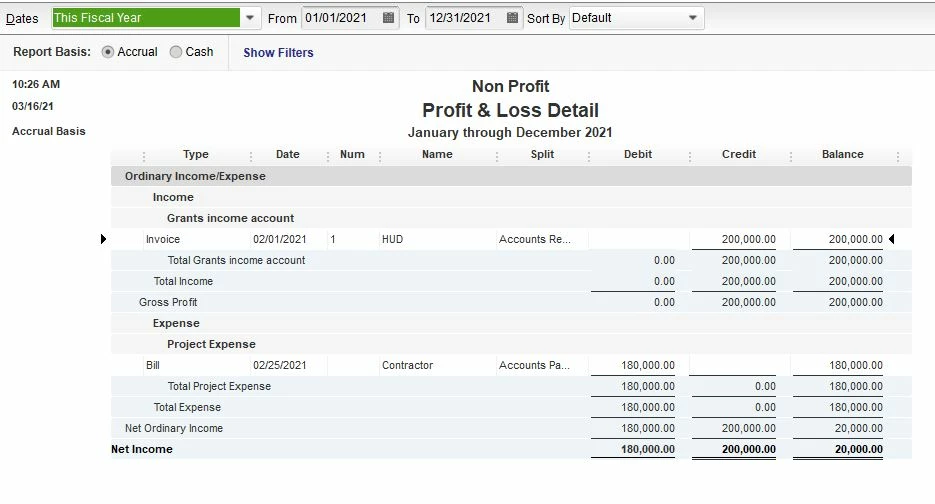
QB ignores the income account when posting to the P&L.  This means, either I did not make 
a proper entry or QB has an error in its software.
Please advise how this problem can be fixed.  It is urgent !!!!
Regards,
qikd
email:  [email address removed].



Best answer by IamjuViel

I got you covered, @np8.


Let me share to you detailed outline to ensure that you're able accurately tracked your non-profit transactions. Also, I've added screenshots as visual reference.


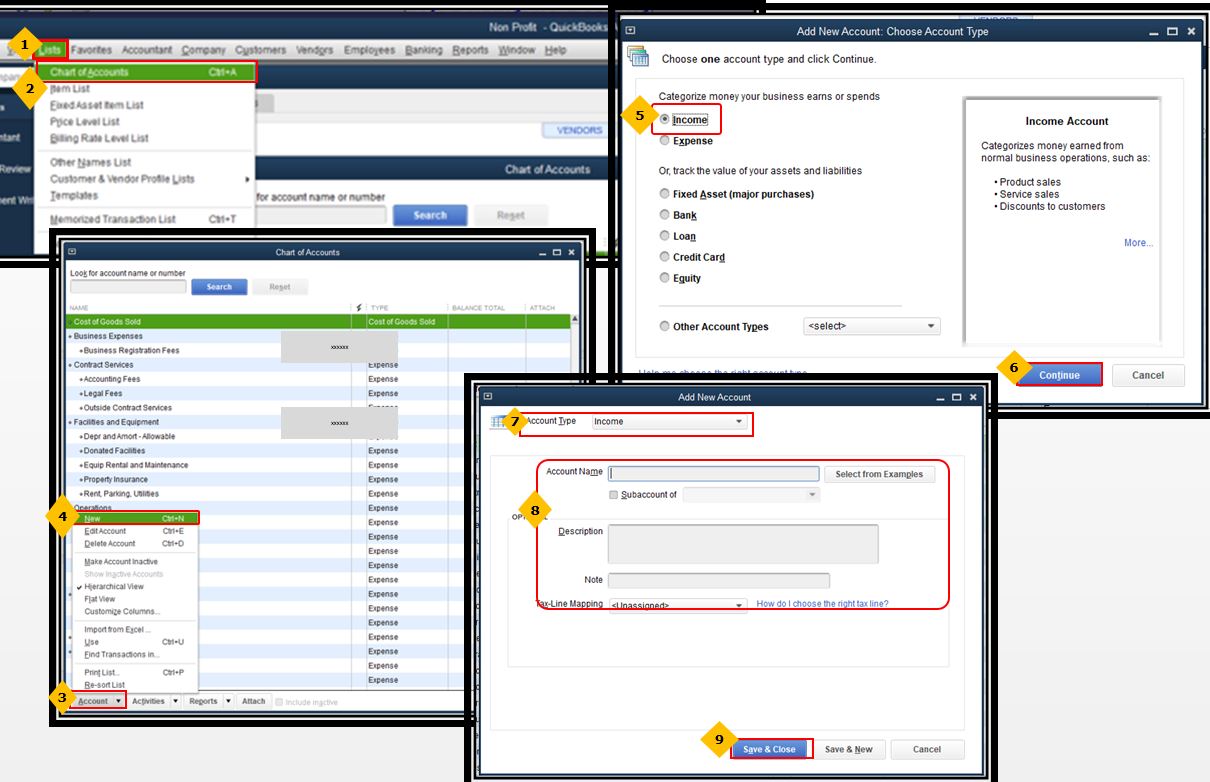
Following the suggestions of @john-pero, since the built-in account in the chart of account does not suit your business structure, you can easily create one.


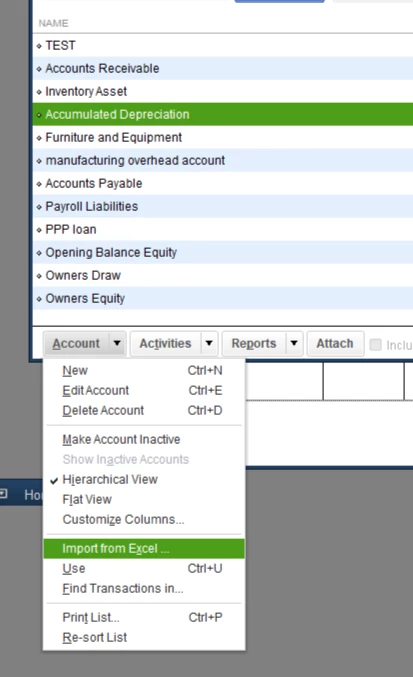
Also, you can import your existing chart of accounts. You can refer to the steps below:

  1. Click the List menu, then choose Chart of Accounts.
  2. Choose Import from Excel
  3. Browse for your spreadsheet file.
  4. Select an account mapping option.
  5. Click Import.


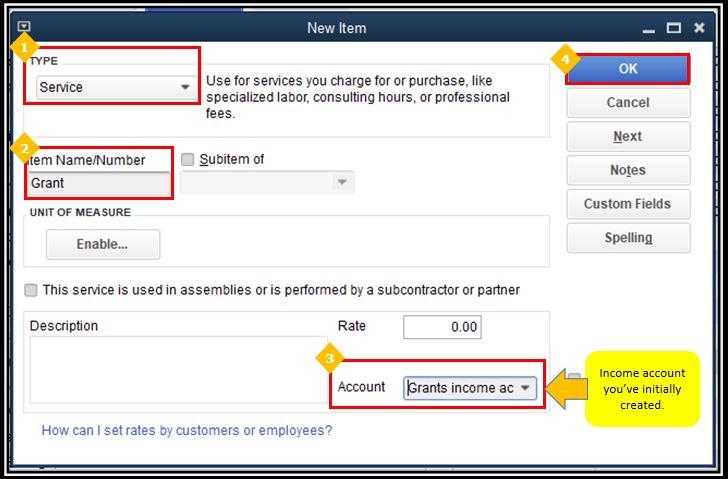
Once completed, you can create a service item and associate the income account you've created to it.


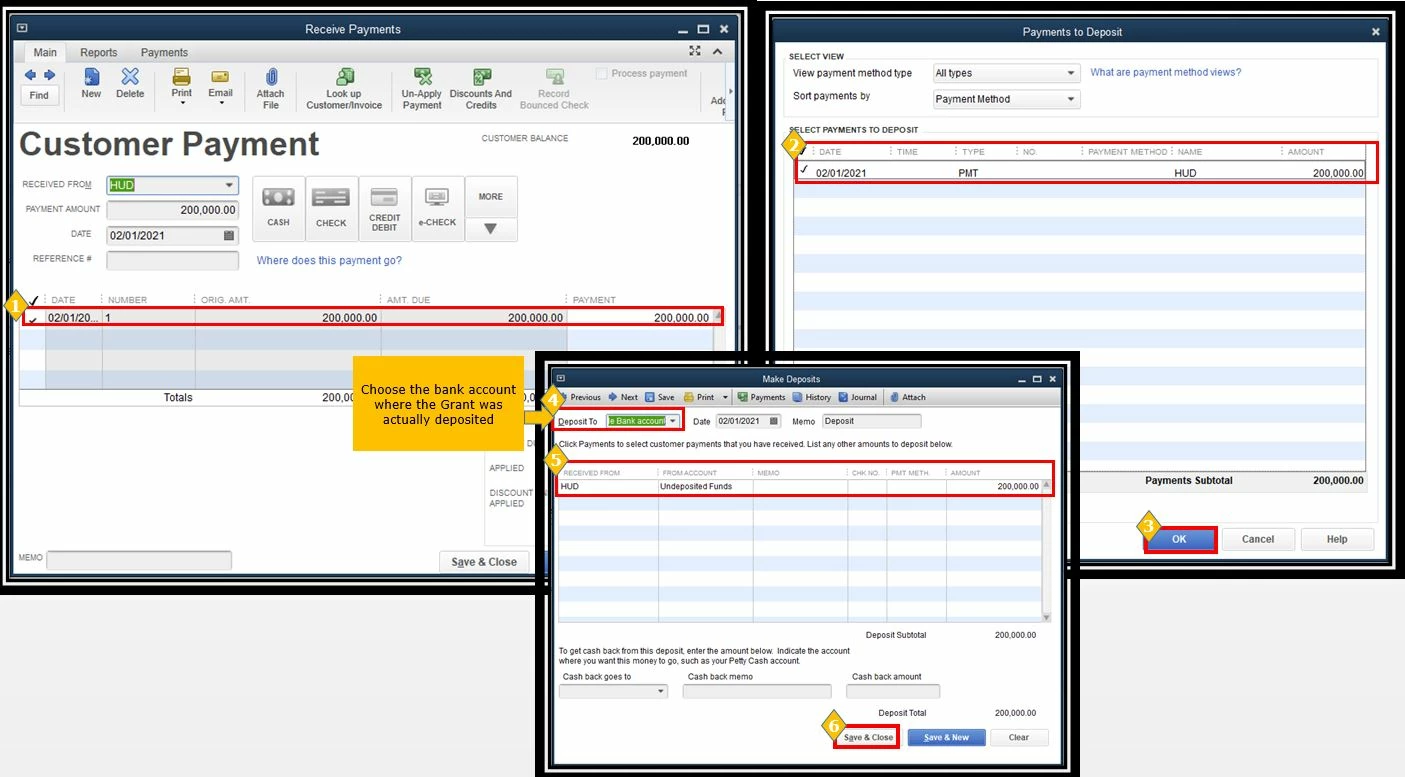
Now, you can create an invoice and record its payments.


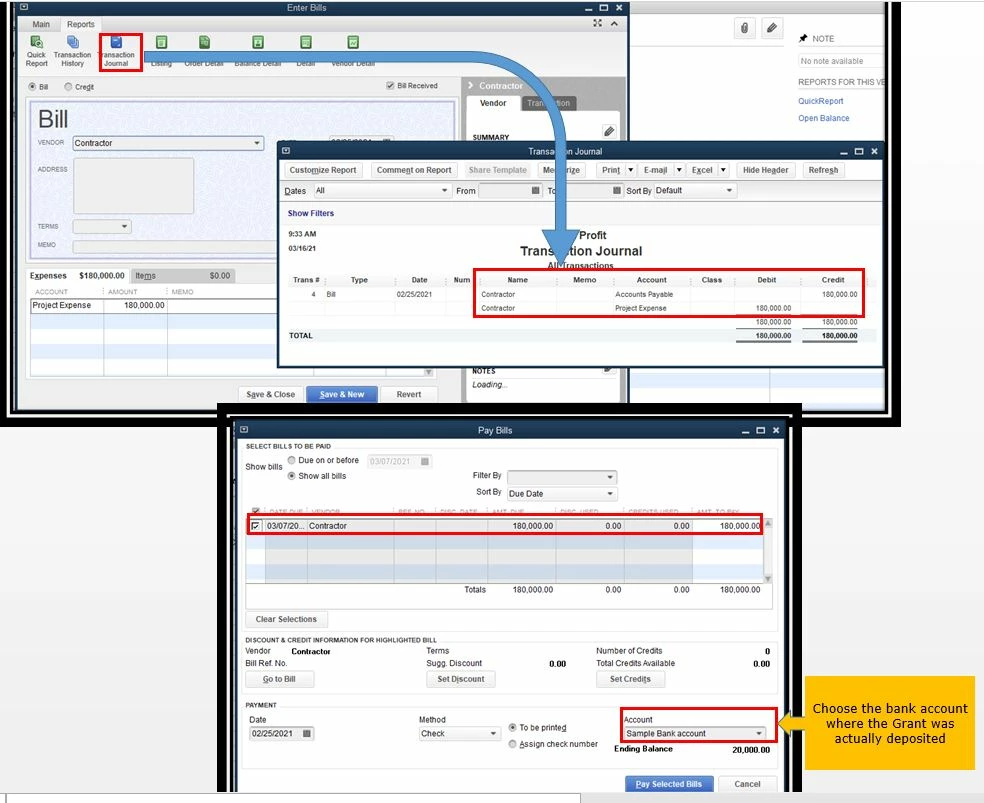
Now, you'd want  to deposit the payments to the bank account where the actual grant was deposited.


Meanwhile, you can create a bill to track the expenses used in implementing your projects.


By following the steps above, you can make sure that all transactions are accounted accurately.


Lastly, I've added these articles to help you manage your non-profit transactions:

Swing by here in the Community if you have other questions about getting the most out of  QuickBooks full potential. I’m just a few clicks away.

2 replies

john-pero
March 15, 2021

1. STOP using journal entries for money movement. Use deposits, checks, sales receipts etc. Journal entries bypass the accrual vs cash concepts and cannot be used to track by name.


2. If your P&L is not displaying $20k income and $0 expense  as your example indicates then

A. your accounts are not set up correctly

B. Your postings are incorrect


C. Software messed up? Possibly but for simple money in money out, unlikely.


Consider this, after your example , unless you missed a hugely important step you still have receivables of $200k and negative $180k in the bank. 


If the grant is only a promise of money to come later use an Invoice, posting to an income account. For contractor use a Bill, and pay later. 

np8Author
March 15, 2021

Thank you for your directions.  We will work on your advice.
QB is much different than our prior software.  It appears 
QB works from entries on their forms when constructing 

statements as opposed to constructing from the journal. 

Your direct comments and advice are greatly appreciated.


np8Author
March 16, 2021

Just to add to the prior reply:
All accounts register the proper amounts within the 

chart of accounts under activities.  Bank records are 

in order.  It is only within the architecture of QB whereby 

one must use their sales, invoice, et.al. to construct 

proper statements.  Therefore, the statements and 
trial balance cannot be accurate without making the 

entries in the sales, invoice, etc. accounts.as you 
so correctly advise.  Mostly, these accounts do not
apply to nonprofits.  QB claims it has a nonprofit 
program but the nomenclature and other items 
do not resemble nonprofit accounting nomenclature 

in many areas.  With thanks again as it is obvious 
that you know this product in detail.  Sadly, I don't.
Regards

IamjuViel
IamjuVielAnswer
March 16, 2021

I got you covered, @np8.


Let me share to you detailed outline to ensure that you're able accurately tracked your non-profit transactions. Also, I've added screenshots as visual reference.


Following the suggestions of @john-pero, since the built-in account in the chart of account does not suit your business structure, you can easily create one.


Also, you can import your existing chart of accounts. You can refer to the steps below:

  1. Click the List menu, then choose Chart of Accounts.
  2. Choose Import from Excel
  3. Browse for your spreadsheet file.
  4. Select an account mapping option.
  5. Click Import.


Once completed, you can create a service item and associate the income account you've created to it.


Now, you can create an invoice and record its payments.


Now, you'd want  to deposit the payments to the bank account where the actual grant was deposited.


Meanwhile, you can create a bill to track the expenses used in implementing your projects.


By following the steps above, you can make sure that all transactions are accounted accurately.


Lastly, I've added these articles to help you manage your non-profit transactions:

Swing by here in the Community if you have other questions about getting the most out of  QuickBooks full potential. I’m just a few clicks away.