

June 22, 2022
Question

Invoice import "cant match customers"

  • June 22, 2022
  • 1 reply
  • 0 views

Hi all,


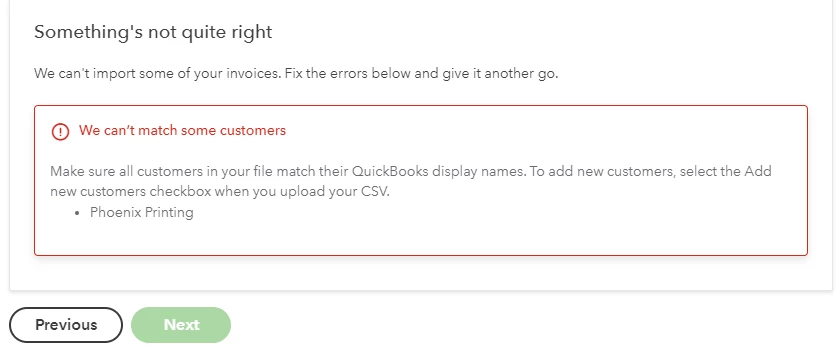
I am having an issue when importing a CSV file with an invoice. I am getting the below error where QB is telling me it cannot match the customer. On my CSV file I copied and pasted the exact display name for the Vendor so I am not sure what the issue can be. 

On the previous screen I even clicked the Add new customers to Quickbooks and when I upload i get an error that states the Customer already exists so clearly the display name is correct. Any help will be appreciated
 

1 reply

June 22, 2022

Good to see your post here, Brianchaves.


I'll make sure you'll be able to import CSV file with an invoice in QuickBooks Online (QBO).


When importing your bank transactions, there are certain factors to consider.
 

  • Make sure the file is in a CSV (comma-separated values) format.
  • Ensure to save your data as a CSV or Comma delimited.
  • Check if the file has blank lines if it does delete them.
  • Please make sure to select the column header labels (from the dropdowns) that match the column header labels in your CSV file.
  • Your CSV file should contain the following information: DateDescription, and Amount.

Check out the additional pointers below that will guide you in reformatting your CSV file:

  • 0's are not allowed anywhere in the file, e.g Rs. 0 should be left blank
  • Commas for thousands are not allowed either e.g 2,111 should be 2111
  • Other special characters such as #, %, and & are not allowed
  • Correct any transactions with the amount shown in the description column

Please know that the standard date format is dd/mm/yyyy (01/02/20). I would also recommend shortening your description so that the program will be able to easily read your bank transactions.


Once verified, you can re-import your transactions following the correct format. Here's an article for more information and steps on importing these files, see this article: Manually upload transactions into QuickBooks Online.


For instructions on how to match transactions from the banking page, check out this guide for more insights into this process: Categorize and match online bank transactions in QuickBooks Online.


Feel free to visit these links about reconciliation in QBO as a reference for your next step:

Keep me posted if you have additional questions about QuickBooks. Please know that I've got your back. Wishing you the best.

June 22, 2022

Hi Mod,


The file set up seems to be completely correct so I am unsure why I am getting the error stating that the Customer does not match what is in Quickbooks. 

JasroV
June 22, 2022

Thanks for getting back to us and for making sure your setup is accurate, @Brianchaves.


I'll share some insights on how we can get around this issue so can seamlessly upload your invoices to QuickBooks Online (QBO).


I suggest logging out and logging back in to refresh your account. This also aids in the implementation of the updates. Import your invoice again once logged in to double-check.


If the issue persists, I recommend contacting our support team. One of our live agents can look into your account and determine why you received the error message. Here's how to get in touch with them.


  1. Go to the (?) Help icon.
  2. Select the Search tab.
  3. Click Contact Us.
  4. Enter a brief discussion of your concern and click Continue.
  5. Select either Chat with us (if you preferred messaging) or Give us a call.


Please ensure to check their support hours to know when agents are available.


Once you're all set, you might want to check out this article that can help you in printing your invoices: Email or print multiple invoices and sales forms.


I'm all ears if you need more help uploading your invoices or with any QBO-related concerns you may have. Stay safe and more power to your business!