May 21, 2020
Solved

Is anyone else having issues contacting Intuit? I've tried to use the chat feature for the last couple of days... but it doesn't appear to be working?

  • May 21, 2020
  • 16 replies
  • 0 views
Original commenter did not share additional details

Best answer by JessT

Hi Brian!


I'll help you on questions 5 and 6 since Mirriam is already out of the office.


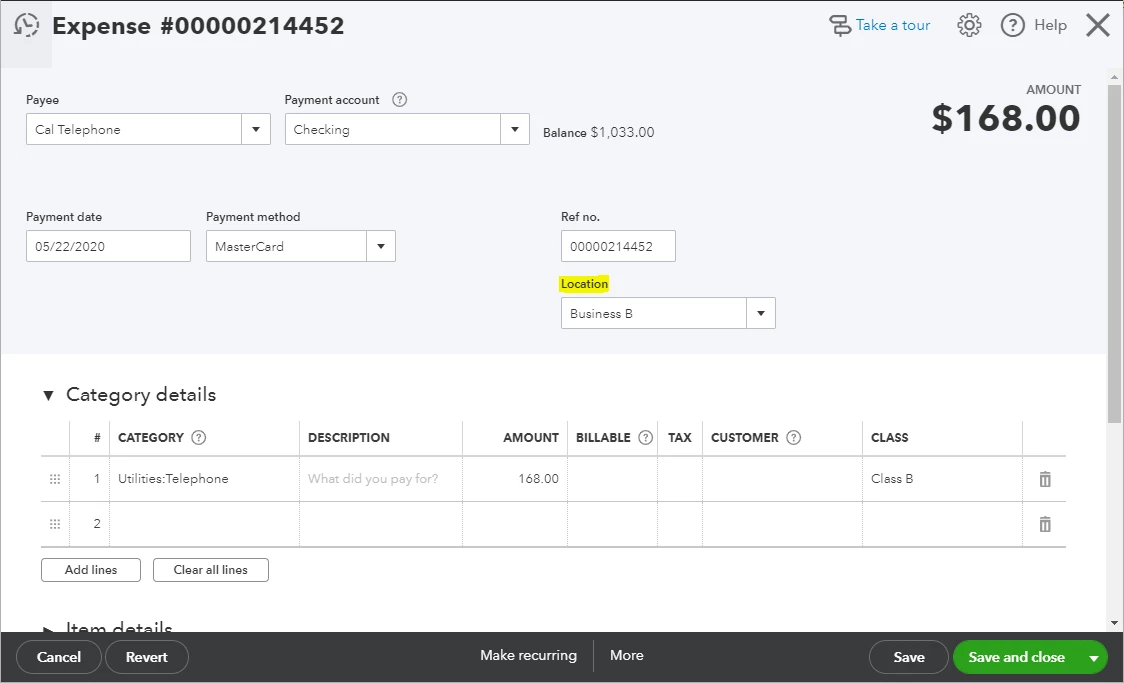
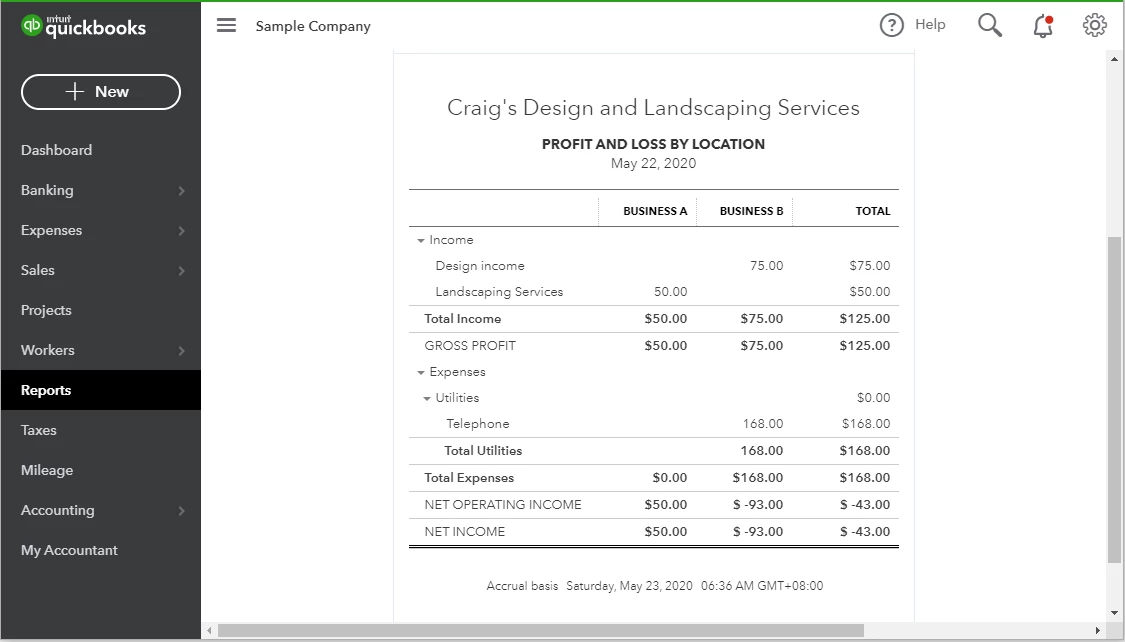
Good news because QuickBooks has a Location tracking feature that lets you tag locations in your transactions. Then, you can run the Profit and Loss by Location report to see your net profit per company. You can try this using the QuickBooks Online Test Drive account.


To enable the feature:

  1. Click on the Gear icon and choose Accounts and Settings.
  2. Click the Advanced bar and click on the Categories section. 
  3. Put a checkmark in the Track Locations checkbox and choose a label.
  4. Click Save and Done.

To add a list of location names:

  1. Click the Gear icon and choose All lists under LISTS.
  2. Select Locations.
  3. Click the New button and enter the information of the first location.
  4. Click Save, and create a new one for the other business.

After enabling this feature, you will see a Location field on the transaction pages, where you will choose the names you create. Please refer to the screenshots below. You can click on them for a better view.


I've noticed that you have a few questions posted here. We appreciate it that you're utilizing this medium to get help with QuickBooks. You can also run through the QuickBooks Online articles if you need quick references in the future.


Let us know if you have additional questions about the feature. Have a great weekend, Brian!

16 replies

April 30, 2021

I'm having the same issue today with my payroll. Employees can't pay their rent, or their bills. Payroll should be reliable intuit!!! 

MaryLandT
April 30, 2021

This isn't what I want anyone to experience when reaching out to our support, apapanic.


Phone lines are now open. We temporarily suspended calls to prevent long hold times as we resolved a direct deposit payroll issue.


Please bear with us and know that our representatives will be happy to help you once they reach you. You can contact them again by selecting your product and fill out the form to chat with an expert.
 

Please take note of the support hours through this article: Contact Payroll Support.
 

I'm adding this link to know the next step to take once you delete a paycheck in QuickBooks: Learn how to delete or void pay checks in Online Payroll.


If you have questions or concerns I can address here in the Community, feel free to add them below. I'll be glad to help you.

April 30, 2021

This is unacceptable, all we pay for is you guys to pay our employees and you can't get it right... I'm going to GUSTO. you all are a bunch of assholes. It's the end of the day NOW 5:52pm and STILL No completed deposits. 

May 5, 2021

I've tried for nearly 2 hours to have a live chat with quickbooks online.  It is impossible.  And no phone number either for customer support.  I just wanted to cancel my subscription.  Looks like I'll just have to instruct the bank not to let the automatic debit go through, since quickbooks doesn't want to communicate.

May 5, 2021

Thank you for posting here in the Community, 3173395881. 


We aim to deliver customer satisfaction at all times. Besides, this isn't the kind of customer service I desire you to experience. Rest assured, I'll take note of this so I can pass along your experience. And provide all the feedback you have to the appropriate channels.


Can you tell me what's the specific error you're getting? Any additional information would help us provide the best resolution for your inquiry.


But, to better isolate if this is a browser issue or not. Let's access QuickBooks Online (QBO) using a private or incognito window. 


Here's how you can access private browser: 


  • Google Chrome: Ctrl + Shift + N 

  • Microsoft Edge: Ctrl + Shift + P 

  • Firefox: Ctrl + Shift + P 

  • Safari: Command + Shift + N 

I know you've already called in. However, I'd still suggest getting in touch with our Customer Care team. This way, they can determine the root cause of your concern.


Here's how:

  1. Click the Help menu in the upper-right hand corner.

  2. Type in "Talk to a human", then press Enter.

  3. Look for I still need a human and click on it.

  4. Click Get help from a human or Contact Support Team.

  5. Select between Send a message, Schedule an appointment, or Get a callback. 

You can visit our blog site so you'll be able to get the latest news about QuickBooks and what our Product Care Team is working on.


Please know that I'm always here to help you if you have other concerns. Take care always!


June 1, 2021

I have had major issues with the chat since the new Intuit Payroll Core Platform was introduced.  They don't respond and eventually disconnect from me if they can't answers.  I am trying to get the same reports I used to generate from Intuit Online payroll.  I need general ledger codes on reports and reports that can be exported into a CSV file.  I was told this could not happen.  I asked why if I could generate these reports before?  See chat attached.  This happened 3 to 4 times already which resulted in hours of time to get no where.   The Support Team Member just decides to disconnect.  I will definitely be looking for a new payroll application.  I only have 20 employees but none the less, its important to have a payroll system to gives you what you need and interacts with your accounting software.

Rubielyn_J
June 1, 2021

I value your effort, and I know you went through a lot while trying to connect with our support, @tcummings1961.


Also, our goal is to provide the best service at all times. It could be possible that the representative experienced a system issue that results in the disconnection. 


To help export reports into a CSV file, here's what you need to do:


  1. Open the report.
  2. Choose the Excel drop-down at the top of the report.
  3. Click Create New Worksheet.
  4. On the Send Report to Excel window, select Create a comma-separated values (.csv) file.
  5. Click Export.
  6. Assign a file name, then select the location where you want to save the file.
  7. Locate, open, and edit the file as needed.


If you still want to contact our support team for further assistance, feel free to click this link: Contact us.


Also, I've added this article to guide you on how to run basic reports in QuickBooks Online: Generate reports. This also includes steps on how to print, email, and export reports. 


Let me know how if you have questions about the steps I've provided above. I'll make sure to get back to you right away to answer them all. Stay safe and healthy always.

June 1, 2021

Thank you for your quick response Rubielyn.  Unfortunately, the report I need is not available because none of them include general ledger codes for employees.  I also can cannot export my payroll transactions again.  It states I no longer have any transactions to export.  So it seems to be "once and done" for the payroll export.  How can I run the export again?  I think you may have given me the info for quickbooks online but I am on Quickbooks Online Payroll Core and it seems that many of the features from our old Intuit Online Payroll system does not exist.  

June 3, 2021

Well, the issue is back.... one year later!! I can't get through by phone or their "Help". The error message says they're too busy to call, for crimeny sakes!

JoesemM
June 4, 2021

We'd love to help you here in the Community, @Daezy.


Can you also tell us more details about your concern? I might be able to share an article or give you steps that can help you sort it out. We also have several QuickBooks experts and users that can read your post and jump in to answer your question or concern. 


I want to make sure somebody from our support team will help with your request. Kindly refer to this article for the different types of support we offer at Intuit and their availability: Support hours and types. It also contains important reminders about occasional downtime in the Footnotes section.


Let me also share these steps with you on how you can reach out to our support again.


  1. Click Help in the upper right-hand corner of QBO.
  2. Look for Talk to a human and click on it. 
  3. Type in "support" or "contact support" again and press Enter.
  4. Click I still need a human.
  5. Select Get help from a human.
  6. Choose between Chat with us or Have us call you


Additionally, I don’t want to leave you empty-handed, you'll want to visit our Community Help Articles hub in case you need some related articles in managing your account.


Keep in touch if you need any more assistance with this, or there's something else I can do for you. I've got your back. 

April 26, 2022

Very disappointing. I've tried asking for help, searching for contact information. No luck. The do communicate, one way, at you to collect their money. Been a customer so long and this is how they treat us. I will never recommend QB. Shame on you QB. You sure put on a front of a "team" , what a misleading effort 

June 7, 2022

Hi John please it’s Jordan you help on Saturday can you call me back asap it’s very important please you promise to call me today Monday and have everything figured out I have customers to pay please can I know what the hell is going on asap 

Fiat Lux - ASIA
June 7, 2022

@Jordan datia  

Any specific issue?
