
February 7, 2021
Solved

Is it possible to add a new status to Projects?_

  • February 7, 2021
  • 1 reply
  • 0 views
I found marking them completed is unhelpful when an unexpected expense for the job comes in after that is done.

Best answer by jamespaul

Hello, ktuva.


I'll shed some light on the status for the projects in QuickBooks Online. 


We can only set the project status as Completed, Canceled, or In progress. You can set it as "In Progress" in the meantime if you think there will be unexpected expenses after completing it. 


Alternatively, you can add some notes if you don't want to change the status. Simply open a project, then click the Edit button.
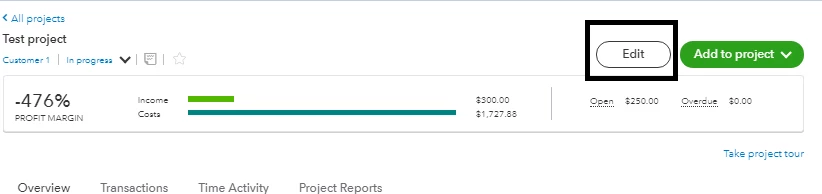
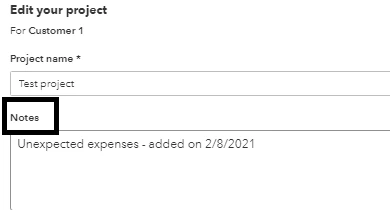


From there, you would want to add something like "Added unexpected expenses" or similar. 


Though, adding more project status would make the progress more flexible in terms of unexpected changes to it. This feature might be added in the coming updates. 


I suggest checking out our QuickBooks Blog from time to time for news about QuickBooks Online updates. 


Find out more about the Projects feature from this article: Set up and create projects in QuickBooks Online


Need to run reports for your projects or transactions? Our articles can help you build one. Check out the list of guides in our Reports articles


If you need more information about other features or questions about QuickBooks Online, comment your concerns below. I'm here to help. 

1 reply

jamespaulAnswer
February 7, 2021

Hello, ktuva.


I'll shed some light on the status for the projects in QuickBooks Online. 


We can only set the project status as Completed, Canceled, or In progress. You can set it as "In Progress" in the meantime if you think there will be unexpected expenses after completing it. 


Alternatively, you can add some notes if you don't want to change the status. Simply open a project, then click the Edit button.


From there, you would want to add something like "Added unexpected expenses" or similar. 


Though, adding more project status would make the progress more flexible in terms of unexpected changes to it. This feature might be added in the coming updates. 


I suggest checking out our QuickBooks Blog from time to time for news about QuickBooks Online updates. 


Find out more about the Projects feature from this article: Set up and create projects in QuickBooks Online


Need to run reports for your projects or transactions? Our articles can help you build one. Check out the list of guides in our Reports articles


If you need more information about other features or questions about QuickBooks Online, comment your concerns below. I'm here to help. 

June 21, 2023

Once again QB Support provides an answer that does not resolve the actual issue, nor does it make adequate sense from an accounting aspect. The solution here for Intuit is to be able to mark projects as complete, but NOT removing them as viewable customers/projects when attempting to enter future items would be helpful, because that's really the issue here. Removing Completed projects from certain reports or filtering is nice, but removing them from view altogether is not.

June 21, 2023

I hear your sentiments, @2rsDigital1. I'm here to share some details about managing the status of projects in QuickBooks Online (QBO).


In this case, I'd suggest sending feedback to our product developers for this option in QBO to help improve your experience.


Here's how:
 

  1. Go to the Gear icon.
  2. Choose Feedback.
  3. Enter your comments or product suggestions.
  4. Then, click Next to submit feedback.


You can visit our QuickBooks Online Feature Requests website to track the status of your submitted feedback.


Additionally, check this article for more details on managing projects in QBO: Create and manage Projects in QuickBooks Online.


Furthermore, if you want to pull up reports that will give you a snapshot of your business, check this article for future guidance: Run reports in QuickBooks Online.


Please tap the Reply button for further assistance or any other QuickBooks-related concerns. Take care!