Solved
Is it possible to run a report to see a list of users and their current permissions within Quickbooks Desktop?
Original commenter did not share additional details


Hello, h2o_sea.
Here's a quick overview on how we can view a list of users, and how to check for their permissions.
At this time, we can only see and check the users' settings in the Set Up Users window (they're aren't exactly a list, but native to the company settings).
You'll want to go to the Company menu and check your users' current permission settings one at a time. Here's how:
Our developers might include a simple report specific to the users list. Stay tuned for our newsletters about the program updates.
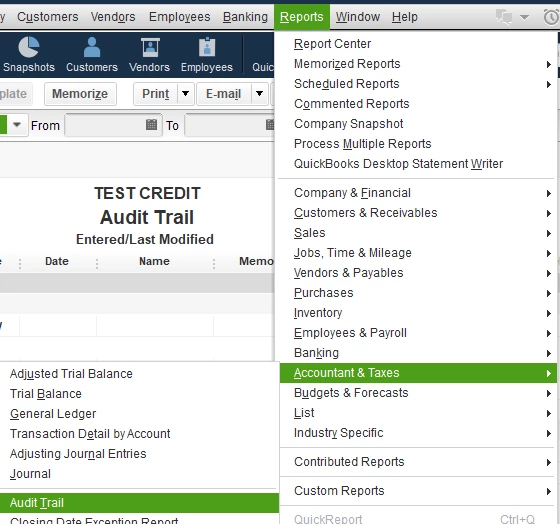
If you need to see the users' activities on your company file, you can pull up the Audit trail report. Here's how:
For more details about users and their permissions, you can check this article: QuickBooks Desktop Users and Restrictions.
I'm sure you have other areas to work on in QuickBooks Desktop. You're welcome to check out our articles if you need help with the processes.
Do you have other questions about the Multiuser setup or any other processes? Please let me know by replying to this thread. I'm here to help.
Enter your E-mail address. We'll send you an e-mail with instructions to reset your password.