December 2, 2020
Solved

Is our account aliagable for the QuickBooks Desktop Shipping Manager? How can we access the Shipping Manager?

  • December 2, 2020
  • 1 reply
  • 0 views

For some reason we canot fint the Shipping Manager function. Your tutorials says that on Desktop version go to "File" than "Shipping" options to set up the manager but unfortunatly no "Shipping" options can be found under the "File" dropdown menu.

Best answer by LieraMarie_A

I appreciate your interest in the Shipping Manager tool for QuickBooks Desktop, @laci117@gmail.co.
 

What's your QuickBooks Desktop version? Shipping Manager requires at least QuickBooks Pro, Premier 2011 for Windows or Enterprise Solutions 11.0 or QuickBooks Point of Sale 10.0 Pro, Pro Multi-Store or higher. Make sure to get the latest QuickBooks release version to get the latest features and fixes. You can update your QuickBooks Desktop  to the latest release version from our official website.


Here's how:

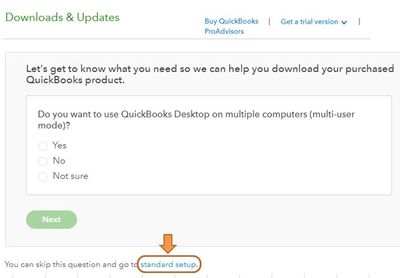
  1. Go to the Downloads & Updates page.
  2. Click the standard setup link.
    Capture.JPG
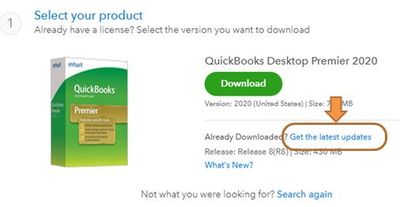
  3. Select the country, product, & version and click the Search button.
  4. Click the Get the latest updates link.
    Capture.JPG
  5. After downloading the updates, navigate to the Downloads folder of your computer and double click the update file to initiate the installation process.
  6. Follow the prompts on the screen to install the updates.
  7. Restart your computer after the update is installed successfully.


You can also turn on the automatic update to make sure that your QuickBooks Desktop and payroll tax table is always updated. Please check this article and follow the Schedule future automatic updates steps: Update QuickBooks Desktop.


Additionally, you can read through these links to check if your QBDT has the latest version already:


For more insights about the availability of this feature, you can visit the links below:

Please feel free to get in touch with me here for any additional questions with using the Shipping Manager feature. The Community always has your back.


1 reply

LieraMarie_A
December 2, 2020

I appreciate your interest in the Shipping Manager tool for QuickBooks Desktop, @laci117@gmail.co.
 

What's your QuickBooks Desktop version? Shipping Manager requires at least QuickBooks Pro, Premier 2011 for Windows or Enterprise Solutions 11.0 or QuickBooks Point of Sale 10.0 Pro, Pro Multi-Store or higher. Make sure to get the latest QuickBooks release version to get the latest features and fixes. You can update your QuickBooks Desktop  to the latest release version from our official website.


Here's how:

  1. Go to the Downloads & Updates page.
  2. Click the standard setup link.
    Capture.JPG
  3. Select the country, product, & version and click the Search button.
  4. Click the Get the latest updates link.
    Capture.JPG
  5. After downloading the updates, navigate to the Downloads folder of your computer and double click the update file to initiate the installation process.
  6. Follow the prompts on the screen to install the updates.
  7. Restart your computer after the update is installed successfully.


You can also turn on the automatic update to make sure that your QuickBooks Desktop and payroll tax table is always updated. Please check this article and follow the Schedule future automatic updates steps: Update QuickBooks Desktop.


Additionally, you can read through these links to check if your QBDT has the latest version already:


For more insights about the availability of this feature, you can visit the links below:

Please feel free to get in touch with me here for any additional questions with using the Shipping Manager feature. The Community always has your back.