October 6, 2020
Solved

Is there a way to automatically populate email address when emailing customer invoices?

  • October 6, 2020
  • 2 replies
  • 0 views
Original commenter did not share additional details

Best answer by MaryLandT

Yes, there is, sunshine0259,


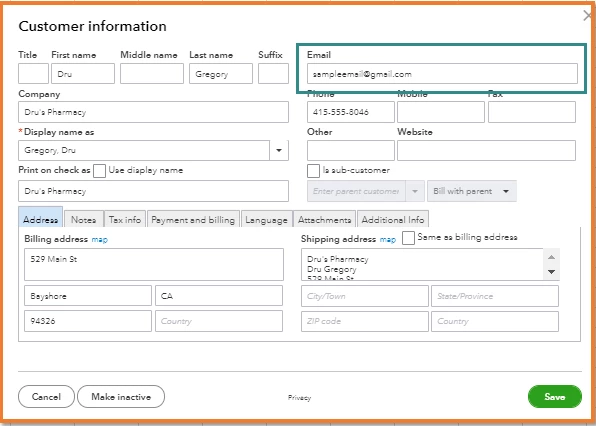
You can simply set up the email address on the customer profile. This way, the information will automatically populate when sending invoices to customers.


Let me show you how:
 

  1. Go to Sales from the left menu, then choose Customers.
  2. Locate the customer and click the name to open the profile.
  3. Click Edit to open the Customer information window.
  4. Enter the address in the Email field, then click Save
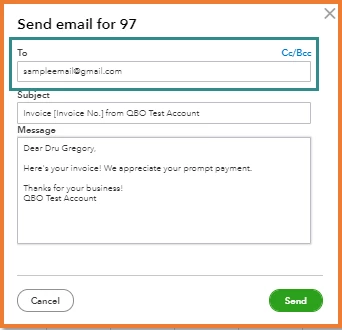
  5. When sending an invoice, you'll see the address in the To field.

Check out the Send multiple invoices in case you need this process. Also, you can send reminders to customers when their invoices are to be overdue.


Stay in touch with me if there's anything else you need about emailing invoices. I'm always glad to help.

2 replies

MaryLandT
MaryLandTAnswer
October 6, 2020

Yes, there is, sunshine0259,


You can simply set up the email address on the customer profile. This way, the information will automatically populate when sending invoices to customers.


Let me show you how:
 

  1. Go to Sales from the left menu, then choose Customers.
  2. Locate the customer and click the name to open the profile.
  3. Click Edit to open the Customer information window.
  4. Enter the address in the Email field, then click Save
  5. When sending an invoice, you'll see the address in the To field.

Check out the Send multiple invoices in case you need this process. Also, you can send reminders to customers when their invoices are to be overdue.


Stay in touch with me if there's anything else you need about emailing invoices. I'm always glad to help.

March 15, 2021

Is this possible when importing multiple invoices from an integrated program? Also, can you automatically import payment methods already set up or at least give the customer the option to pay with the default imported as "on" for payment options when the invoice is imported? Or is this a programming issue that programmers need to address with my programmers behind the scenes so to speak?


katherinejoyceO
March 15, 2021

Thanks for joining in this conversation, @dbaker1. You can import multiple invoices at once in QuickBooks Online Advanced version. 


Find out what you can and can't import by reading through this help article: Import multiple invoices at once.


As for importing payment methods, it's currently unavailable in QuickBooks. You'll want to consider looking for a third-party app that's suited to your business needs. Here's how:


In your QuickBooks Online (QBO) account:

  1. Go to the Apps menu.
  2. Type the name of the third-party app or click Browse.


Additionally, I encourage checking our QuickBooks Blog page to get yourself updated on the latest news and events in QBO.


For future reference, here's an article that contains additional guidance on importing data to QBO: Common questions about importing data to QuickBooks Online.


You can always get back to us whenever you need help. I'd be glad to help anytime.


March 23, 2022

We used to be able to autofill the email addresses when sending an invoice, EVEN IF I HAVE NOT ADDED THE EMAIL ADDRESS TO THE CONTACT. The address USED to autofill with emails Ive responded to using my Yahoo mail (or mac mail).


HOW CAN WE GET OUR EMAIL ADDRESSES TO DO THIS AGAIN

March 23, 2022

Hello there, @JRamirez2


Thank you for posting here in the QuickBooks Community. I appreciate you for performing the steps to change the email address. 


You have the email but can't populate the email address. Check if it has anything to do with the browser you're using. Your browser's cache saves your data. 


  • Google Chrome: Ctrl + Shift + N
  • MS Edge and Firefox: Ctrl + Shift + P
  • Safari: Command + Shift + N

If your invoice auto-populates your customer's email addresses, you can go back to your regular browser and clear its cache. If not, please try other browsers to see if we get the same thing. 


Also, you can still follow the steps provided by my colleague, MaryLandT, to set up the email address on the customer profile. 


If none of the steps will fix the issue, I recommend contacting our QBO Support to check this further using more tools. 


If you need to send numerous invoices, go to the Send multiple invoices page. You can also send clients reminders when their invoices are past due.


You can always leave a comment below if you have follow-up questions about your business data. I'm continuously here to assist you. Take care.
