February 28, 2019
Solved

Is there an way to get an report showing unbilled items

  • February 28, 2019
  • 1 reply
  • 0 views

How can I get and report showing AP items that has not been billed ?

Right now I have been going one by one and takes too long

 

Best answer by BettyJaneB

Thanks for explaining further what you're trying to accomplish, @nnsuzuki.


Allow me to join this conversation and provide you with steps on how to pull up a report that will show the status of your COGS.


You can pull up a Journal report and filter it to you COGS transactions. 


Let me guide you how:

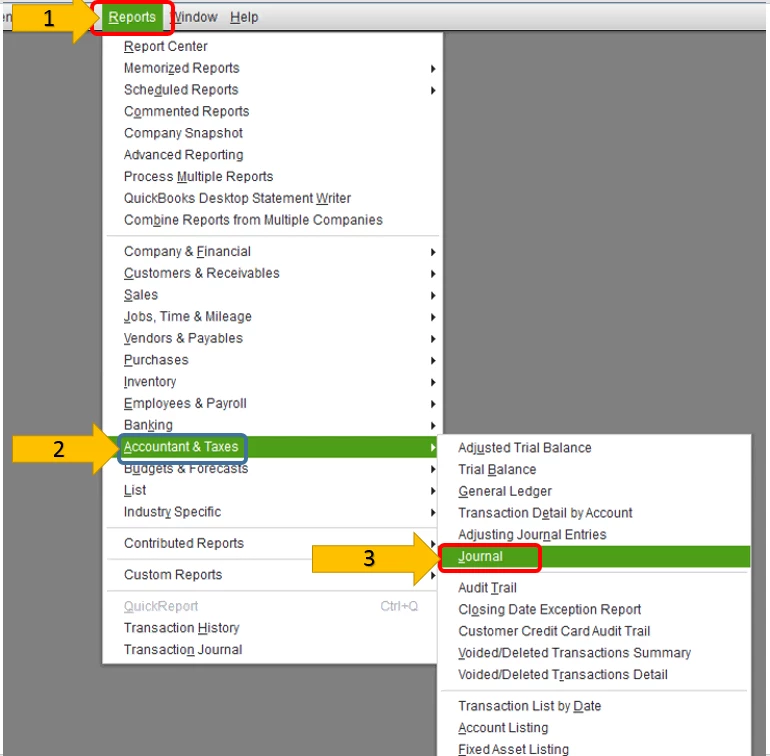
  1. Click on Reports at the top menu bar.
  2. Select on Accountant and Taxes.
  3. Click on Journal.
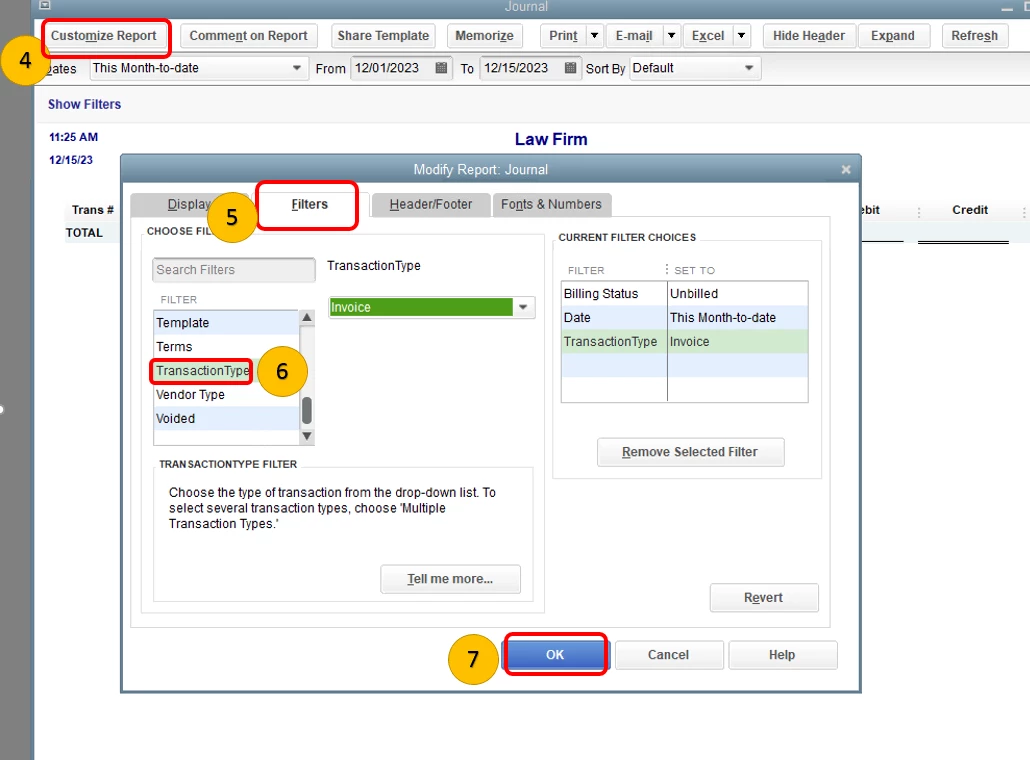
  4. Select on Customize report.
  5. Click on Filters.
  6. Under the choose filter section, select on Transaction Type.
  7. Choose Invoice as the transaction type.
  8. Click on OK.
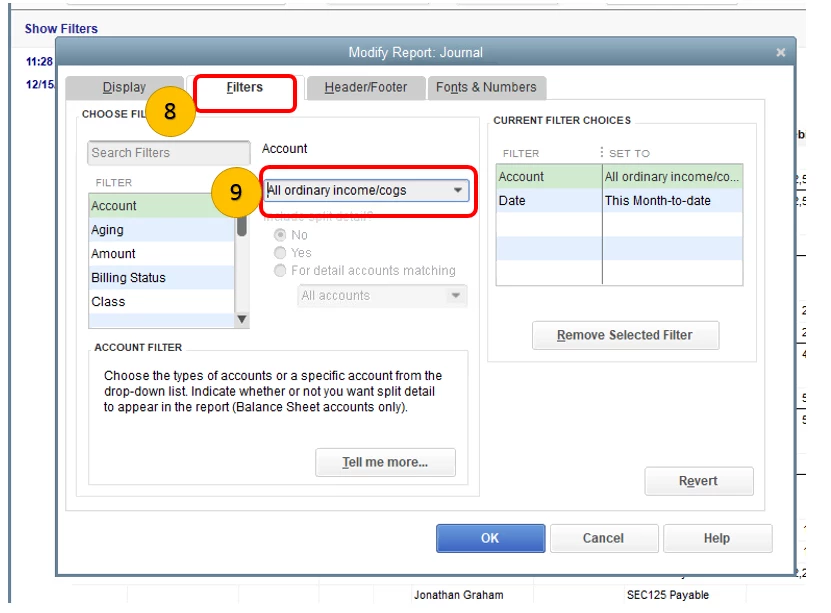
  9. Click on Filter then select Account.
  10. Under Account, click on All ordinary income/COGS.

I've attached some screenshots below to guide you with the steps:
 

Also, for more insights about transaction journal, please check out this article: View the Transaction Journal report in QuickBooks Desktop.


That should do it.


Please let me know how it goes. I'll be around if you need further assistance with pulling up reports. Have a great day!

1 reply

Adrian_A
February 28, 2019

Hello there, nnsuzuki.


Yes, there's a way to pull up the unbilled AP items report, please follow these steps:

  1. Click the Reports menu.
  2. Choose Jobs, Time & Mileage.
  3. Then, select Unbilled Costs by Job.

Let me know if you need anything else. Take care!

nnsuzukiAuthor
March 1, 2019

Thank you adrianrose


BettyJaneB
March 1, 2019

Thanks for explaining further what you're trying to accomplish, @nnsuzuki.


Allow me to join this conversation and provide you with steps on how to pull up a report that will show the status of your COGS.


You can pull up a Journal report and filter it to you COGS transactions. 


Let me guide you how:

  1. Click on Reports at the top menu bar.
  2. Select on Accountant and Taxes.
  3. Click on Journal.
  4. Select on Customize report.
  5. Click on Filters.
  6. Under the choose filter section, select on Transaction Type.
  7. Choose Invoice as the transaction type.
  8. Click on OK.
  9. Click on Filter then select Account.
  10. Under Account, click on All ordinary income/COGS.

I've attached some screenshots below to guide you with the steps:
 

Also, for more insights about transaction journal, please check out this article: View the Transaction Journal report in QuickBooks Desktop.


That should do it.


Please let me know how it goes. I'll be around if you need further assistance with pulling up reports. Have a great day!