
Art013
March 7, 2023
Solved

Is there any way possible to default Bank (ach) transactions on the QB invoice (especially the online payment screen)? Thanks

  • March 7, 2023
  • 1 reply
  • 0 views
Original commenter did not share additional details

Best answer by MichelleBh

Yes, you can set the ACH as default payment method if you have QuickBooks payments subscription, @Art013. I'm glad to outline the complete steps to achieve your tasks. 


You need to edit the invoice template and choose Bank Transfer as the accepted form of payment. This way, your customers' primary payment method is ACH.


 Here's How:
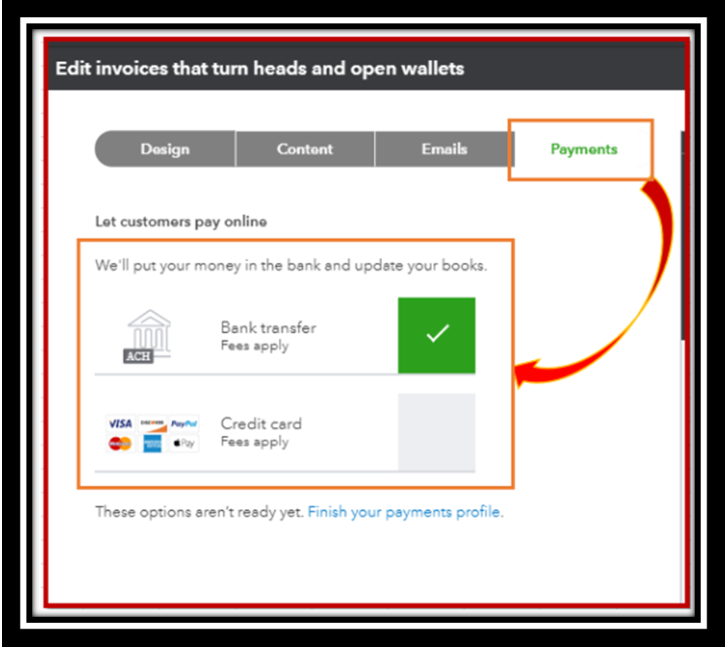
 

  1. Go to the Gear icon at the top and select Customer Form styles.
  2. Find the template, then click Edit under Action.
  3. Go to the Payments tab and ensure only Bank transfer is checked.
  4. Click Done


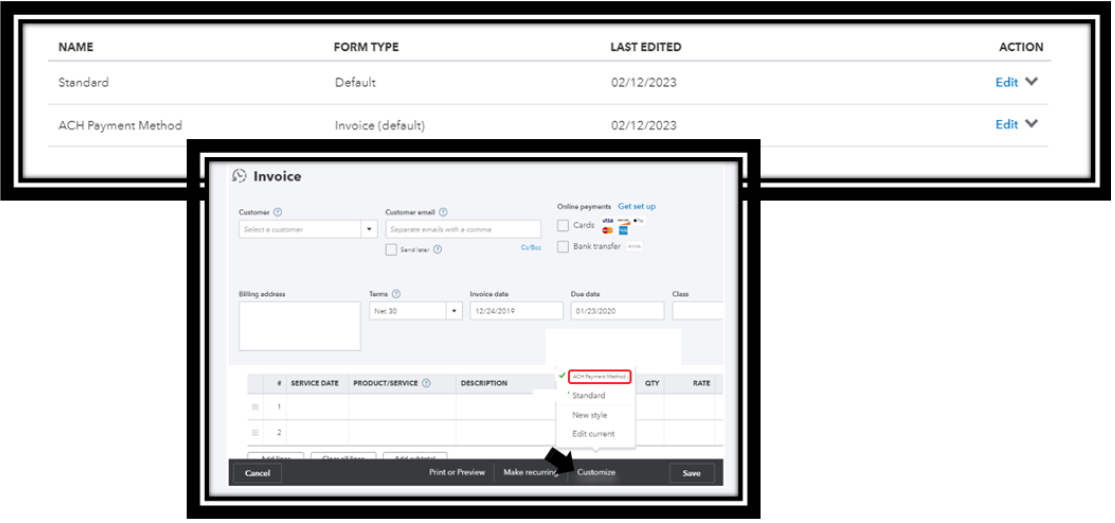
Also, you have the option to set that template as your default. This way, we can ensure that your customer can pay you via ACH. Just click small drop-down arrow beside Edit and  select Make default. See the sample screenshot below for your reference:
 

For more details, see this article: Customize invoices, estimates, and sales receipts in QuickBooks Online,


Check out these articles below to get answers to the commonly asked questions about ACH payments in QuickBooks:


If you have more questions about QuickBooks, feel free to come back. The Community is always around to help in any way that we can.

1 reply

MichelleBh
March 7, 2023

Yes, you can set the ACH as default payment method if you have QuickBooks payments subscription, @Art013. I'm glad to outline the complete steps to achieve your tasks. 


You need to edit the invoice template and choose Bank Transfer as the accepted form of payment. This way, your customers' primary payment method is ACH.


 Here's How:


  1. Go to the Gear icon at the top and select Customer Form styles.
  2. Find the template, then click Edit under Action.
  3. Go to the Payments tab and ensure only Bank transfer is checked.
  4. Click Done


Also, you have the option to set that template as your default. This way, we can ensure that your customer can pay you via ACH. Just click small drop-down arrow beside Edit and  select Make default. See the sample screenshot below for your reference:


For more details, see this article: Customize invoices, estimates, and sales receipts in QuickBooks Online,


Check out these articles below to get answers to the commonly asked questions about ACH payments in QuickBooks:


If you have more questions about QuickBooks, feel free to come back. The Community is always around to help in any way that we can.

Art013
Art013Author
March 7, 2023

Thanks.


This option makes it look like ACH is the only option to pay the invoice. I was hoping to just make it the default.


Seems like we should be able to set the default payment type/method on our invoices and billings. The message on the invoice is great, but if they don't open the invoice before paying it, it's not seen.


I'll have to test it out on my clients and see if this slows the payments down.
