Solved
Is there somewhere in QBO that tells me what the amount charged each month represents?
I want a breakdown of what the fees QBO is charging. Hoping they create an invoice to its QBO customers.


I'd be pleased to walk you through on where you can get your monthly invoice for your QuickBooks Online, JasperContracting.
Monthly QuickBooks subscription invoices are sent to the account's primary contact via email. In QuickBooks Online, you can access these invoices through the Account and Settings section.
Here's how:
The following is a brief video to serve as a visual reference:
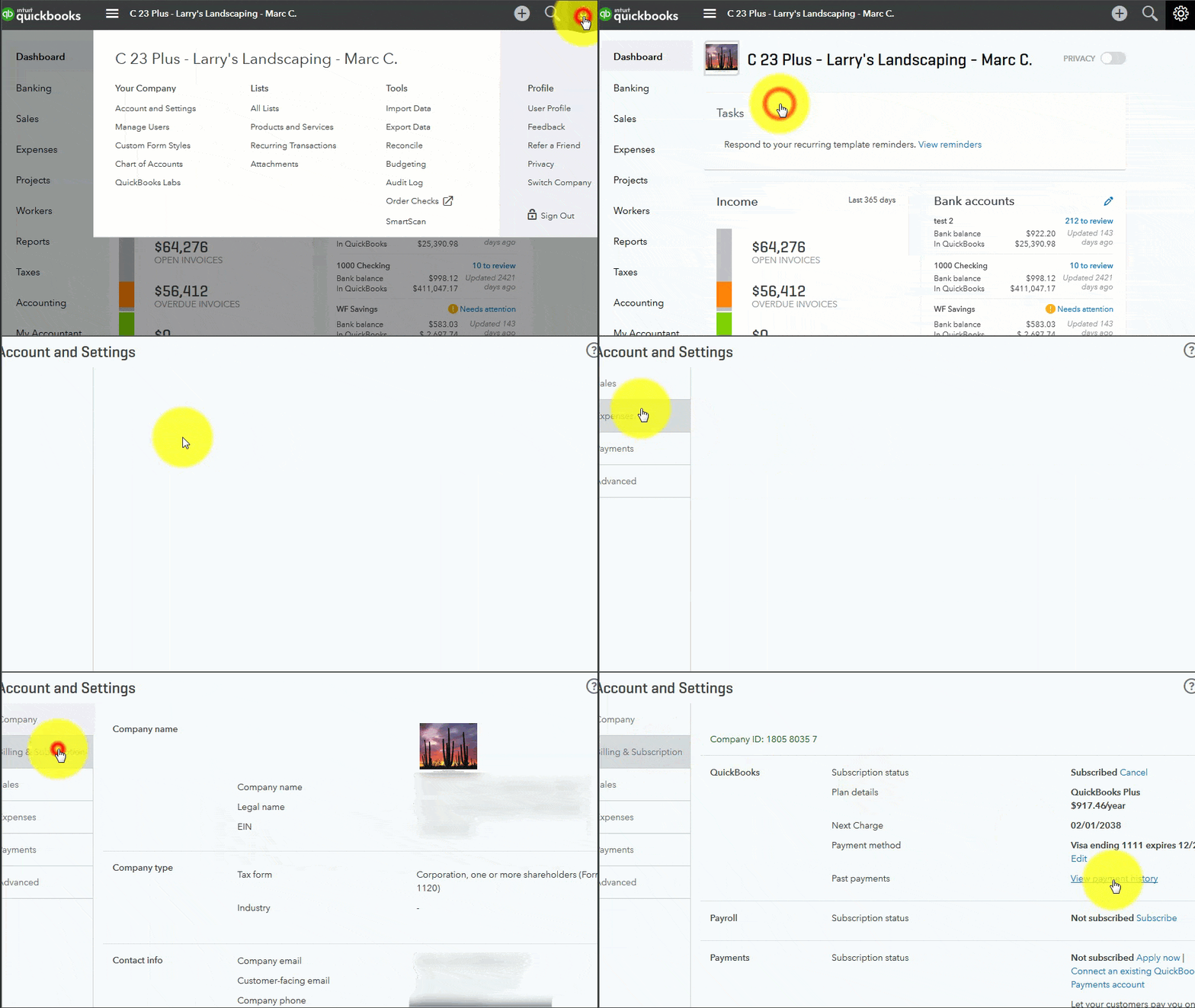
However, if you can't see the Payment History option, just switch the company URL and paste this one: https://qbo.intuit.com/app/paymentHistory.


You should be able to see the payment history from there. I'm leaving you some recommended articles. This will give you the steps to view your transaction history as well as handle billing cycles in QuickBooks Online: Update your billing and subscription info in QuickBooks Online.
You're always welcome to post any concerns you have in this space. I'll be here if you need assistance with QuickBooks or have follow-up questions. Have a great day!
Enter your E-mail address. We'll send you an e-mail with instructions to reset your password.