May 26, 2021
Solved

Job Estimates vs Actual Reporting

  • May 26, 2021
  • 3 replies
  • 0 views


Using 2020 Premier Contractors Edition of QB Desktop.


I am new to estimates, and also billing from estimates. I THINK I figured out the problem, but here goes:


Did estimate

Did invoice from estimate

Ran Job Estimate vs Actual report.

Report shows Estimated Cost, but no actual cost.  Not good.

Report shows Estimated revenue and Actual Revenue. This is good.

There ARE vendor bills with costs assigned to the job.  Why don’t these amounts show up?


When I enter vendor bills, I enter as "expenses", NOT "items".  Perhaps this is the problem?  Our "items list" is actually the job phases, such as "erosion control", "Site clearing", "Site clearing" etc.  I cannot see it being possible to have every item we purchase entered into that list.  


Help?  Suggestions?  and thank you in advance.
Best answer by LieraMarie_A

Hi there, @pjmitchell55. Let me share some insights about the Job Estimates vs. Actuals report.


Job Estimates vs. Actuals report offers detailed costs and revenues for the customer or job you have selected. It compares estimated and actual costs and estimated to actual revenue for each job that you invoiced. 


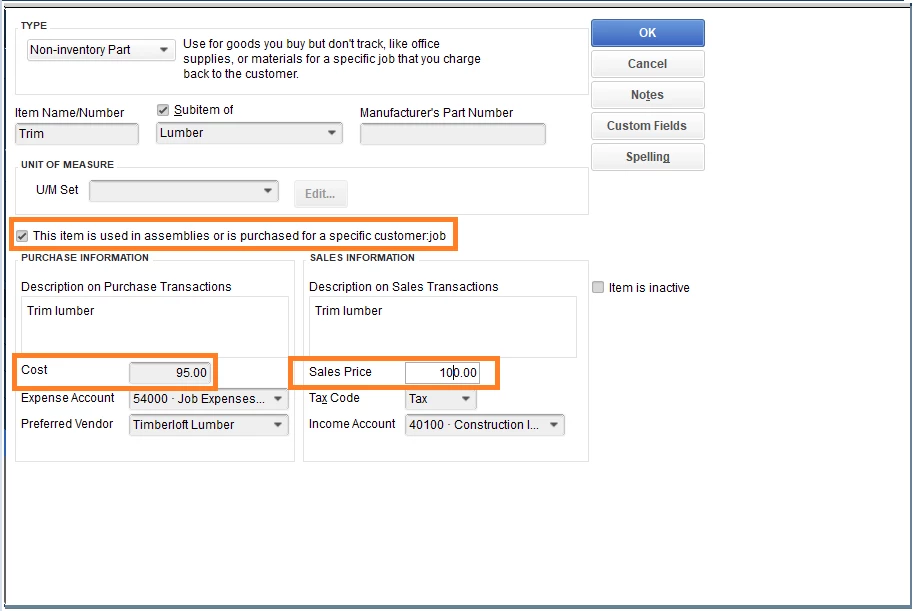
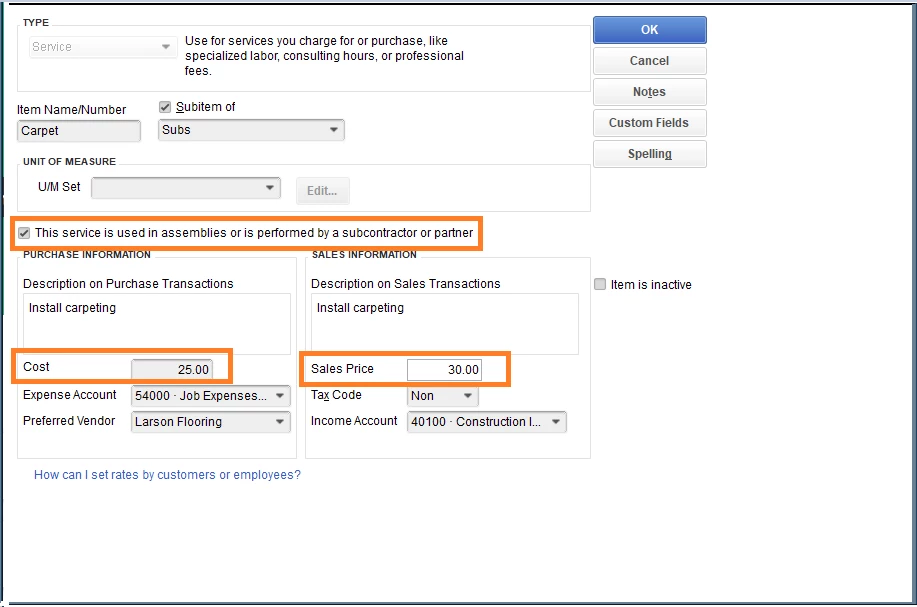
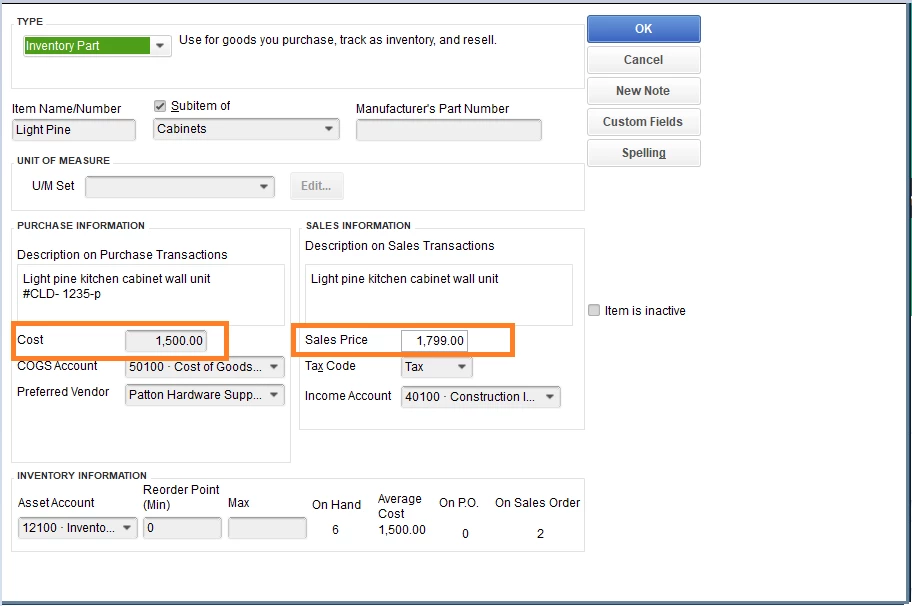
Estimated Cost comes from the Cost side while the Estimated Revenue comes from the Sales side. Item is anything that your company buys, sells, or resells. When entering items, make sure to enter the item cost and its sales price. Please see my attachments.


With regards to the vendor bills, I'd recommend adding them as items. This way, you'll be able to track both sides; cost and revenue.

  1. Go to Lists, then select Item List .
  2. On the Item List window, select Item then New .
  3. Select the type of item you want to create.
  4. Fill out the item fields.
  5. To enter the cost for:
    • Service, click This service is used in assemblies or is performed by a subcontractor or partner.
    • Non-Inventory Part, click This item is used in assemblies or is purchased for a specific customer:job.
  6. Fill in the rest of the fields.
  7. Select OK.


You can check out this guide to get a better grasp in managing items in QuickBooks: Add, edit, and delete items.


I'm also adding a guide that covers all available reports can be accessed through the QuickBooks Reports menu: Understand reports.


Please come back and let us know if you need further assistance. The Community has your back. Have a great day.

3 replies

LieraMarie_A
May 26, 2021

Hi there, @pjmitchell55. Let me share some insights about the Job Estimates vs. Actuals report.


Job Estimates vs. Actuals report offers detailed costs and revenues for the customer or job you have selected. It compares estimated and actual costs and estimated to actual revenue for each job that you invoiced. 


Estimated Cost comes from the Cost side while the Estimated Revenue comes from the Sales side. Item is anything that your company buys, sells, or resells. When entering items, make sure to enter the item cost and its sales price. Please see my attachments.


With regards to the vendor bills, I'd recommend adding them as items. This way, you'll be able to track both sides; cost and revenue.

  1. Go to Lists, then select Item List .
  2. On the Item List window, select Item then New .
  3. Select the type of item you want to create.
  4. Fill out the item fields.
  5. To enter the cost for:
    • Service, click This service is used in assemblies or is performed by a subcontractor or partner.
    • Non-Inventory Part, click This item is used in assemblies or is purchased for a specific customer:job.
  6. Fill in the rest of the fields.
  7. Select OK.


You can check out this guide to get a better grasp in managing items in QuickBooks: Add, edit, and delete items.


I'm also adding a guide that covers all available reports can be accessed through the QuickBooks Reports menu: Understand reports.


Please come back and let us know if you need further assistance. The Community has your back. Have a great day.

May 26, 2021

Thanks so much.  I'm proud of myself for coming close!  Thanks for the details you provided.  I have a lot of work to do now to re-structure our items list, and also how I will have to input our estimates !  Job security, ha ha!

May 4, 2022

I am new to estimates, and also billing from estimates. Below is my process:

Created the estimate

Created an invoice from estimate

Ran Job Estimate vs Actual report.

Report shows Estimated Cost, but no actual cost.  THIS IS A PROBLEM.

Report shows Estimated revenue and Actual Revenue. THIS PART IS GOOD.


There ARE vendor bills with costs assigned to the job.  Why do these amounts not show up as actual costs?  These are showing up as "No Item" at the bottom of the report.  I need to have these expenses that were incurred to show up as actual job costs on this report and also need to have them post to our P&L for this Job.  If I enter the bill and use the "items" tab, the costs will show up on the Job Estimates vs Actual Costs report and my accounts payable aging report; but I need these to show on the P&L for this job.  If I add the bill and use the "expense" tab the cost does not appear on this report as actual costs, but will show up in accounts payable aging report and the P&L for the Job.  My issue is that I need the costs associated with the Job to show on the Job Estimates vs Actual Costs report as actual costs, in accounts payable as a bill that needs to be paid, and on the P&L as an expense for this Job.  Is there a way to account for the expense in this way. 


Any help would be greatly appreciated in this effort.

May 4, 2022

Thanks for sharing the details of your concern in this thread, @Witneysmom2022. I'm here to share some insights about the Job Estimates vs. Actual Costs report in QuickBooks Desktop (QBDT).


The Job Estimates vs. Actual Cost report in QBDT shows the costs set up for the items. The option to show the transactions associated with an expense account is unavailable. The reason why it's showing as No item is because you have used the Items tab and not the Expense tab.


Since this option isn't available yet, I'd recommend sending a feature request directly to our Product Development team. This helps us improve your experience and the features of the program. 


Here's how:


  1. Go to the Help menu and then select Send Feedback Online.
  2. Choose Product Suggestion.
  3. Add the type of feedback.
  4. Type in your feature suggestion.
  5. Once done, click Send Feedback.


For your visual reference, I've attached some screenshots below.


Furthermore, to assist you in customizing reports and learning more about how QuickBooks generates them, I recommend checking out this article: Understand reports.


For tips and other resources, I recommend visiting our website for future reference: QBDT self-help articles.


Please feel free to add a comment below if you have any other questions about managing your reports in QBDT, I'll be right here to help you. Have a good day, Witneysmom2022!

July 23, 2024

Sorting the Job Estimate vs the Actual report to view the order on your Estimate would be a great option, MargeS. The closest way to achieve this is by exporting the report to Excel to modify it based on your needs.


I know this functionality to sort Job Estimates vs Actual reports would be beneficial to your business. I'd suggest sending feedback directly to our Product Development team. Doing so helps us improve your experience and the features of the program. 


Here's how:


  1. Go to the Help menu and then select Send Feedback Online.
  2. Choose Product Suggestion.
  3. Add the type of feedback.
  4. Type in your feature suggestion.
  5. Once done, click Send Feedback.


Additionally, I will provide you with some resources that can assist you in making modifications and exploring certain reports:


If you require additional assistance with managing your reports, feel free to reach out. I'm here to help and make sure everything is running smoothly for you.