November 25, 2020
Solved

Line items not showing up on printed invoices

  • November 25, 2020
  • 3 replies
  • 0 views

HI,

I have a few customers that i'm preparing invoices based on a model price. I itemize the bill but I am not adding prices to each item. just one base price.

However, When I'm printing the invoice, the invoice will only have the items that have prices to it.

Is this how quickbooks works or is it a setting i can change?

I would appreciate your insight.

Thanks in advance!

Best answer by MaryLurleenM

There's one thing you need to uncheck on your settings, malky.


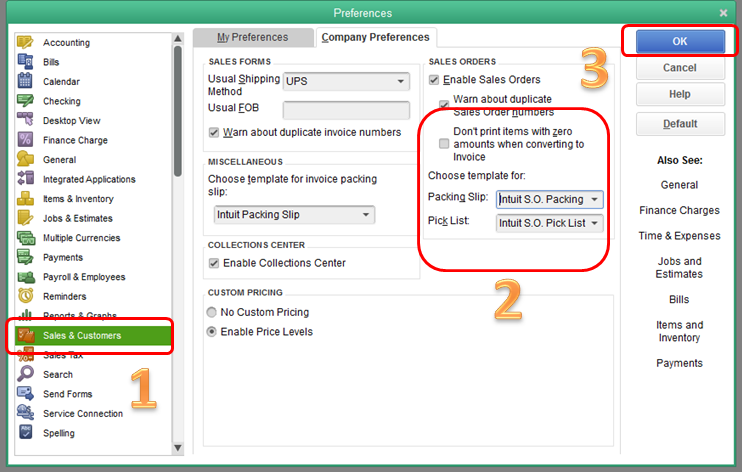
Let me share how you can print an invoice that will include items with no prices on them. You can go to the Preferences tab and uncheck the Don't print items with zero amounts when converting to Invoice button. This will allow you to print the items that have no cost on a printed invoice.


Here's how:

  1. Click the Edit menu at the top, then choose Preferences.
  2. Select Sales & Customers, then choose Company Preferences.
  3. Remove the check-mark for Don't print items with zero amounts when converting to Invoice.
  4. Click OK.

image.png


You'll want to check this article for more information on invoicing in Quickbooks: Create an invoice in QuickBooks Desktop.


That should do it. Please know that you can always leave a reply if you need anything else.

3 replies

MaryLurleenM
November 25, 2020

There's one thing you need to uncheck on your settings, malky.


Let me share how you can print an invoice that will include items with no prices on them. You can go to the Preferences tab and uncheck the Don't print items with zero amounts when converting to Invoice button. This will allow you to print the items that have no cost on a printed invoice.


Here's how:

  1. Click the Edit menu at the top, then choose Preferences.
  2. Select Sales & Customers, then choose Company Preferences.
  3. Remove the check-mark for Don't print items with zero amounts when converting to Invoice.
  4. Click OK.

image.png


You'll want to check this article for more information on invoicing in Quickbooks: Create an invoice in QuickBooks Desktop.


That should do it. Please know that you can always leave a reply if you need anything else.

malkyAuthor
November 25, 2020

Wow! That was easy!

thanks for your quick response!

March 9, 2021

I am having problem on printed invoices that it not showing company phone number, email or fax number?

March 9, 2021

Hi @QUALITY COOL,


You'll need to customize the layout of your invoices so it includes your company's phone number, fax number, as well as email address. 


Here's how:


  1. Go to the Customers menu.
  2. Select Customer Center.
  3. Move to the Transactions tab.
  4. Click Invoices.
  5. Search for the invoice you want to print, then double-click it. 

Now you're on the Invoice page. Proceed with these steps:


  1. Tap the Formatting tab.
  2. Hit Customize Data Layout.
  3. Press Basic Customization.
  4. Under the Company & Transaction Information section, tick Fax NumberPhone Number, and E-mail Address.
  5. Click OK, then OK again. 

Take a look at this article for additional information on customization: Use and customize form templates. It includes the steps on how you can duplicate, import, and export templates. 


Let me know in the comments below if you have other concerns with templates in your QuickBooks Desktop. I'll assist you as soon as I can. 

June 19, 2023

Two check mark must be uncheck in edit / preference ( do not print zero) !

1)  job and estimate/ company preference

2) sale and customers / company preference