December 16, 2019
Solved

Make a journal entry option is gone. can only get it through Help menu and it opens up entry but no menu for it.

  • December 16, 2019
  • 1 reply
  • 0 views
Original commenter did not share additional details
Best answer by MaryLandT

@ShiellaGraceA wrote:


  1. Go to Gear at the top right, then Account and Settings.
  2. Choose the Advanced tab and then switched to the Accountant view.

Can anyone share the screenshot of this?

There is no such thing as the "Accountant view" under the Advanced tab.


Hi vpcontroller,


Let me share the screenshot of the Accountant view option in QuickBooks Online (QBO).
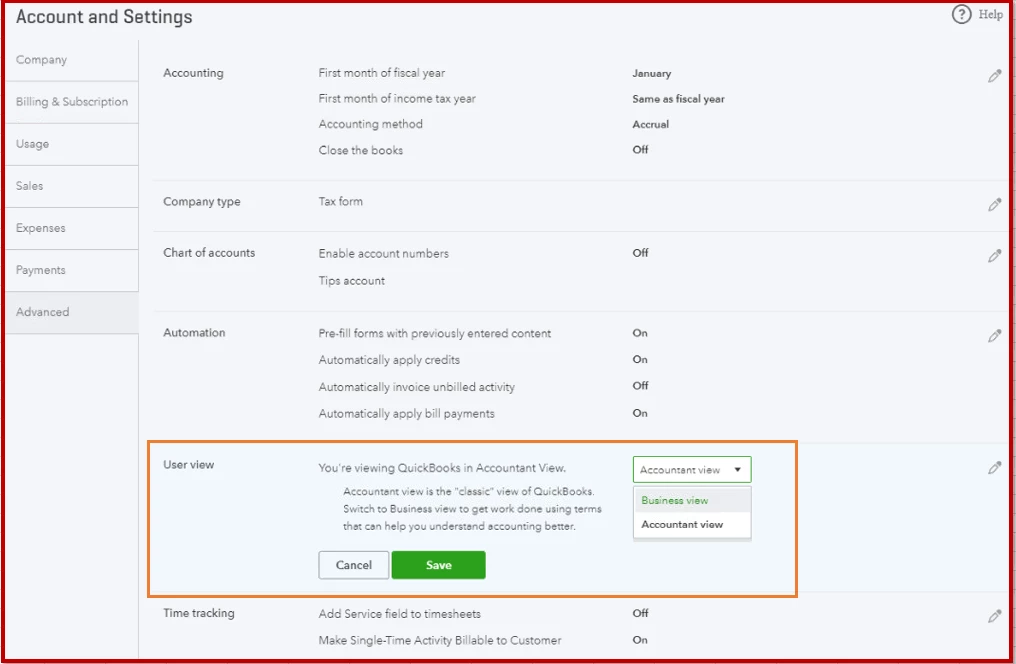
 

Journal entries are the last resort for entering transactions @donhahn. Use them only if you're following the advice of an accountant. And, you're unable to see this option unless you'll switch to Accountant view as mentioned in this thread.


Also, the option to toggle between Business view and Accountant view is available to our new QBO users. We're still working to update the existing accounts.


Keep me posted if there's anything else you need, and I'll get back to you with the information you need.


1 reply

AlcaeusF
December 16, 2019

Thanks and welcome to the Community, @donhahn.


We haven't received any reported cases similar to this issue. I also tried replicating it on my test account, and everything seems fine.


As an initial troubleshooting step, please try logging into your QuickBooks Online (QBO) account using a private browser (incognito). There are times that the browser is full of frequently accessed pages, causing some unusual responses.


Here's how:


  • Press Ctrl Shift (Google Chrome).
  • Ctrl Shift (Firefox or Internet Explorer).
  • Control Option (Safari).

If it works, go back to your default browser and clear its cache. Every so often the cache becomes overwhelmed with older data which can potentially cause viewing and performance issues.


Clearing it will refresh the system, and you'll be able to work with a clean slate. However, if the issue persists, try using other supported browsers.


If there’s anything else I can help you with, click the Reply button and post a comment. I’ll be right here ready to help you. Have a good one.

donhahnAuthor
December 16, 2019

Thanks for the quick response. I tried private browser, and Firefox which I rarely use.  There is no + button on the upper right.  The "+ New" button on the upper left shows the attached menu, no journal entry option.
