September 4, 2024
Solved

Memorized reports

  • September 4, 2024
  • 1 reply
  • 0 views

I created memorized reports mistakenly. want to delete all of them. How to do it

Best answer by Nicole_N

Hi, @andiie46.  


You can delete your saved reports in QuickBooks Desktop (QBDT) individually. I can guide you through the process.


Here's how:
 

  1. Open your QBDT account.
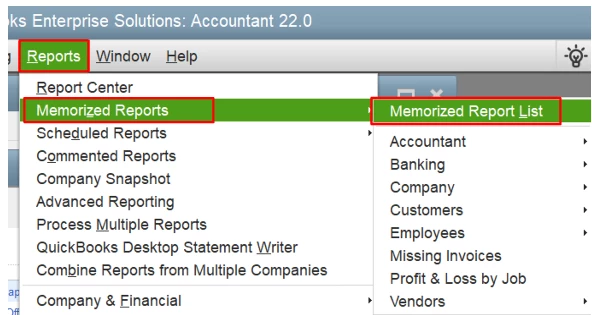
  2. From the Reports menu, select Memorized Reports then Memorized Report List.


  3. Find the report to delete from the list.
  4. Right-click the report, choose Delete Memorized Report, or press Ctrl + D on your keyboard.


  5. Hit OK to confirm that you want to delete the memorized report.


Utilize this article for more information: Create, access, and modify memorized reports.


Moreover, when running reports in QBDT, you can also export them to Excel if there's information you want to add that isn't available within QuickBooks. From there, you can personalize your data further manually.


Fill me in if you have more queries about managing reports in QBDT. I'm here to assist you in any way I can.

1 reply

Nicole_N
Nicole_NAnswer
September 4, 2024

Hi, @andiie46.  


You can delete your saved reports in QuickBooks Desktop (QBDT) individually. I can guide you through the process.


Here's how:
 

  1. Open your QBDT account.
  2. From the Reports menu, select Memorized Reports then Memorized Report List.


  3. Find the report to delete from the list.
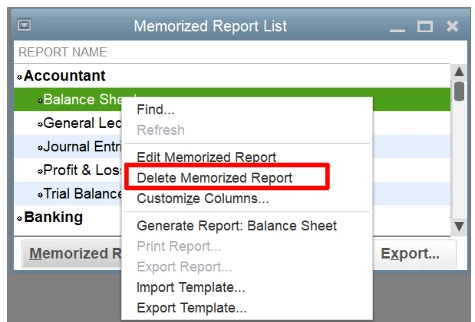
  4. Right-click the report, choose Delete Memorized Report, or press Ctrl + D on your keyboard.


  5. Hit OK to confirm that you want to delete the memorized report.


Utilize this article for more information: Create, access, and modify memorized reports.


Moreover, when running reports in QBDT, you can also export them to Excel if there's information you want to add that isn't available within QuickBooks. From there, you can personalize your data further manually.


Fill me in if you have more queries about managing reports in QBDT. I'm here to assist you in any way I can.
