August 31, 2020
Solved

Moving jobs to customer

  • August 31, 2020
  • 1 reply
  • 0 views

[This may be a duplicate message.  I received an error when I posted it, and then corrected the post but still received another error, or the error message didn't clear.  If duplicate, this one can be deleted]


Start of Questions -


I am not sure this can be done in QBDT Pro or Plus but here goes.


I am working with a client and I am updating his books for multiple years, one year at a time.


He has been using QBDT Pro since 2005, and we are currently using QBDT Pro 2019. 


He is a General Contractor and often does multiple projects for the same client usually over several years.  During the past several years he would create a customer for each job


[For Example]

Smith - Bathroom

Smith - Kitchen

Smith - New House


Is it possible to create a Customer Record for Smith and move each of the jobs into the main Customer Record?


Thanks


EJ


Best answer by Catherine_B

Yes, you can definitely move customers as jobs, GolfNut72.


I'll show you the easy steps on how to move existing customers as Jobs. 


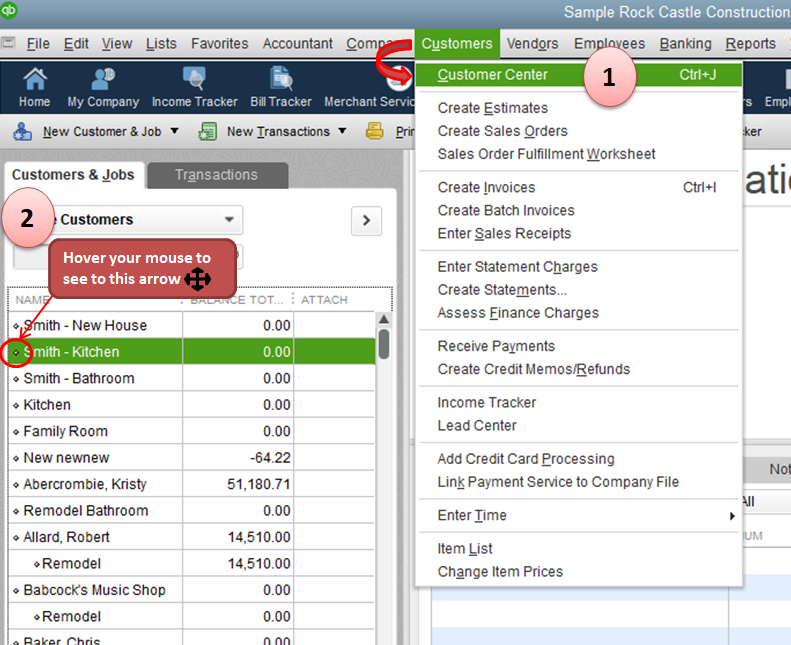
  1. Go to the Customers menu and select Customer Center.
  2. From the customer's list, hover your mouse to the diamond bullet under Smith - Bathroom.
  3. You'll see a four-headed arrow and then drag it to the right. Do the same steps in moving other customers into a job. 


Now the customer is already under the main Smith customer. 


To help you manage your customers and jobs, you can refer to these articles:

I'm just around the corner if you need more help. YOu take care always and have a great day!

1 reply

Pabz_L
August 31, 2020

Thank you for reaching out to us here in the Community, @GolfNut72.


Let me share with you how to set up or add multiple jobs for the same customer in QuickBooks Desktop.


Here’s how.


  1.  1. Go to the Customers tab.
  2.  2. Select the Customer Center on the drop-down.
  3. 3. Right-click on your customer's name, then select Add Job.
  4.  4. Enter the necessary information, then click OK once done.


For your future reference, you may check out this article to track job costs in QuickBooks Desktop: Tracking job costs in QuickBooks Desktop.


Please let me know if you have any other questions. I am here to help. Keep safe.

GolfNut72Author
September 1, 2020

Pabz_L


Thank you for your reply and I understand how to create a new job under a customer.


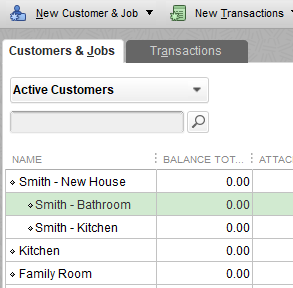
I didn't make myself clear enough.  I have customers that should be jobs.  I have a customer called Smith - Bathroom and another customer called Smith - Kitchen and another just called Smith.


Smith is the first job that the contractor did for the Smith's.


Can the Smith - Bathroom, and Smith - Kitchen be moved under Smith?


I hope I made it more understandable.


Thank you


EJ


September 1, 2020

Yes, you can definitely move customers as jobs, GolfNut72.


I'll show you the easy steps on how to move existing customers as Jobs. 


  1. Go to the Customers menu and select Customer Center.
  2. From the customer's list, hover your mouse to the diamond bullet under Smith - Bathroom.
  3. You'll see a four-headed arrow and then drag it to the right. Do the same steps in moving other customers into a job. 


Now the customer is already under the main Smith customer. 


To help you manage your customers and jobs, you can refer to these articles:

I'm just around the corner if you need more help. YOu take care always and have a great day!