Hi, @SH042924. Warm greetings.
Yes, generating Aging Reports for each of your Accounts Receivable (A/R) in QuickBooks Desktop (QBDT) can be done. I'd be glad to assist with running the report.
You can consider running multiple A/R Aging Detail for each of your A/R accounts in your General Ledger (GL). Then, filter each report only to display data for a corresponding A/R account. Here's how:
- Go to the Reports menu in your QBDT. Then, Customer and Receivables.
- Choose A/R Aging Detail report.
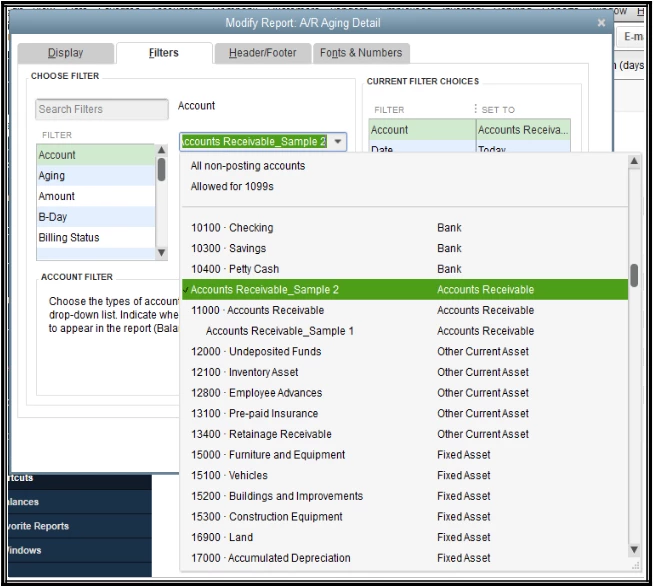
- Select Customize Report.
- Click on the Filters tab.
- Select Account in the Filter section. Then, choose an A/R account from the drop-down list.
- Hit OK.
- Repeat all the steps for each A/R General Ledger account.
If you need to save the current customizations of your reports in QBDT, let me add this article as a future reference: Create, access, and modify memorized reports.
We'll be here in the Community if you have further questions about running reports for your A/R accounts in QBDT. We'll do our best to assist. Take care!

