November 17, 2019
Solved

My accounts are not updating, yet QuickBooks says they are connected. How do a fix this?

  • November 17, 2019
  • 2 replies
  • 0 views
Original commenter did not share additional details
Best answer by SarahannC

Hello there info582,


Can you tell me the name of your financial institution that you're trying to update? This helps me check if there's a reported issue related to your concern.


However, we can start updating your bank account manually. This troubleshooting helps to refresh the connectivity between your bank's website into QuickBooks.


Here's how:

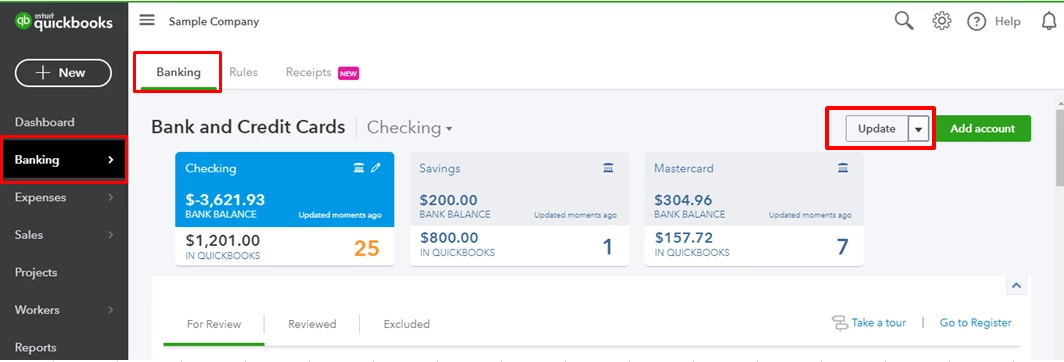
  1. Click Banking on the left panel.
  2. Select the account from Bank and Credit Cards drop-down menu.
  3. Click the Update button.


If these steps help you update the account, you can now reconcile your account. 


Fill me in if you have other questions. I'll be right here.

2 replies

SarahannCAnswer
November 17, 2019

Hello there info582,


Can you tell me the name of your financial institution that you're trying to update? This helps me check if there's a reported issue related to your concern.


However, we can start updating your bank account manually. This troubleshooting helps to refresh the connectivity between your bank's website into QuickBooks.


Here's how:

  1. Click Banking on the left panel.
  2. Select the account from Bank and Credit Cards drop-down menu.
  3. Click the Update button.


If these steps help you update the account, you can now reconcile your account. 


Fill me in if you have other questions. I'll be right here.

info582Author
November 17, 2019

I manually updated my account and reconciled; problem resolved. 

July 20, 2020

my Paypal account will not update the bank balance