
December 31, 2023
Solved

My app on my Droid no longer loads all the data. The receipts now say, "no contact set"

  • December 31, 2023
  • 1 reply
  • 0 views
Original commenter did not share additional details

Best answer by ChristineJoieR

Welcome to the QuickBooks Community forum. I see you're looking for guidance on how to load your data on your mobile application and seeking advice to resolve this within QuickBooks, @finsec. I can share details on how to refresh your data on your QuickBooks Online Mobile app.


When you refresh data in the QBO mobile app, it retrieves the most up-to-date information, such as transactions, customer details, and financial reports, from the QBO servers, allowing you to view the latest data on your mobile device.


Follow these steps:


Android


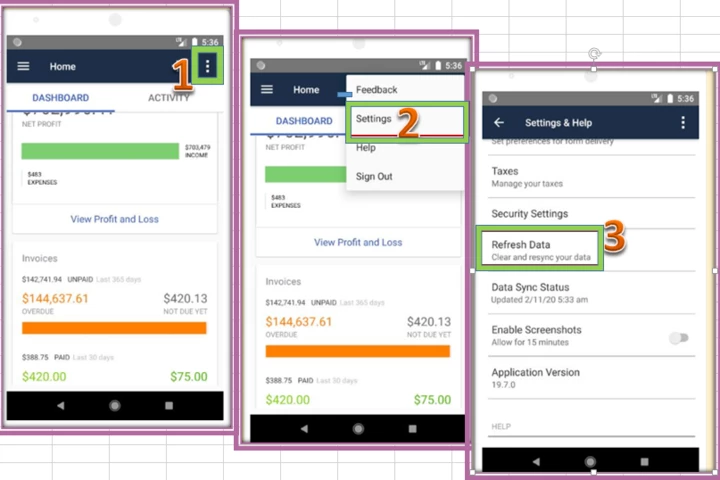
1. Go to Menu ☰ then tap More Options.
2. Tap Settings then Refresh Data.
3. Tap YES to confirm.
 

For more addition reference, you can see this article: See your latest data in the QuickBooks Online app.


With that details, it should shed some confusion. If you have more questions, you can leave a post whenever you have other questions. Keep safe!

1 reply

December 31, 2023

Welcome to the QuickBooks Community forum. I see you're looking for guidance on how to load your data on your mobile application and seeking advice to resolve this within QuickBooks, @finsec. I can share details on how to refresh your data on your QuickBooks Online Mobile app.


When you refresh data in the QBO mobile app, it retrieves the most up-to-date information, such as transactions, customer details, and financial reports, from the QBO servers, allowing you to view the latest data on your mobile device.


Follow these steps:


Android


1. Go to Menu ☰ then tap More Options.
2. Tap Settings then Refresh Data.
3. Tap YES to confirm.


For more addition reference, you can see this article: See your latest data in the QuickBooks Online app.


With that details, it should shed some confusion. If you have more questions, you can leave a post whenever you have other questions. Keep safe!

finsecAuthor
December 31, 2023

That worked! Thank you very much! 

December 31, 2023

Thanks for updating us, @finsec.


On behalf of my colleague,  ChristineJoieR, you're welcome. The QuickBooks Community will always be around to lend you a hand any time you need guidance. I'll be around if you need further assistance with any QuickBooks-related tasks.


I hope you have a pleasant day ahead. Happy holidays!