Solved
My customers have separate projects which I need to identify when invoicing. How can I add the project name to the invoice?
Original commenter did not share additional details


Let's make this happen in your sales forms, @roberta-tpclawye.
I have ways to include the case name and number in the invoices in QuickBooks Online. This way, you can easily track and review them on your customer projects page.
I'd recommend creating a custom field to add the case name and number in the sales forms. Proceed as follows:
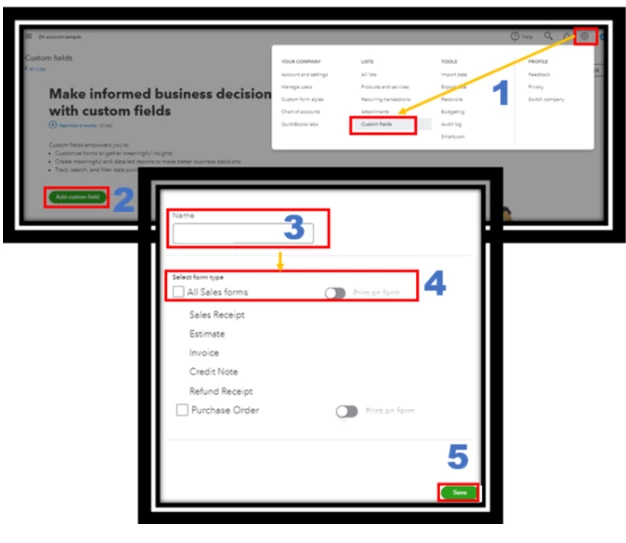
For more details, see this link: How to add custom fields to sales forms and purchase orders.
Once you create transactions, the custom fields you've created will appear in the form. Just enter the details manually, and this stream to the project page of your client.

After that, let's review this in your customer's project. Do the following:

In addition, you have the option to utilize our class tracking feature. Use classes to track your transactions by departments, product lines, or any other meaningful segments in your business. So when it’s time to run reports, you have a clear picture of each segment’s financial health.
Further, check out these articles below on how to create recurring transactions and calculate your profits and costs by a project in QuickBooks:
I always check my notifications to respond to all replies. That said, don't hesitate to leave a comment if you have other questions. I'm happy to help again. Be safe, Roberta.
Enter your E-mail address. We'll send you an e-mail with instructions to reset your password.