July 8, 2021
Solved

My direct deposits are appearing twice: once as a DD and once as a debit from QB. How can I fix this?

  • July 8, 2021
  • 1 reply
  • 0 views

I came across similar posts, such as this one: https://quickbooks.intuit.com/learn-support/en-us/reports-and-accounting/i-used-dd-to-pay-independent-contractors-however-the-transaction/00/780680


However, the account for both the DDs and the debits are all marked as an expense account (more specifically "Contract labor", a default expense account present when I first logged in). 


Is there some way to merge these transactions, or to setup a rule to make them not double count in the future?

Best answer by Rasa-LilaM

Hello there, ABair.


Thanks for reaching out to the Community about your direct deposit concern. I’m here to help  and make sure the transaction will no longer show up twice in QBO.


If you’re using the online banking feature, the data we receive is dependent upon what your financial institution sends over to us. Before downloading the transactions, check the mapping first to avoid duplication.


If you have manually recorded the entries, make sure not to add them to your online banking. This is to keep them from showing up twice in your account.


For the duplicate downloaded direct deposits, you can exclude them to keep your records in order. I’ll help make sure the process is a breeze for you.


  1. Press the Banking menu on the left panel to choose the Banking tab.
  2. Select the account from the list.
  3. Tick the boxes for the transactions you wish to remove and press the Exclude menu.
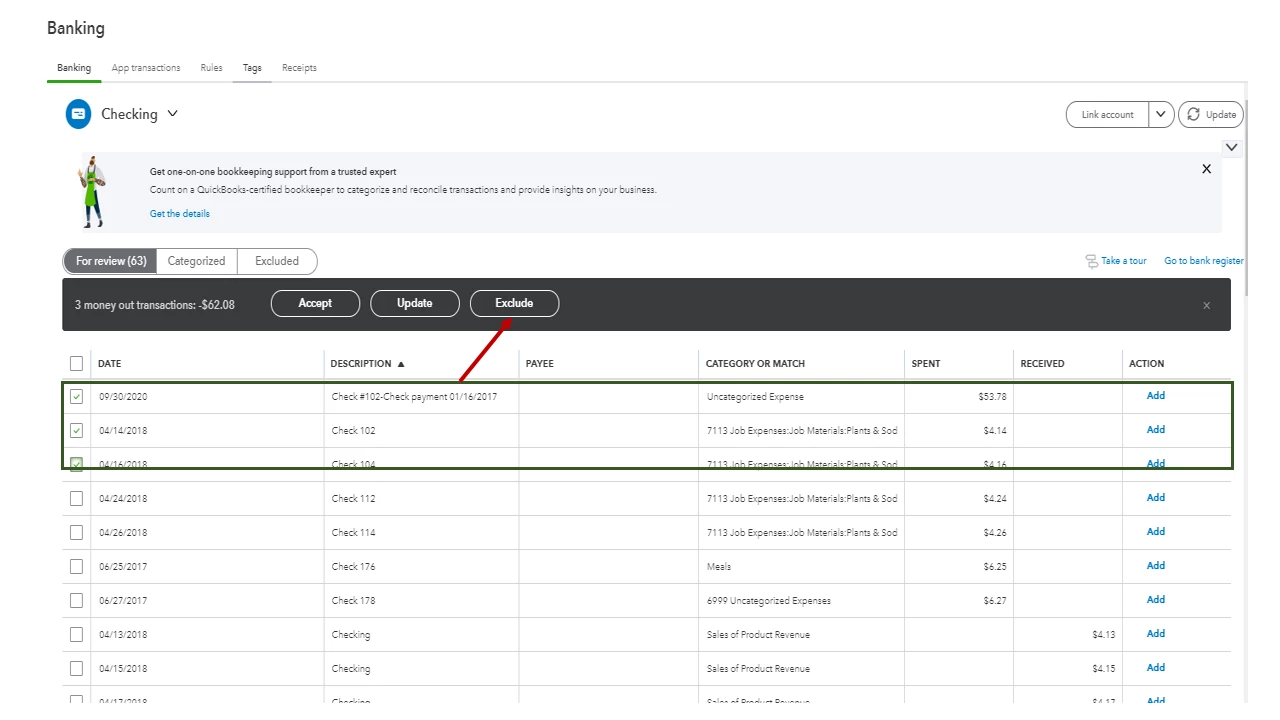
  4. This will move the entries to the Excluded section.


You can read through this article to learn more about removing duplicate transactions: Exclude a bank transaction you downloaded into QuickBooks Online.


Additionally, the following write-up contains information on how to pay your vendor via direct deposit. From there, you’ll see a link about paying contractors through paper check: Pay a contractor with direct deposit.


Feel free to post a comment below if you still need help with QuickBooks. I’ll jump right back in to assist further. Have a good one.


1 reply

July 8, 2021

Hello there, ABair.


Thanks for reaching out to the Community about your direct deposit concern. I’m here to help  and make sure the transaction will no longer show up twice in QBO.


If you’re using the online banking feature, the data we receive is dependent upon what your financial institution sends over to us. Before downloading the transactions, check the mapping first to avoid duplication.


If you have manually recorded the entries, make sure not to add them to your online banking. This is to keep them from showing up twice in your account.


For the duplicate downloaded direct deposits, you can exclude them to keep your records in order. I’ll help make sure the process is a breeze for you.


  1. Press the Banking menu on the left panel to choose the Banking tab.
  2. Select the account from the list.
  3. Tick the boxes for the transactions you wish to remove and press the Exclude menu.
  4. This will move the entries to the Excluded section.


You can read through this article to learn more about removing duplicate transactions: Exclude a bank transaction you downloaded into QuickBooks Online.


Additionally, the following write-up contains information on how to pay your vendor via direct deposit. From there, you’ll see a link about paying contractors through paper check: Pay a contractor with direct deposit.


Feel free to post a comment below if you still need help with QuickBooks. I’ll jump right back in to assist further. Have a good one.

ABairAuthor
July 8, 2021

This is exactly what I was looking for! Thank you!