
Solved
My new customer invoices are being recorded in a AR sub-account (allowance for doubtful accounts) and I need it to record in the standard AR account? how do I change?
Original commenter did not share additional details

Hello, bobbrilon.
I have some information when handling multiple AR accounts in QuickBooks Online.
You mentioned something about converting from the Desktop version. QuickBooks Online uses the last default A/R account before you converted (or when you selected it during conversion).
This is likely the reason why the system uses the sub-account for new invoices.
Unlike the Desktop version, we're unable to change the default AR account. What you can do is to merge both the parent and the subaccount.
This will record new invoices under the merged account. Here's how:
Make the subaccount as a regular account:
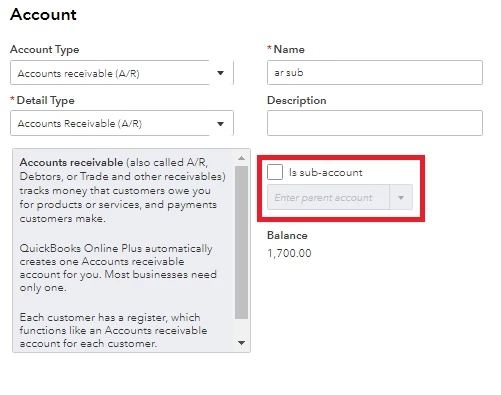
Merge both accounts:
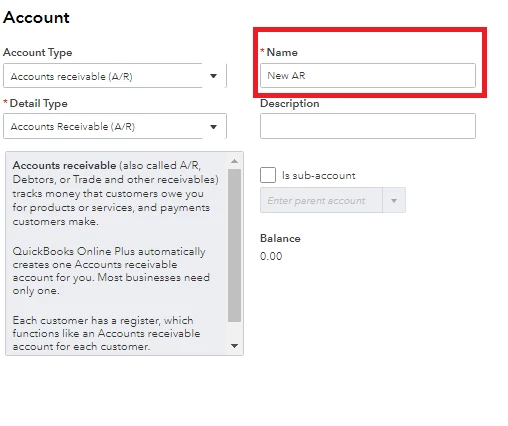
For more details about merging accounts, you can check this article: Merge duplicate accounts, customers, and vendors in QuickBooks Online.
In addition, QuickBooks Online can only handle one AR account. If you have multiple accounts, I recommend reading this article for a guide: How to group Accounts Receivable or Accounts Payable account types.
Do you need help navigating around QuickBooks Online? You can learn the ropes by checking our guides in the articles list page.
I'm here to answer any other concerns you might have. Simply use this thread for your new questions and I'll be right there with you.
Enter your E-mail address. We'll send you an e-mail with instructions to reset your password.