

December 20, 2023
Question

My QBO sales report has a glitch, never seen this before - ANY IDEAS ???

  • December 20, 2023
  • 1 reply
  • 0 views

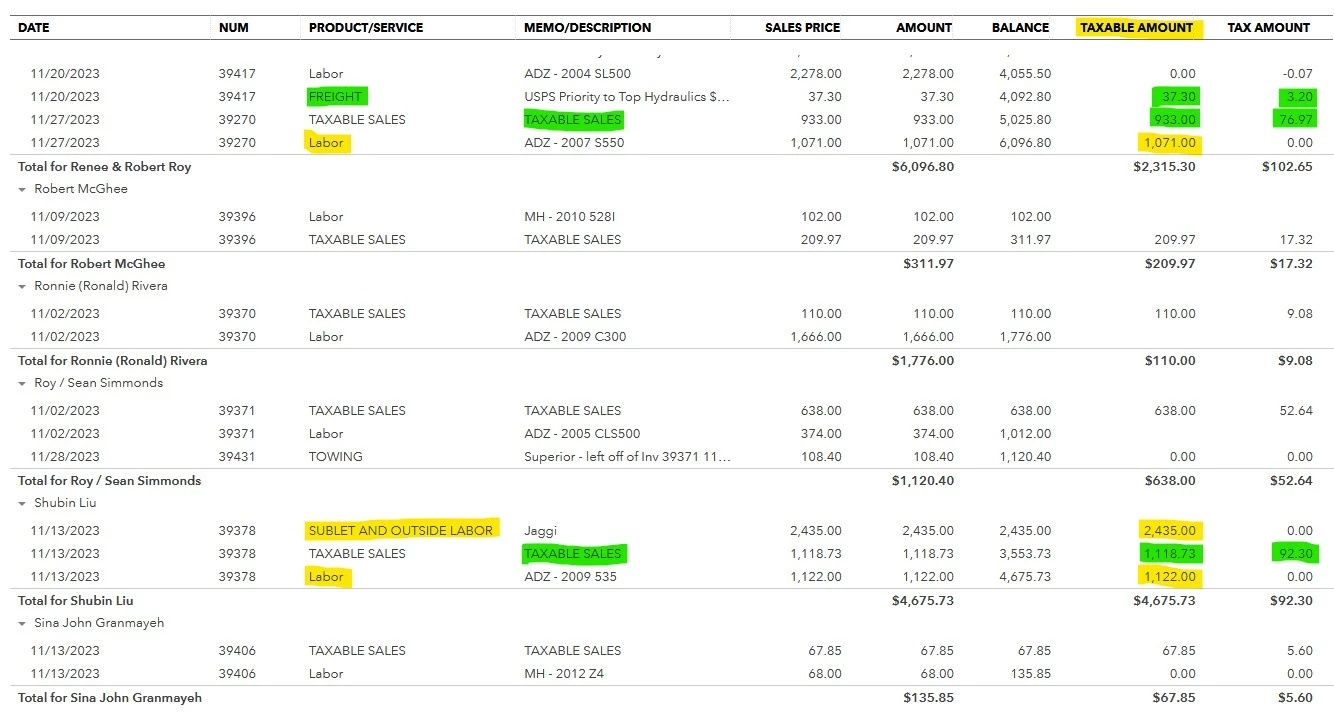
Monthly Sales Detail Report:- What would be causing this (see yellow hi-lite), non-tax charges showing up in the "Taxable Amount" column.  There are six invoices doing this adding over $5,000.00 to my taxable sales amount for the month. In the actual invoices affected, the tax box for the yellow lines is not checked.
 

1 reply

December 20, 2023

Thanks for sharing your concern in the QuickBooks Community, @Haven.


Excessive browser cache can sometimes lead to unexpected issues with the product. This may be why items are appearing in the Taxable amount column in the report even when the Tax box is unchecked.


To address and resolve this issue, let's try accessing your account in a private window to determine if the problem is related to cached data. Use the following shortcut keys to open a private window in your browser:


  • Mozilla Firefox: CTRL + Shift + P
  • Microsoft Edge: CTRL + Shift + N
  • Google Chrome: CTRL + Shift + N
  • Safari: Command + Shift + N


If it works, go back to your regular browser and clear its cache. If the issue persists, use another supported browser instead. 


In addition, you can customize reports in QuickBooks to easily focus on the details that matter the most to you.


Please inform me of the outcome of these troubleshooting steps. I want to ensure that you're getting an accurate data from your reports in QuickBooks. If you have any further questions about running sales reports in the program, feel free to ask here, and I'll be happy to assist you.