jmikewhittington
October 15, 2020
Solved

Old Accounts/Line items in Budget

  • October 15, 2020
  • 1 reply
  • 0 views

I'm using the P&L Budget vs Actual.  When I created the budget everything was fine with all current accounts.  The filter is "all income/expense accounts".  


The problem is when I generate the report I have many old accounts that aren't used (from 20+ years ago).  It is showing "inactive" accounts.  


How can I get this report to just show the active accounts that I used in the budget setup?


Thank you

Best answer by Charies_M

Thanks for asking this matter, mwhittington.


The Profit & Loss Budget vs. Actual report by default shows all the accounts (active or inactive) associated with the budget in a given period. While there isn't a way we can filter it to remove the inactive accounts from 20 years ago, you can export the report and manually remove the inactive accounts.


To do this, just click the Excel button and choose to Create New Worksheet.


In case you encounter issues when exporting the report, you can visit this article for the steps on how to fix it: Fix export to Excel issues in QuickBooks Desktop.


You may also find these resources helpful when managing reports in QuickBooks Desktop:


We continue making improvements with the product and while doing so, I want you to be updated with the new features added in the software by following the steps below:


Here's how:


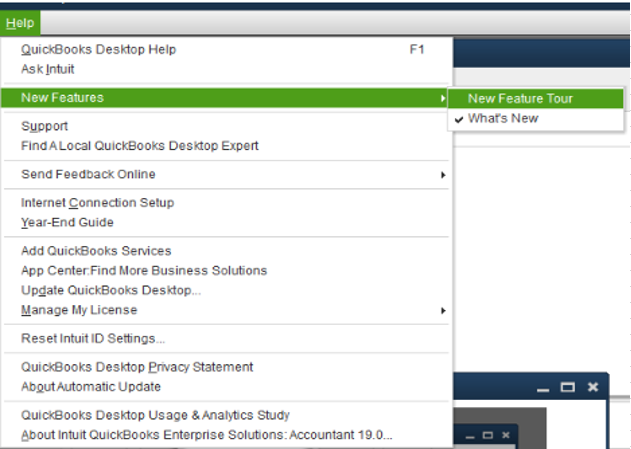
  1. Go to the Help icon.
  2. Click New Features.
  3. Choose either New Feature Tour or What's New.
    undefined
     

Another way to be updated to the latest future release in QuickBooks Desktop is by visiting this website: QuickBooks Updates: New QuickBooks Accounting Software Updates.


Please leave a comment on this thread if you need anything else. We are always around to help you some more. Take care. 

1 reply

Charies_MAnswer
October 15, 2020

Thanks for asking this matter, mwhittington.


The Profit & Loss Budget vs. Actual report by default shows all the accounts (active or inactive) associated with the budget in a given period. While there isn't a way we can filter it to remove the inactive accounts from 20 years ago, you can export the report and manually remove the inactive accounts.


To do this, just click the Excel button and choose to Create New Worksheet.


In case you encounter issues when exporting the report, you can visit this article for the steps on how to fix it: Fix export to Excel issues in QuickBooks Desktop.


You may also find these resources helpful when managing reports in QuickBooks Desktop:


We continue making improvements with the product and while doing so, I want you to be updated with the new features added in the software by following the steps below:


Here's how:


  1. Go to the Help icon.
  2. Click New Features.
  3. Choose either New Feature Tour or What's New.
    undefined
     

Another way to be updated to the latest future release in QuickBooks Desktop is by visiting this website: QuickBooks Updates: New QuickBooks Accounting Software Updates.


Please leave a comment on this thread if you need anything else. We are always around to help you some more. Take care.