I'm here to guide you in handling uncleared entries, CreoleHB.
We can manually mark the journal entry as cleared in QuickBooks Desktop since this transaction has already been settled in real life. Take note that if you want it to show as DEP instead of GENJRN in the records, you'll have to delete the JE and recreate it as a deposit.
Once done, follow these steps to set its status as cleared:
- Head to the Lists menu.
- Go to Chart of Accounts.
- Open the appropriate account.
- Locate the transaction and select it to expand the view.
- Keep clicking the Checkmark column until you see an asterisk (*).
- Click Record, then hit Yes to confirm the action.
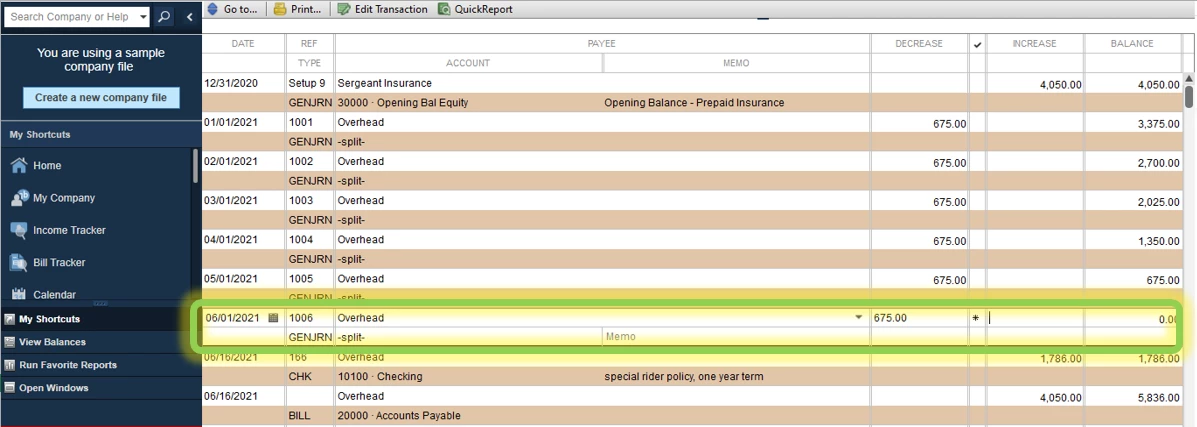
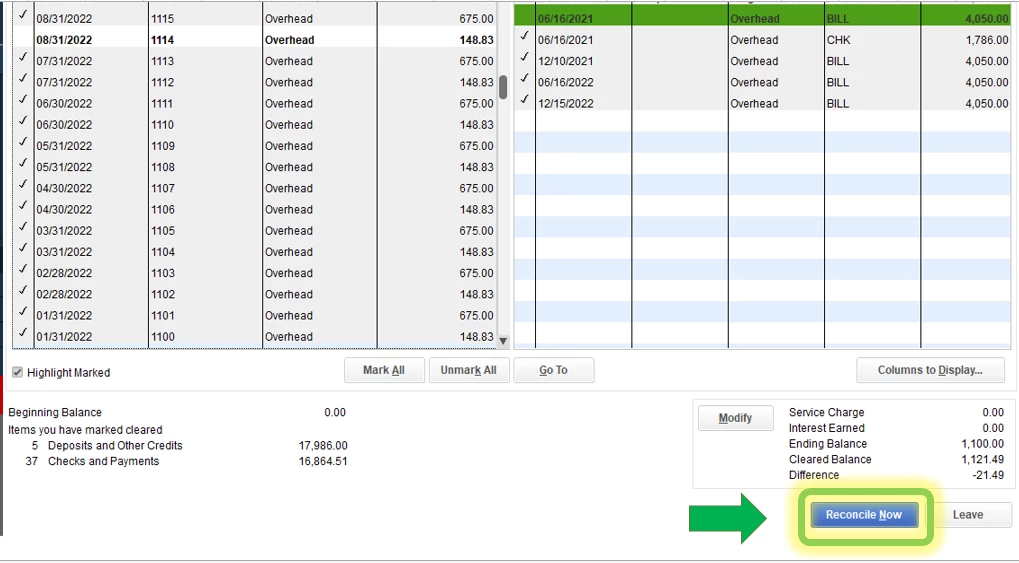
After that, we'll have to perform a mini reconciliation to make a correction. This assumes you know the ending balance from the most recent reconciliation, putting the previously unreconciled transactions back without affecting the cycle that they follow. Here's how:
- Head to the Banking menu.
- Select Reconcile and pick the appropriate bank account.
- In the Date of Statement field, enter an off-cycle date. This date can be any date between your last reconciliation and the next scheduled one.
- In the Ending Balance field, enter the balance of your last successful reconciliation.
- Hit Continue, then check the transactions you are fixing and re-reconciling.
- Make sure that the difference is $0.00.
- When everything looks good, tap Reconcile Now.
Finally, here are some articles that you can read to learn what to do if your accounts in QBDT don't match your bank statements:
You can always drop by in the Community if you have more banking questions. It's always our pleasure to assist.

